Your product is unavailable. A customer lands on the page. What happens next?
If you’ve set up a preorder, they can buy it right now and receive it later. If you’ve set up a back in stock alert, they leave their email and you notify them when it’s back. Both solve the same core problem, a product that can’t ship today, but the preorder vs back in stock shopify decision changes how much revenue you recover and when you get it.
Here’s the thing most articles miss: these aren’t competing strategies. They solve different problems at different stages of a product’s life. 69% of shoppers abandon their purchase and shop with a competitor when a product is out of stock (Opensend, 2025). Whether you use preorders, back in stock alerts, or both, the goal is the same, stop losing those customers.
This article breaks down how each approach works, when each one makes sense, and how the conversion rates compare with real data.
What is the difference between preorder and back in stock on Shopify?
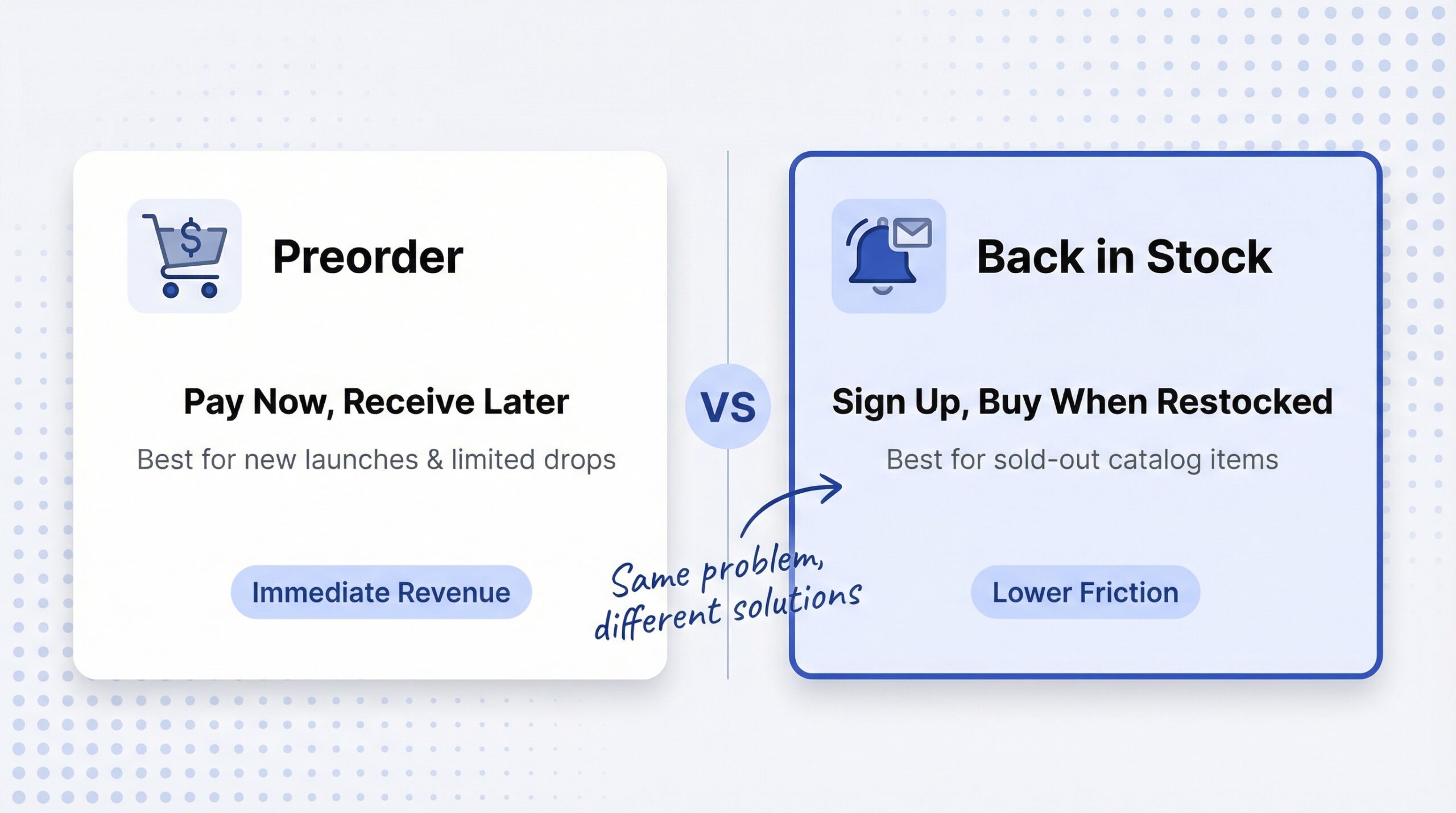
A preorder lets customers purchase a product before it’s available to ship. They pay upfront (or place a deposit), and you fulfill the order when the product is manufactured, restocked, or officially released.
A back in stock alert captures a customer’s contact information when a product is sold out, then automatically notifies them when inventory returns. No payment is collected at signup.
That’s the fundamental preorder back in stock difference shopify merchants need to understand. With preorders, you get money now. With back in stock alerts, you get demand data now and money later.
How preorders work on Shopify
Shopify doesn’t have a native preorder feature, so you’ll need a third-party app. Here’s the typical flow:
- Customer lands on product page marked as “preorder”
- They click “Pre-Order” (replaces the “Add to Cart” button)
- Payment is collected, either full price, partial deposit, or charged later
- You fulfill the order when the product is ready
Preorder payment models include pay now (full payment at checkout), pay later (charged when product ships), and deposit (partial payment now, balance on shipment). Pay now is most common for smaller Shopify stores because it generates immediate cash flow.
How back in stock alerts work on Shopify
Back in stock alerts work through apps like StoreBeep restock notification app that add a “Notify Me” button to out-of-stock product pages. The flow is simpler:
- Customer lands on an out-of-stock product page
- They click “Notify Me” and enter their email (or WhatsApp number)
- When you restock, the app automatically sends a notification
- Customer clicks through and completes the purchase
There’s no payment at signup. That means lower friction, more people sign up. But it also means you don’t have revenue until the product restocks.
Quick comparison table
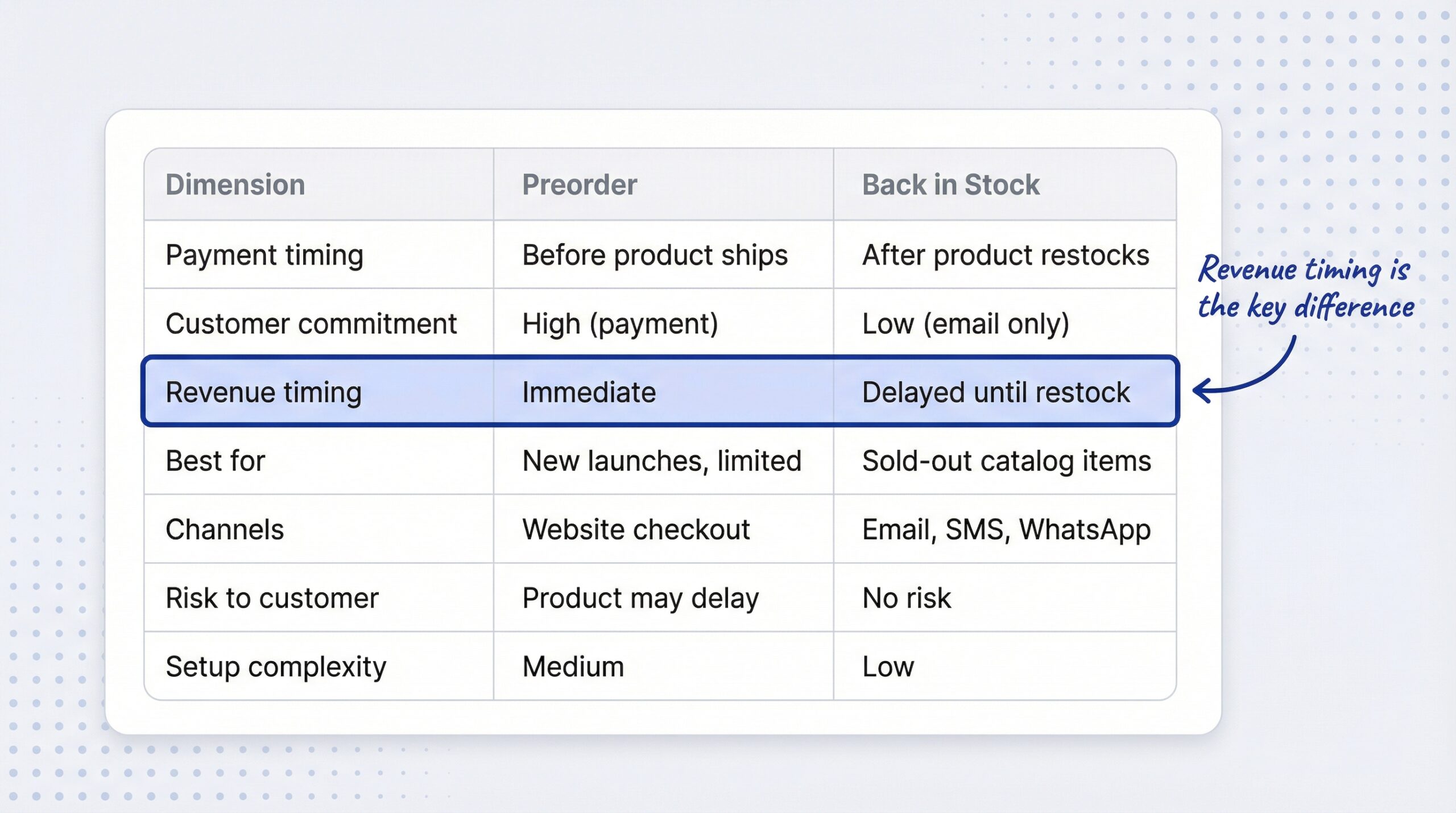
| Dimension | Preorder | Back in stock |
|---|---|---|
| Payment timing | Before product ships | After product restocks |
| Customer commitment | High (payment required) | Low (email/phone only) |
| Revenue timing | Immediate | Delayed until restock |
| Best for | New launches, custom, limited edition | Sold-out catalog items, fast restockers |
| Channels | Website checkout | Email, SMS, WhatsApp, push |
| Risk to customer | Product may be delayed | No risk (just notification) |
| Data captured | Payment + shipping info | Contact info + demand signal |
| Setup complexity | Medium (payment handling) | Low (button + email) |
| App cost range | $0-50/month | $0-30/month |
When should you use preorders on Shopify?
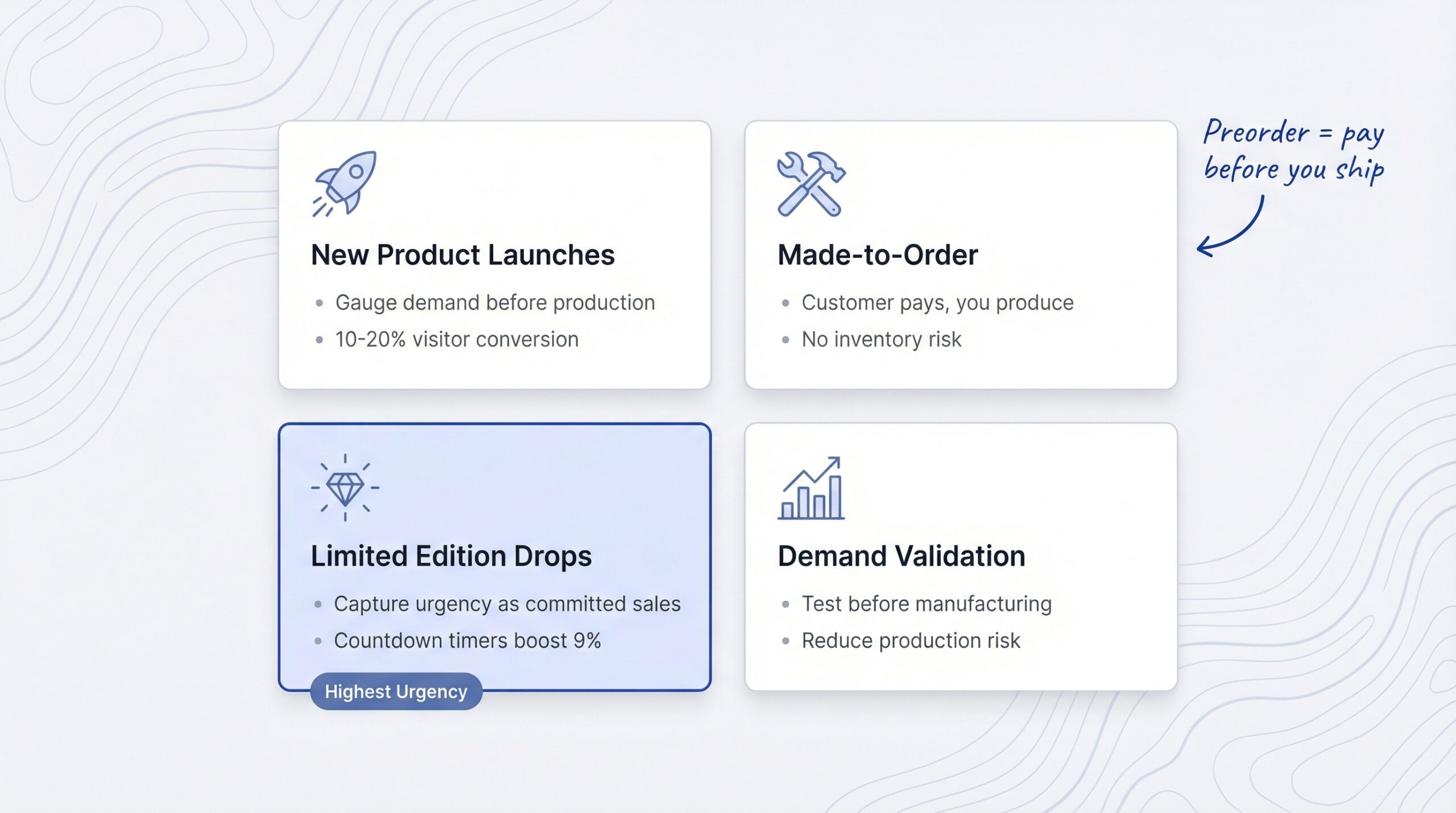
Preorders make sense when a product doesn’t exist yet or hasn’t been released. The customer is essentially buying a promise, and the preorder or back in stock shopify decision starts with whether the product has been sold before.
New product launches
Preorders are ideal for products that haven’t hit the market yet. You can gauge demand before committing to a full production run. 10-20% of visitors commit to preorders before a product is available (Amra & Elma, 2025), which is significantly higher than the standard 2-4% e-commerce conversion rate.
That pre-launch revenue also helps fund production, reducing your financial risk.
Made-to-order or custom products
If you sell custom or made-to-order products, preorder is the natural model. The customer pays, you produce. There’s no inventory to go “out of stock” because each unit is manufactured after the order.
Limited edition or seasonal drops
Limited releases create urgency. Preorders let you capture that urgency as committed sales before the product is available. Countdown timers on preorder pages boost conversion rates by up to 9% (Amra & Elma, 2025), making them a strong tactic for hype-driven launches.
Demand validation before production
This is one of the smartest uses of preorders: testing whether people will pay before you invest in manufacturing. If your preorder numbers are low, you can adjust production quantities or pivot before sinking money into inventory.
When should you use back in stock alerts on Shopify?
Back in stock alerts are designed for products that have already proven market demand. The product sold before, it sold out, and customers want to know when it returns. This is a fundamentally different scenario from when to use preorder vs notify me shopify merchants face with new products.
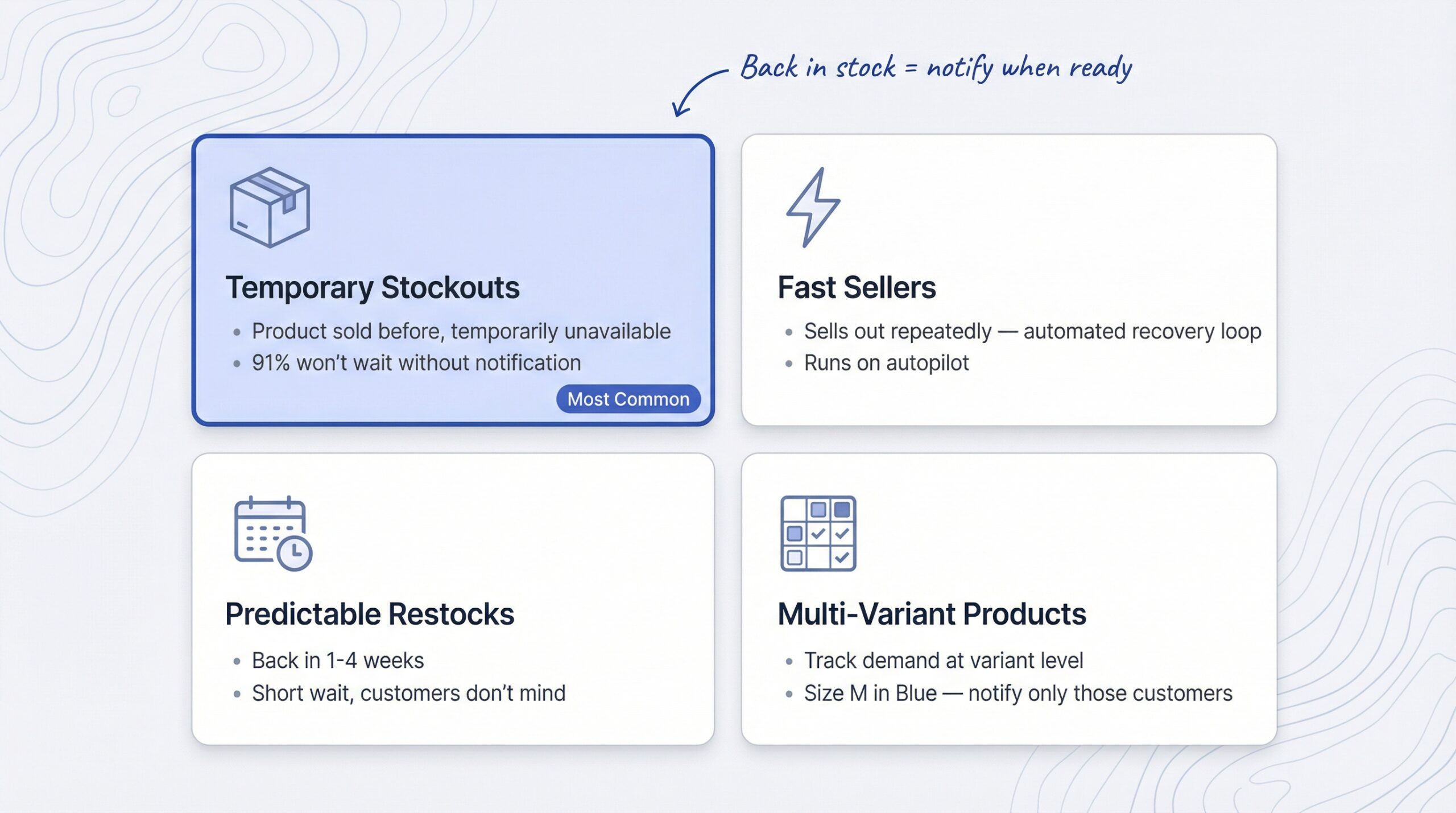
Temporarily out-of-stock products
This is the most common use case. A product you sell regularly goes out of stock, maybe a supplier delay, maybe unexpected demand. Customers expect it to come back. They don’t want to pay for something with an uncertain delivery date. They just want a heads up.
91% of customers refuse to wait for items to be restocked without a notification option (Opensend, 2025). A simple notify me button on Shopify captures that demand instead of losing it.
High-demand products that sell out fast
Some products sell out repeatedly. For these, back in stock alerts create a reliable recovery loop: product sells out, customers sign up, product restocks, customers get notified, they buy, product sells out again. It’s a cycle that runs on autopilot.
Established products with predictable restock cycles
If you know a product will be back in one to four weeks, a back in stock alert is the right call. The wait is short enough that customers don’t mind. And the automated notification means you don’t have to manually track who’s waiting.
Multi-variant products (specific sizes and colors)
Back in stock alerts shine when specific variants sell out while others stay available. A customer who wants a size medium in blue doesn’t want to preorder, they want to know when that exact variant is back. Apps like StoreBeep back in stock alerts track demand at the variant level, so you know exactly which sizes and colors to prioritize when restocking.
How do preorder and back in stock conversion rates compare?
This is where the shopify preorder vs waitlist decision gets interesting. Both approaches have strong conversion data, but they measure different things.
Preorder conversion rates
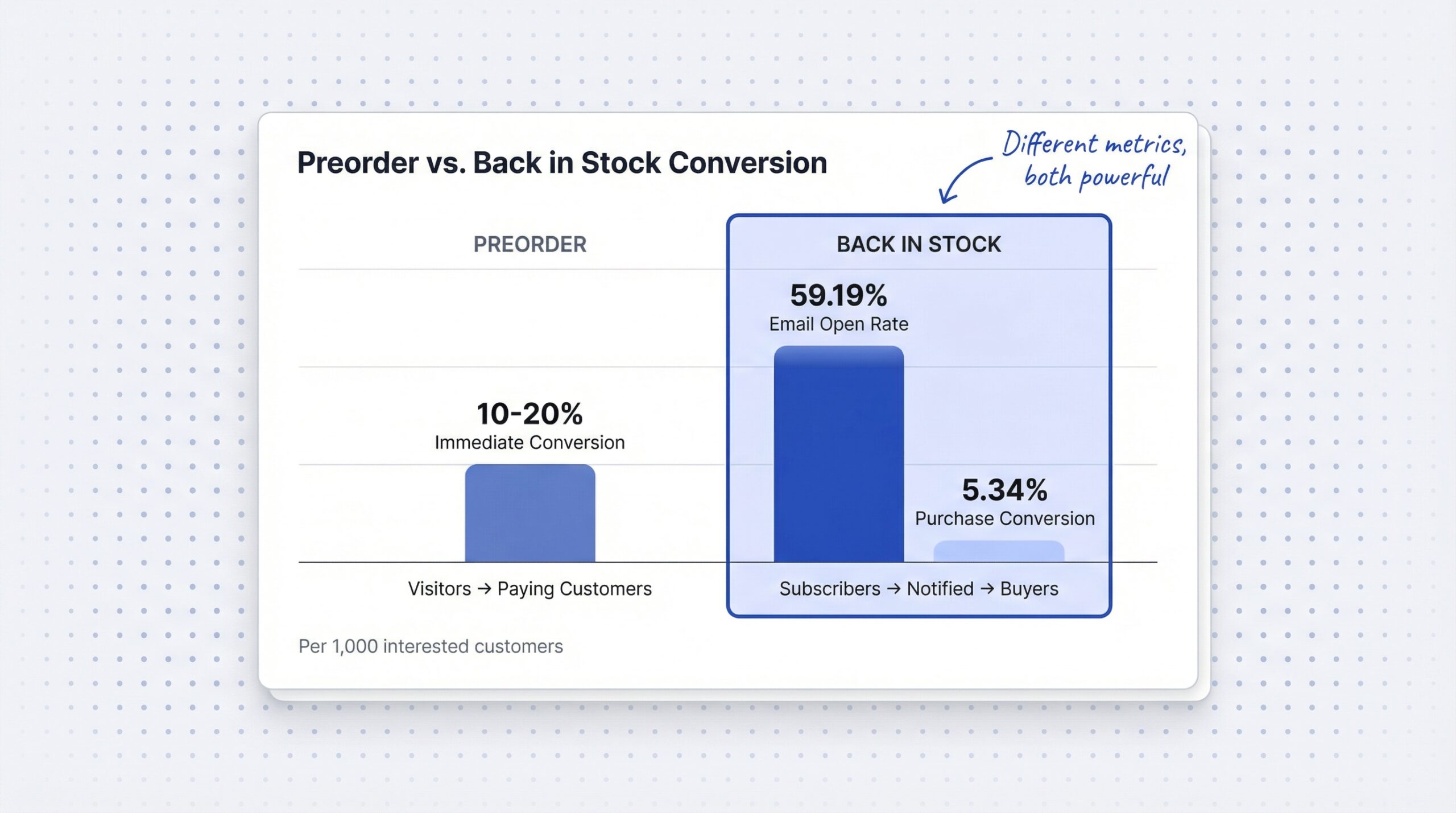
Preorders convert 10-20% of page visitors into paying customers (Amra & Elma, 2025). That’s impressive compared to the typical 2-4% e-commerce conversion rate. The reason is selection bias, visitors who land on a preorder page are often already interested in the product.
70% of e-commerce carts are abandoned, but preorders reduce this by securing commitment early (Amra & Elma, 2025). When someone pays upfront for an unreleased product, they don’t abandon the cart because the purchase is already done.
Back in stock conversion rates
Back in stock emails achieve a 59.19% open rate and a 5.34% conversion rate (Omnisend, 2025). That open rate is the highest of any e-commerce email type, because these customers actively asked to be notified.
If you add WhatsApp as a notification channel, open rates jump even higher. Learn more about how WhatsApp and email compare for Shopify restock notifications to see the full channel breakdown.
Revenue impact comparison
Here’s how the math plays out for 1,000 interested customers:
| Stage | Preorder | Back in stock |
|---|---|---|
| Interested visitors | 1,000 | 1,000 |
| Sign up or commit | 100-200 (10-20%) | 300-400 (~35% signup rate) |
| Open notification | N/A (already paid) | 178-237 (59.19% open) |
| Purchase | 100-200 (immediate) | 16-21 (5.34% of openers) |
| Revenue timing | Day 0 | Day 7-30 (on restock) |
Preorders win on immediate revenue per visitor. Back in stock wins on total signups and demand data captured. The shopify out of stock strategy preorder decision depends on which metric matters more for your situation.
Can you use both preorder and back in stock on the same Shopify store?
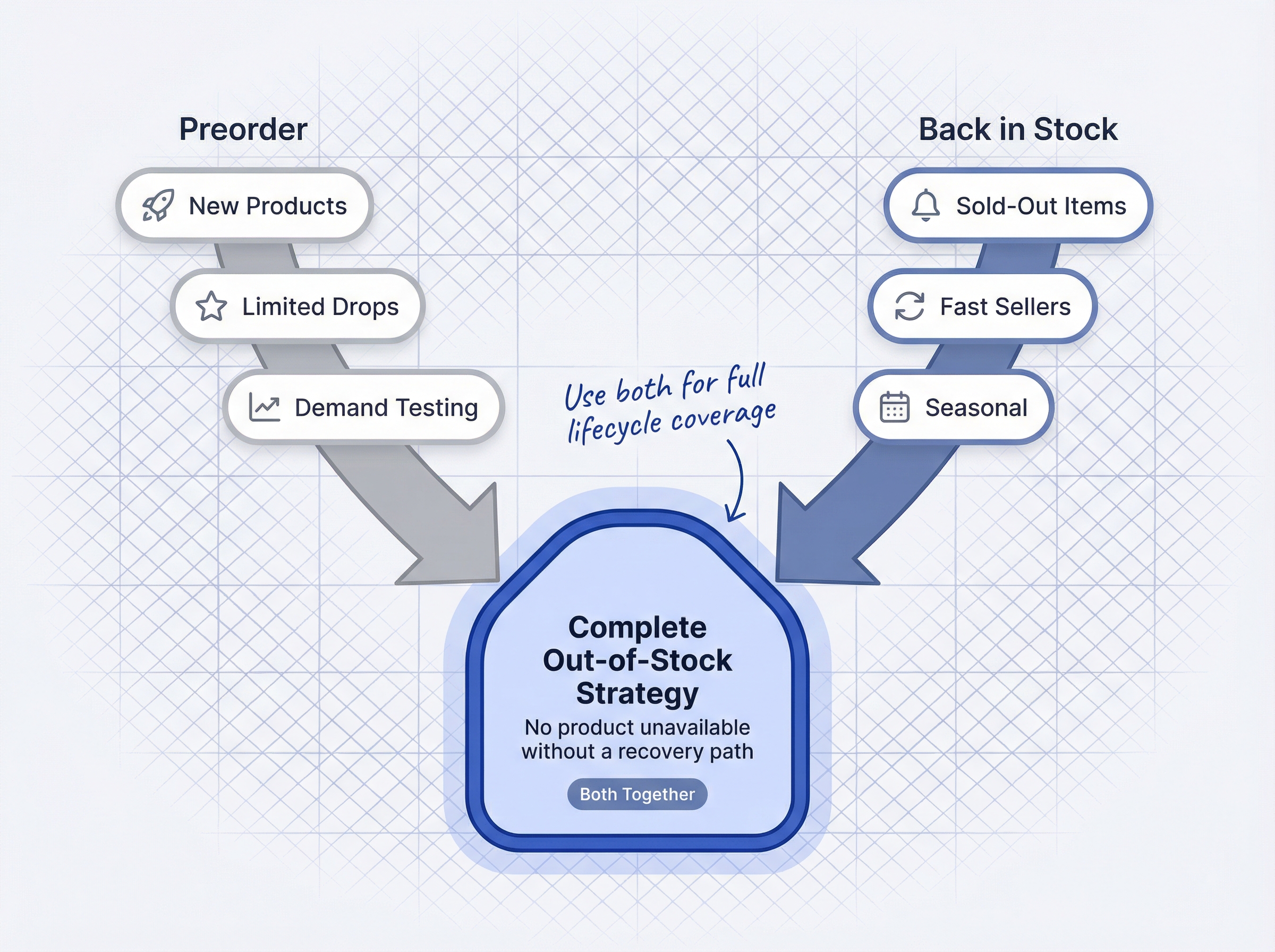
Yes. And for most growing stores, using both is the smartest approach.
The product lifecycle approach
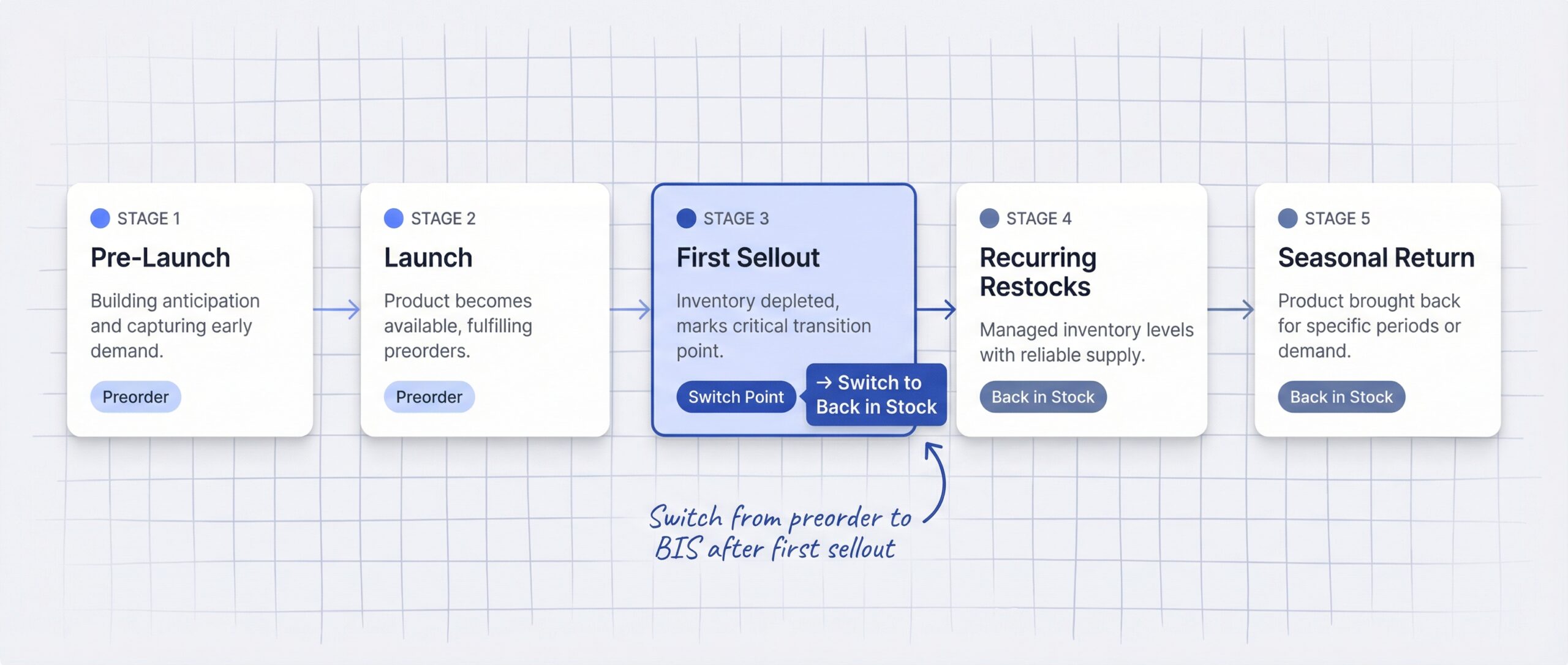
Different products at different stages need different strategies. Here’s how to think about it:
| Product stage | Recommended strategy | Why |
|---|---|---|
| Pre-launch or announcement | Preorder | Validate demand, generate revenue before production |
| Initial launch | Preorder | Capture early adopters, fund production |
| First sellout | Back in stock | Product proven, customers expect restock |
| Recurring restock cycles | Back in stock | Automated notification loop |
| Seasonal return | Back in stock | Long wait period, no upfront payment needed |
| Limited re-release | Preorder | Create urgency, secure commitment |
The key transition point is after a product’s initial launch and first fulfillment. Once customers know the product exists and have seen it sell, back in stock alerts are lower friction and more appropriate than asking for preorder payment.
How to set up both on Shopify
The simplest approach is running two separate apps, one for preorders, one for back in stock alerts. This gives you specialized tools for each function.
For back in stock, free back in stock apps on Shopify like StoreBeep offer a solid starting point. For preorders, apps like PreProduct or Pre-Order Now handle the payment complexities.
Set rules for which products get which treatment:
- New products launching next month? Preorder
- Bestseller that sold out last week? Back in stock alert
- Limited edition re-release? Preorder
- Standard catalog item temporarily out of stock? Back in stock alert
Which apps support both?
A few apps like Timesact and STOQ handle both preorders and back in stock alerts in one app. This simplifies management but may mean compromises in feature depth compared to dedicated apps.
For most stores, running StoreBeep for back in stock alerts alongside a dedicated preorder app gives you the best of both worlds without feature tradeoffs.
How much do preorder and back in stock apps cost on Shopify?
Pricing is a real factor in the preorder vs back in stock shopify decision, especially for stores watching their app budget.
Back in stock app pricing
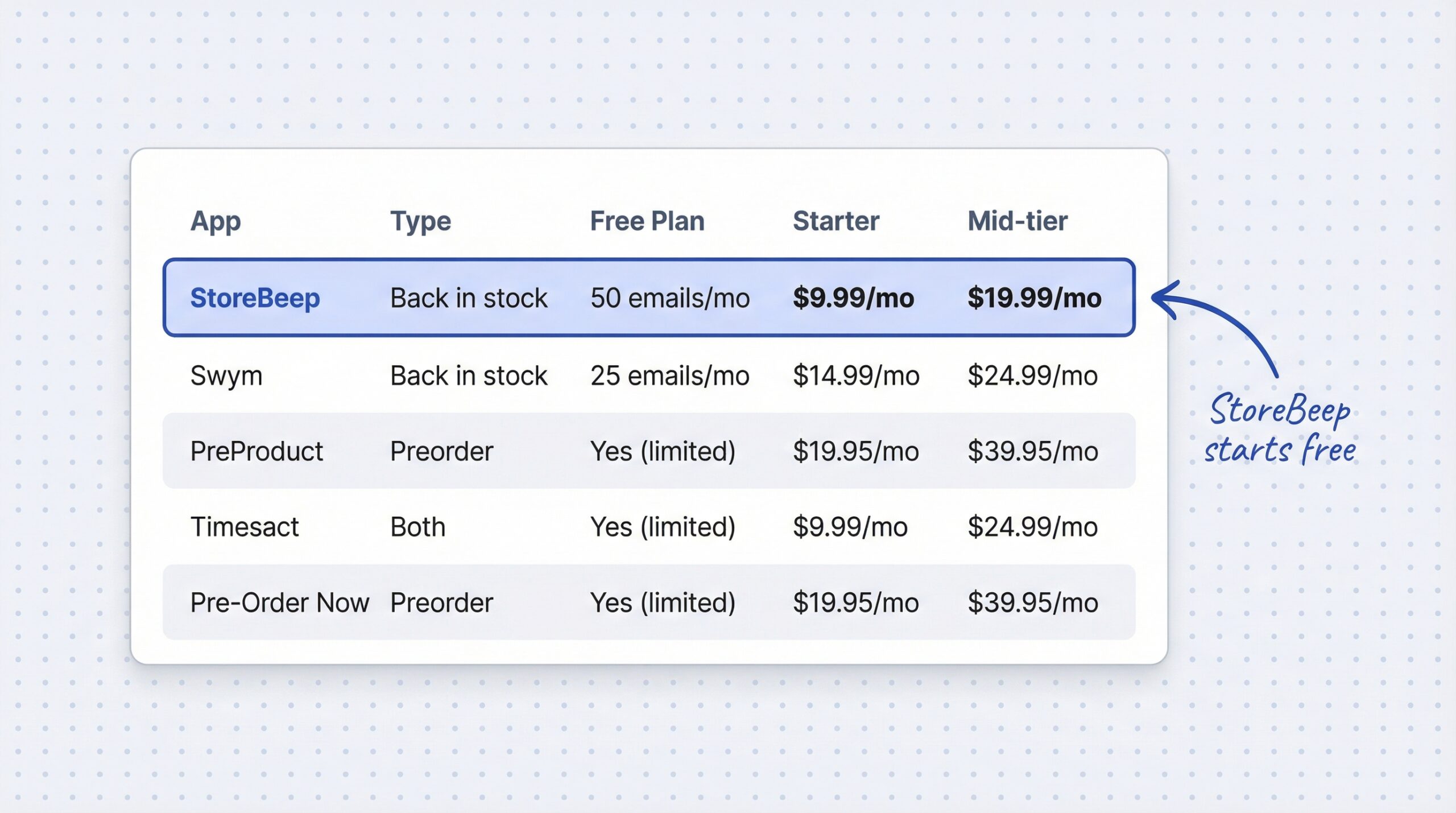
Back in stock apps are generally more affordable. StoreBeep starts with a free plan (50 emails per month) and scales to $29.99/month for high-volume stores. Most back in stock apps fall in the $0-30/month range.
You can compare all the options in our guide to the best Shopify restock notification apps with detailed pricing breakdowns.
Preorder app pricing
Preorder apps tend to be pricier because they handle payment processing complexity. Most popular options start around $19.95/month. Apps like PreProduct, Pre-Order Now, and Timesact all have free plans with limited features, but meaningful functionality starts at the $20-40/month range.
Cost comparison table
| App | Type | Free plan | Starter | Mid-tier |
|---|---|---|---|---|
| StoreBeep | Back in stock | 50 emails/month | $9.99/month (1,000 emails) | $19.99/month (3,000 emails) |
| Swym | Back in stock | 25 emails/month | $14.99/month | $24.99/month |
| PreProduct | Preorder | Yes (limited) | $19.95/month | $39.95/month |
| Timesact | Both | Yes (limited) | $9.99/month | $24.99/month |
| Pre-Order Now | Preorder | Yes (limited) | $19.95/month | $39.95/month |
If you’re running both strategies, expect to spend $10-60/month total depending on your volume and which apps you choose.
How do you decide, preorder or back in stock?
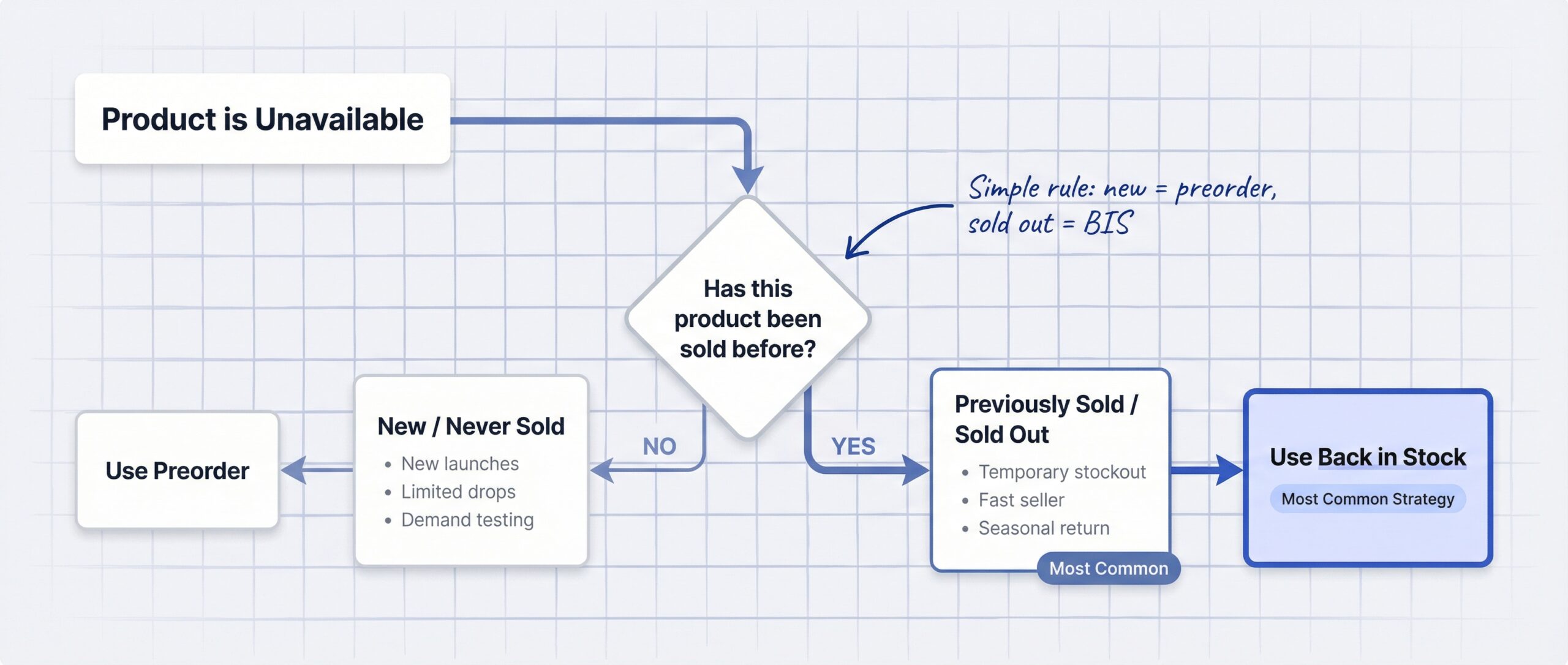
Use this simple rule: if the product has never been sold before, use preorder. If it sold out and you’re restocking, use back in stock.
For more nuanced situations, here’s a scenario-based decision guide:
| Your situation | Use | Why |
|---|---|---|
| Launching a brand new product | Preorder | Generate revenue and validate demand before production |
| Popular item sold out, restocking in two weeks | Back in stock | Low friction, customers just need notification |
| Limited edition drop with fixed quantity | Preorder | Secure commitment, create urgency |
| Seasonal item returning next season | Back in stock | Long wait, no payment needed until available |
| Made-to-order custom product | Preorder | Customer pays upfront, production starts after order |
| General catalog stockout | Back in stock | Automated, captures demand data for restocking |
| Testing interest before manufacturing | Preorder | Revenue or deposits prove real market demand |
| Fast-selling product with weekly restocks | Back in stock | Quick turnaround, notification is sufficient |
The numbers back this up. $1 trillion in missed sales happen annually from out-of-stock items globally (Mirakl, 2025). Whether you use preorders, back in stock alerts, or both, having a strategy for unavailable products is not optional. Read our deep dive on what stockouts actually cost your Shopify store to see the full impact.
Frequently asked questions
What is the difference between preorder and back in stock on Shopify?
A preorder lets customers purchase a product before it ships, collecting payment upfront. A back in stock alert captures contact information on sold-out products and notifies customers when inventory returns, with no payment at signup.
Which converts better, preorders or back in stock alerts?
Preorders convert 10-20% of page visitors into paying customers immediately. Back in stock emails achieve 59.19% open rates and 5.34% purchase conversion, but revenue is delayed until restock.
Can I use both preorder and back in stock on the same Shopify store?
Yes, many stores use preorders for new product launches and back in stock alerts for established catalog items that sell out. You can run separate specialized apps or use combined solutions like Timesact.
When should I offer preorders instead of back in stock alerts?
Use preorders when the product has never been sold before, is made-to-order, or is a limited edition drop. Preorders work best when you want to collect payment upfront and validate demand before production.
How much do preorder apps cost on Shopify compared to back in stock apps?
Back in stock apps are generally cheaper, ranging from free to $30/month (StoreBeep starts at $0). Preorder apps typically range from free limited plans to $40/month, with most starting around $19.95/month for meaningful features.
Do back in stock alerts actually recover revenue?
Yes, back in stock emails have the highest open rate of any e-commerce email type at 59.19%, with a 5.34% conversion rate (Omnisend, 2025). Stores using WhatsApp alerts see open rates as high as 98% based on industry benchmarks for transactional messages.
What payment models do Shopify preorder apps support?
Most Shopify preorder apps support three models: pay now (full payment at preorder), pay later (charged when product ships), and deposit (partial payment now, balance on shipment). Pay now is most common for smaller stores.
Should I use a preorder app or a back in stock app if my product sells out frequently?
Use a back in stock alert app for products that sell out and restock regularly. Back in stock alerts are lower friction for customers and fully automated for merchants, making them ideal for recurring stockout scenarios.
Can I transition a product from preorder to back in stock after launch?
Yes, this is called the product lifecycle approach. Use preorder during the initial launch phase, then switch to back in stock alerts once the product is established and experiencing regular sell-through cycles.
What is the difference between a waitlist and back in stock alerts on Shopify?
In Shopify context, a waitlist and back in stock alerts are essentially the same thing. Both collect customer contact information on out-of-stock products and send notifications when inventory returns. “Waitlist” is just an alternative term used by some apps.
The bottom line on preorder vs back in stock
The preorder vs back in stock shopify question comes down to one thing: what stage is your product in? Both solve the same root problem, an unavailable product, but they fit different situations.
Use preorder when you’re launching something new, selling limited editions, or validating demand before production. You get money upfront, and customers commit to the purchase before the product ships.
Use back in stock alerts when established products sell out temporarily. They’re lower friction, fully automated, and capture demand data you can use for smarter restocking. 63% of shoppers who leave due to a stockout never return even after restock (Timesact, 2025), which is why capturing their interest before they leave is critical.
For most Shopify stores, the answer isn’t preorder or back in stock, it’s knowing when to use each one. Start with back in stock alerts for your existing catalog (they take five minutes to set up with StoreBeep), then add preorders when you launch new products. That way, no matter where a product is in its lifecycle, you’re handling out-of-stock products on Shopify without losing customers.