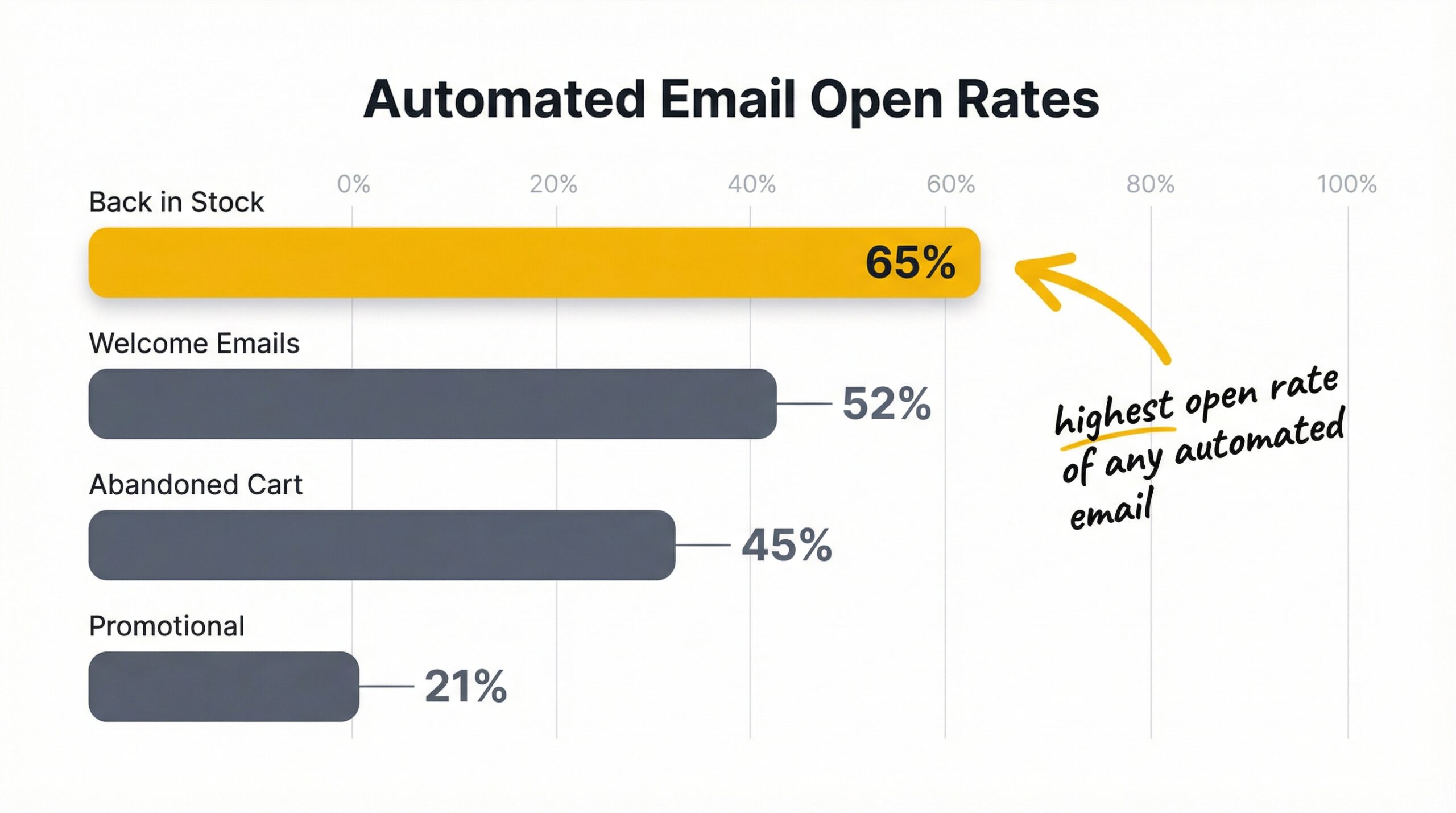
Back in stock emails get a 65% open rate, the highest of any automated email type, including welcome emails and abandoned cart sequences (Barilliance email marketing benchmarks, 2024). That alone should make every Shopify store owner pay attention. But here’s the problem: most stores still send bland, generic “it’s back” emails that waste this massive opportunity. If you’re looking for back in stock email examples for Shopify that go beyond the basics, this article breaks down exactly what separates restock emails that convert from ones that get deleted.
We’ll walk through the five elements every high-converting restock notification email needs, show you real email structures that work, cover subject line strategies backed by data, and give you a framework you can apply to your own Shopify restock notification app setup today.
What makes a back in stock email work?
A back in stock notification email is an automated alert sent to customers who signed up to be notified when a previously out-of-stock product becomes available again. Unlike promotional emails or newsletters, the customer already wants the product, they raised their hand and asked to be told when it’s back. That intent gap is why restock emails outperform every other automated email type.
The numbers back this up. According to Omnisend’s email marketing statistics report, back in stock automated flows see a 59.19% open rate, a 5.34% conversion rate, and generate $1.43 in revenue per email sent. Compare that to the average promotional email conversion rate of under 1%, and the value becomes clear.
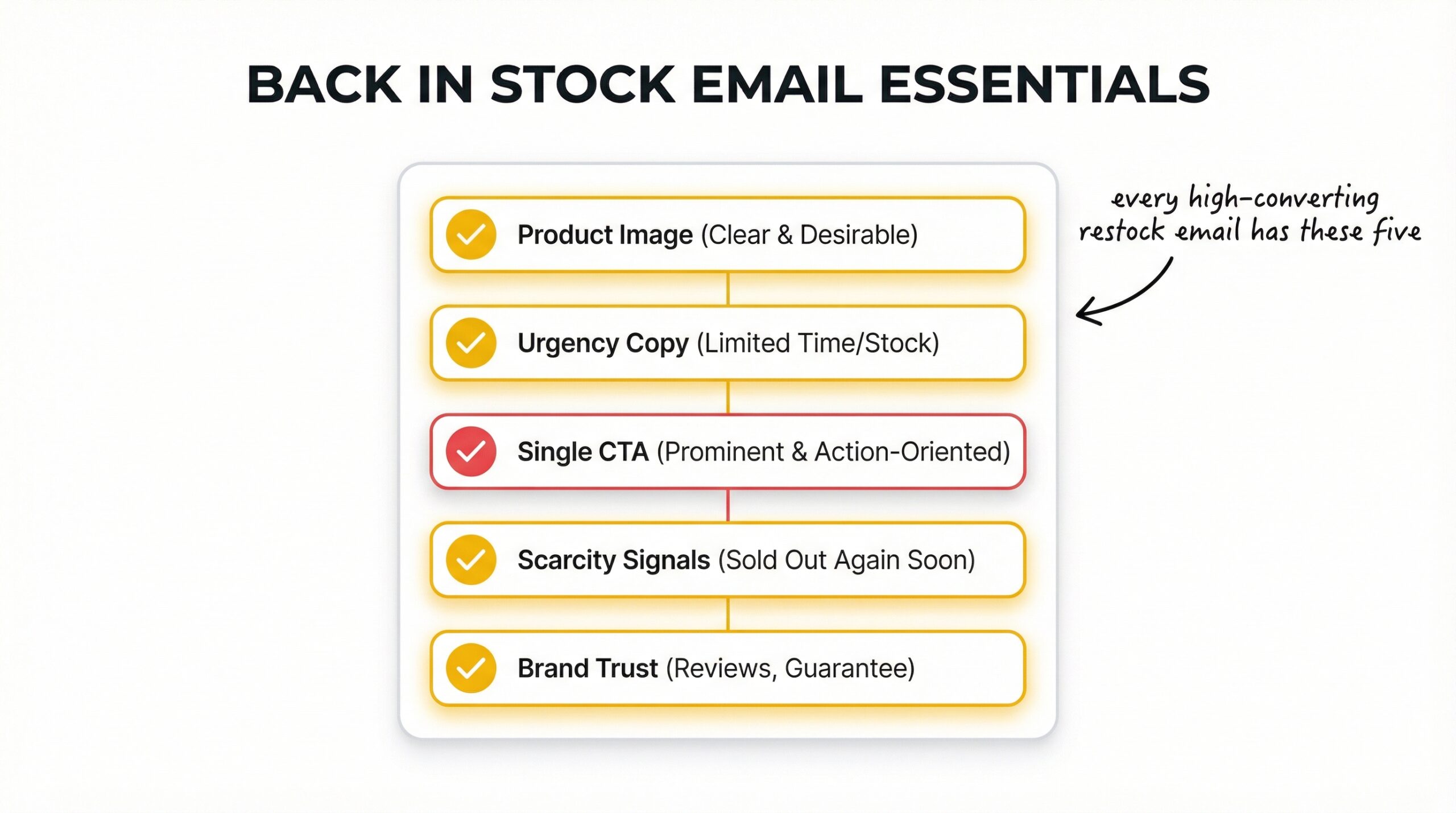
But high open rates don’t automatically mean high conversions. The difference comes down to five essential elements that every effective back in stock email shares:
- A hero product image that shows exactly what’s back
- Urgency-driven copy that’s short, specific, and action-oriented
- A single, impossible-to-miss CTA button
- Social proof or scarcity signals that justify acting now
- On-brand design with a recognized sender domain
Get these five right, and your restock emails will outperform anything else in your automation stack. Miss even one, and you’re leaving conversions on the table.
How should you structure a back in stock email?
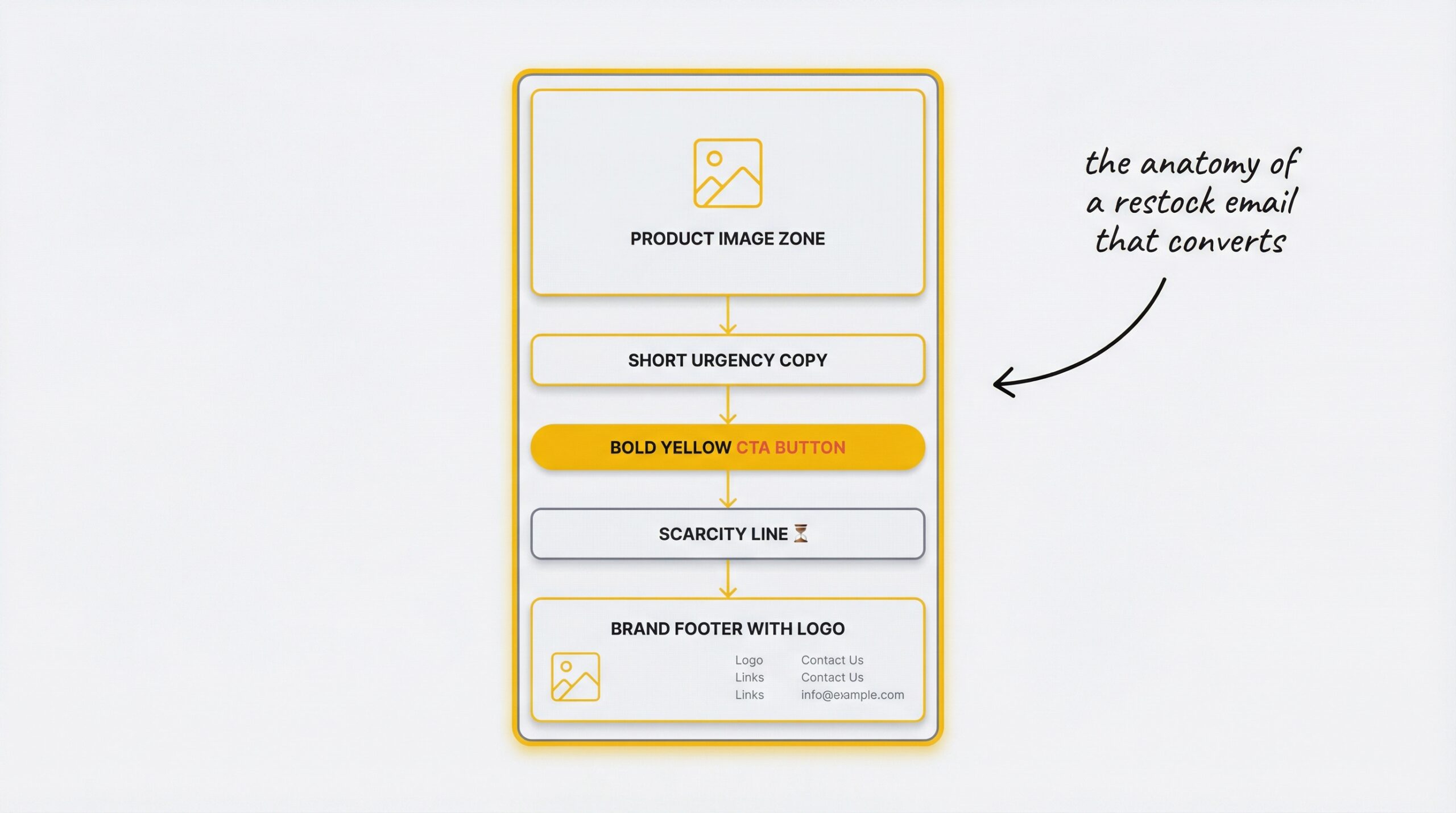
A high-converting back in stock email follows a five-part structure: a hero product image above the fold, urgency-driven copy under 50 words, a single high-contrast CTA button, a genuine scarcity signal like stock count or waitlist size, and on-brand design with a custom sender domain. The best-performing restock emails share this exact anatomy regardless of store size.
Lead with the product image
Your product image should be the first thing the customer sees when they open the email, above the fold, large, and clear. This isn’t the place for lifestyle photography or artistic cropping. Show the exact product in the exact variant they signed up for.
Why? Because the customer already knows what they want. Your job isn’t to sell them on the idea of the product. It’s to confirm that the thing they wanted is back and make it as easy as possible to buy it.
Write copy that creates urgency without being pushy
Keep your email copy under 50 words. That’s not a suggestion, it’s what the data supports. The most effective restock emails say three things:
- The product is back
- It may not last
- Here’s how to get it now
Something like: “Your [Product Name] is back in stock. Last time it sold out in 3 days, grab yours before it’s gone again.” That’s 25 words, and it’s everything the customer needs.
Use a single, impossible-to-miss CTA
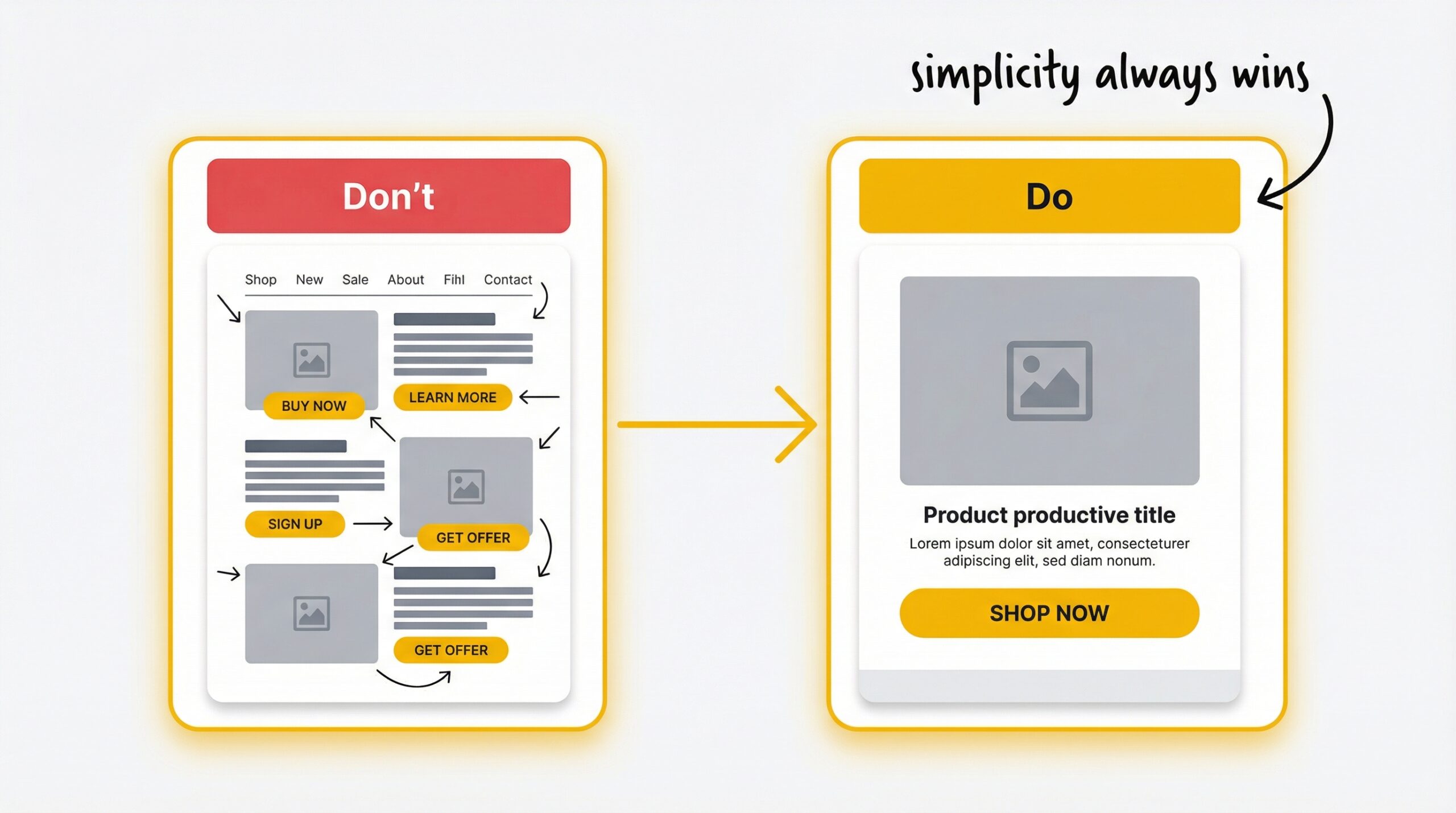
Emails with a single call-to-action increase clicks by 371% compared to emails with multiple competing links (WordStream digital marketing research, 2015). Your CTA button should be large, high-contrast, and say exactly what will happen when they click it. “Buy now” or “Shop [Product Name]” works far better than vague options like “Learn more.”
Don’t add navigation menus, secondary product recommendations, or footer links that compete with the primary CTA. One button. One action. One conversion path.
Add social proof or scarcity signals
If the product sold out once, tell them. “This product had 200+ waitlist signups” or “Sold out in 48 hours last time” gives the customer a reason to act immediately instead of bookmarking the email for later.
Stock count signals work too: “Only 12 left” is a powerful motivator when it’s genuine. But only use real scarcity, fake urgency damages trust and teaches customers to ignore your future emails.
Keep it on-brand
Your restock alert email design should look like it came from your store, not from a random notification service. Use your brand colors, your logo, and your typography. More importantly, send it from your own domain. Emails from “[email protected]” get opened. Emails from “[email protected]” get filtered.
Tools like StoreBeep back in stock alerts let you set up a custom sender domain so your restock emails come from your brand address, not a third party. That one change alone can measurably improve your open and click rates.
Back in stock email examples for Shopify that convert
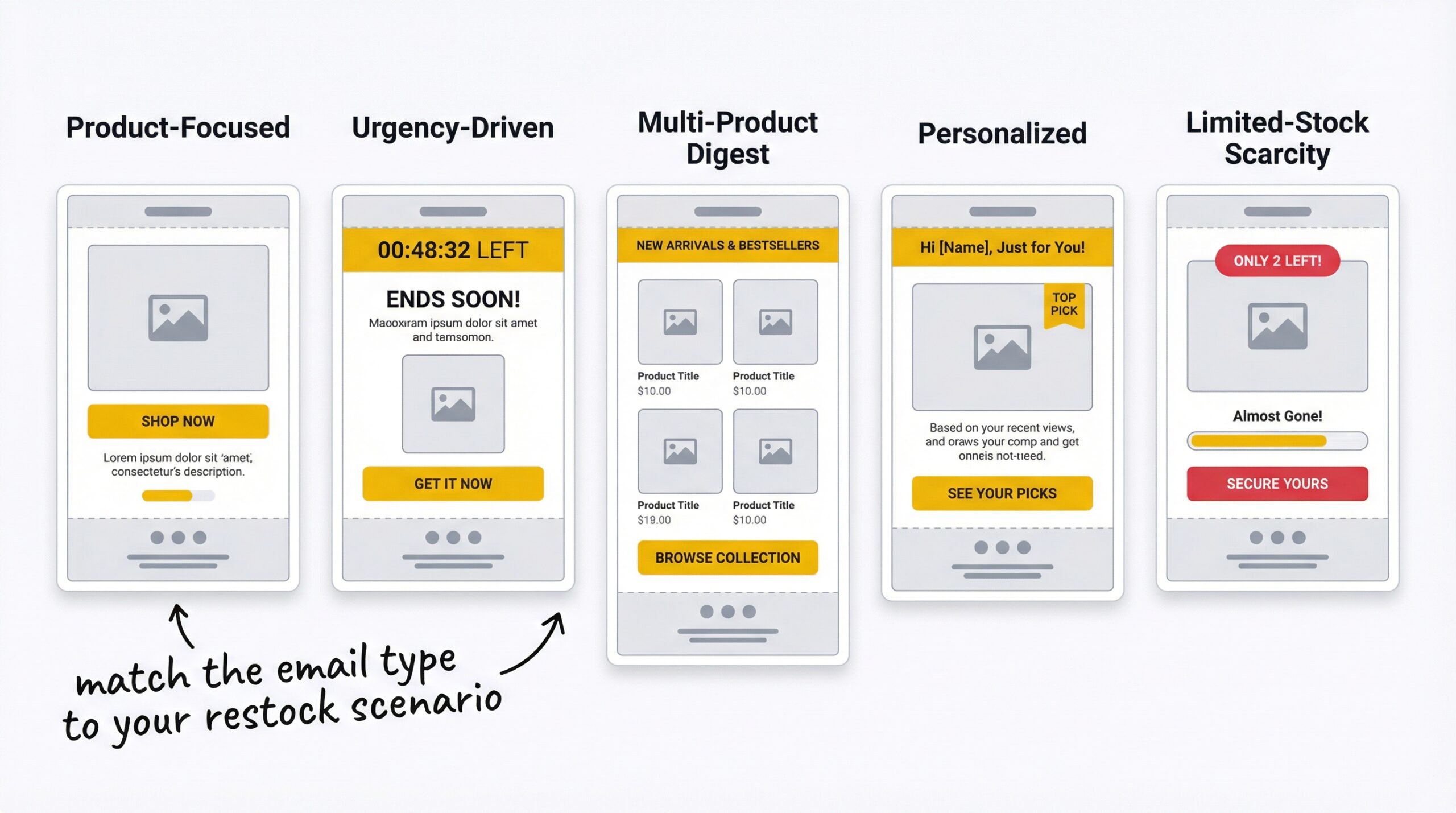
Not every restock email should look the same. The right format depends on what you’re restocking, how scarce the product is, and what kind of customer is receiving it. Here are five restock email examples that work, with a breakdown of why each one converts.
The clean product-focused email
Structure: Hero product image, 2-line copy, single CTA button, brand footer.
This is the most effective format for single high-value product restocks. There’s nothing to distract, the customer sees the product they wanted, reads a brief confirmation that it’s available, and clicks through to buy. Everlane’s restock emails are a textbook example of this approach: white background, product front-and-center, one bold “Shop now” button.
Best for: Limited-edition drops, high-AOV products, fashion and apparel.
The urgency-driven email
Structure: Product image, stock count or “selling fast” badge, urgency copy, CTA with countdown language.
This format adds a genuine scarcity layer on top of the product-focused layout. UGG uses this style effectively, their restock alerts include “selling fast” labels alongside the product, giving customers a clear reason to act immediately rather than wait.
Best for: Products that genuinely sell out fast, trending items, seasonal restocks.
The multi-product restock digest
Structure: Grid layout with 3-4 product cards, each with its own mini-CTA.
When you restock multiple products at once, a digest format helps customers browse everything that’s back in a single email. This format works best for stores with frequent restocks across many SKUs. Myntra uses a grid layout that shows several restocked items, letting customers pick what interests them most.
Best for: Stores with frequent restocks, large catalogs, beauty and cosmetics brands with multiple variant restocks.
The personalized recommendation email
Structure: “[Name], your item is back” headline, primary product, 2-3 related product suggestions below the main CTA.
This format combines the urgency of a restock alert with the cross-sell power of personalized recommendations. The primary CTA focuses on the product they signed up for, and below it you show 2-3 complementary items. “You might also like” sections can increase basket size without diluting the primary message, as long as the main CTA stays dominant.
Best for: Stores with customer purchase history, fashion brands, stores with strong product-pairing data.
The limited-stock scarcity email
Structure: Product image, stock meter or countdown visual, low-stock warning copy, urgent CTA.
When you have genuine limited supply, show it. A visual stock meter (“Only 8 left”) or a countdown to expected sellout creates genuine urgency. This format works because it gives the customer a specific, visual reason to act now. Keds uses bold, simple layouts with a single product and a strong CTA that makes the buying decision feel effortless.
Best for: Trending products with real limited supply, exclusive restocks, products with a history of selling out quickly.
What are the best restock email subject lines?
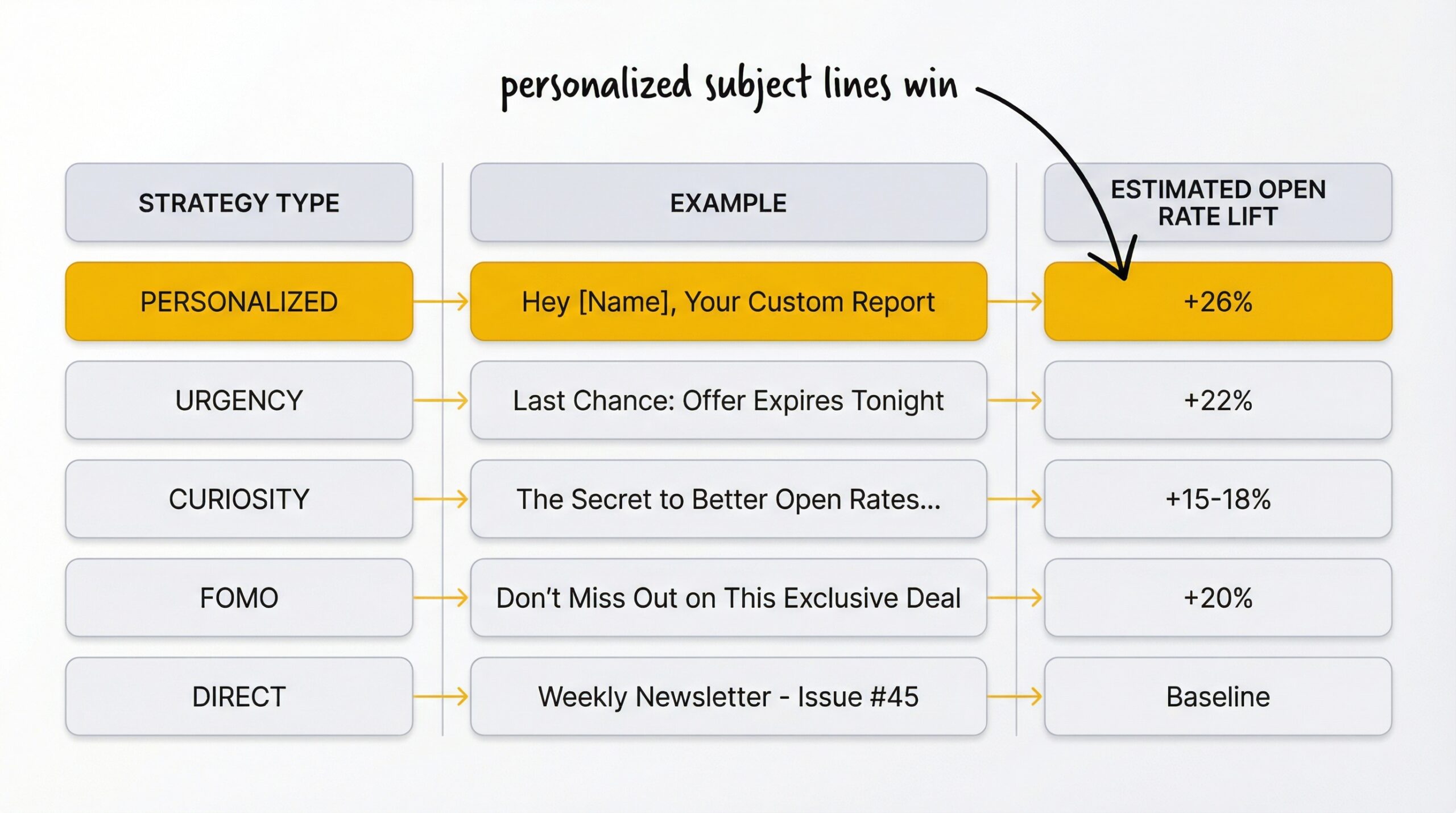
The best back in stock email subject lines include the customer’s name and the product name. Personalized subject lines boost open rates by 26% (Campaign Monitor email marketing trends report, 2024), and urgency-based lines add another 22% lift on top of that.
Here are proven subject line formulas organized by strategy:
Direct and clear:
- “It’s back! [Product Name] is in stock again”
- “Good news: [Product Name] is available”
- “[Product Name] is back in stock”
Urgency-driven:
- “Back in stock, but not for long”
- “[Product Name] is back (and selling fast)”
- “Don’t miss it again: [Product Name] restocked”
Personalized:
- “[Name], the item you wanted is back”
- “[Name], your [Product Name] is available again”
- “We saved one for you, [Name]”
Curiosity-based:
- “Guess what just came back?”
- “Remember this? It’s finally back”
- “You asked, we listened”
Scarcity-focused:
- “Only [X] left: [Product Name] is back”
- “Last chance: [Product Name] restocked in limited quantities”
- “Selling fast: [Product Name] is back”
Keep subject lines under 50 characters when possible. Mobile email clients truncate longer lines, and 47% of email opens happen on mobile devices (Litmus, 2024).
When should you send restock alerts?
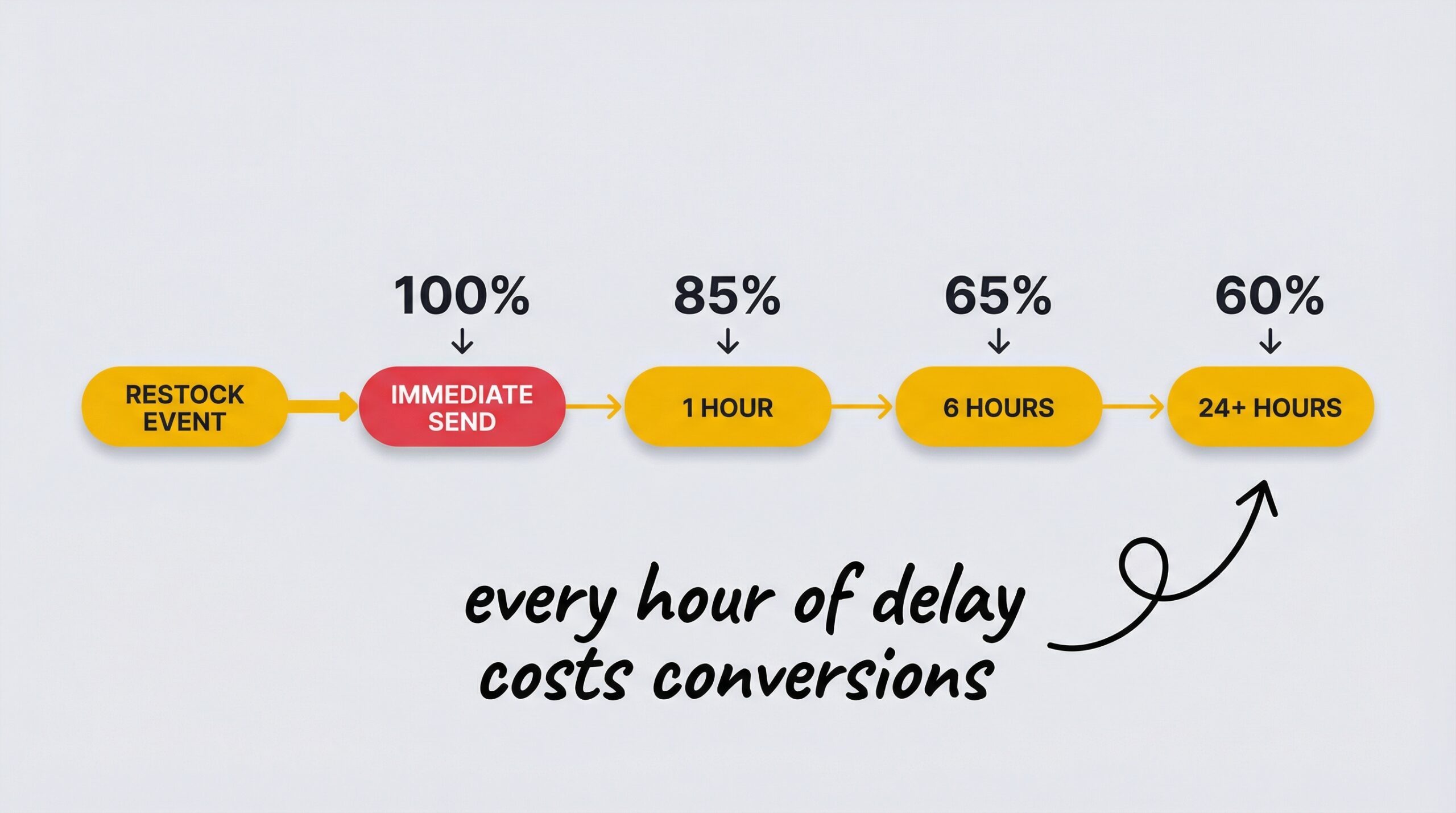
Timing is one of the most underrated factors in restock email performance. Emails sent within one hour of restocking see 40% higher conversion rates than those delayed by 24 hours or more. Every hour of delay costs you conversions because the excitement of “it’s back” fades quickly, and the customer may find the product elsewhere.
Here’s the timing framework that works:
Immediate (within 1 hour): This is the gold standard. Automated tools like StoreBeep automated restock email setup send alerts the moment your inventory is updated, removing any delay between restocking and notification.
VIP early access (15-30 minutes before general): Give your most loyal customers or highest-value waitlist members first access. Even a 15-minute head start creates a sense of exclusivity that strengthens retention.
General alert (immediately after VIP window): Send to the rest of your waitlist. No delay, the product is live, and every minute that passes is a minute the customer might find it somewhere else.
Never send the next day: If your system delays alerts by hours or days, you’re undermining the entire strategy. That’s why 91% of customers won’t wait for an out-of-stock product and will simply shop elsewhere (Opensend out-of-stock strategy research, 2024). If you need a broader strategy for handling out-of-stock products on Shopify without losing customers, restock emails are the centerpiece, but the email has to arrive while the intent is still hot.
Common restock email mistakes (and how to fix them)
Even stores that have restock emails set up often make these mistakes that quietly kill conversions:
Mistake 1: Cluttered design with too many elements. If your restock email has navigation menus, multiple product blocks, social media icons, newsletter signups, and three different CTAs, the customer doesn’t know where to look. Fix: strip it down to product image, copy, and one CTA.
Mistake 2: Multiple CTAs competing for attention. “Shop now,” “Browse similar,” “Read reviews,” “Follow us”, each additional link dilutes the conversion path. Fix: one button, one destination, one goal.
Mistake 3: Sending hours or days after restock. If your restock emails go out in a daily batch instead of in real-time, you’re losing the urgency window. Fix: use an app that triggers alerts automatically the moment inventory updates.
Mistake 4: Ignoring mobile optimization. Nearly half of all email opens happen on mobile. If your CTA button is too small to tap, your images are too wide for phone screens, or your copy requires scrolling to find the purchase link, you’re losing mobile conversions. Fix: design mobile-first, test on a phone before sending.
Mistake 5: Generic subject lines with no personalization. “Product update” or “Inventory notification” as a subject line tells the customer nothing. Fix: include the product name and the customer’s name when possible.
Mistake 6: No urgency or scarcity element. If the email just says “it’s available” with no reason to buy right now, the customer will bookmark it and forget. Fix: add genuine stock counts, sell-out history, or waitlist size.
Understanding what stockouts actually cost your Shopify store helps put these mistakes in perspective, every weak restock email is lost revenue on top of the revenue already lost from being out of stock.
How to set up back in stock emails on Shopify
Setting up effective restock emails on Shopify takes three steps:
Step 1: Install a restock notification app. You need an app that adds a Notify Me button to out-of-stock product pages and sends automatic email alerts when you restock. StoreBeep restock notification app does this out of the box, install it, and the button appears automatically on your out-of-stock products.
Step 2: Customize your back in stock email template. Match your restock email to your store’s branding. Use your logo, your brand colors, and copy that sounds like your brand. Apply the five essential elements from this article: hero product image, urgency copy, single CTA, scarcity signal, and on-brand design.
Step 3: Set up a custom sender domain. This is the step most stores skip, and it makes a huge difference. Sending restock emails from “[email protected]” instead of a generic third-party domain improves deliverability and builds trust. StoreBeep’s Pro plan includes custom sender domain support.
Once your emails are live, track your results. StoreBeep’s purchase tracking shows you exactly which alerts lead to sales, so you can measure the ROI of your restock email strategy. For a channel-by-channel comparison, see how WhatsApp compares to email for Shopify restock alerts to decide if you should add a second notification channel.
For a broader view of which apps handle this best, check out our comparison of the best Shopify restock notification apps.
Frequently asked questions
What is the best time to send a back in stock email?
Send it immediately when the product restocks. Emails sent within one hour see 40% higher conversion than those delayed by 24+ hours. The customer’s intent fades quickly, and automated tools that trigger on inventory updates eliminate the delay entirely.
How many products should I include in a back in stock email?
Focus on one product per email for the highest conversion rate. Multi-product digest emails work if you restock many items at once, but they dilute urgency. The single-product format consistently outperforms because it keeps the customer’s decision simple.
What subject line works best for back in stock emails?
Personalized subject lines using the customer’s name boost open rates by 26%. Include the product name whenever possible. Something like “[Name], your [Product Name] is back” outperforms generic lines like “Product update” every time.
Should back in stock emails include a discount?
Usually not. The customer already wants the product, they signed up for the alert. Adding a discount can train customers to wait for deals rather than buying at full price. Save discounts for abandoned cart emails where the intent barrier is higher.
How long should a restock email be?
Keep the copy under 50 words. The product image and CTA should do the heavy lifting. Long emails with multiple paragraphs distract from the primary goal: getting the customer to click through and buy.
What is a good open rate for back in stock emails?
Back in stock emails average 59-65% open rates, the highest of any automated email type. If yours is below 40%, check your subject lines, sender reputation, and whether you’re sending from a recognized domain.
Can I send back in stock emails from my own domain on Shopify?
Yes. Apps like StoreBeep support custom sender domains, so your restock emails come from your brand address (like [email protected]) instead of a third-party domain. This improves deliverability and customer trust.
How do back in stock emails compare to abandoned cart emails?
Back in stock emails typically outperform abandoned cart emails in open rates (65% vs 45%) because the customer expressed specific product interest rather than general browsing intent. Conversion rates are comparable, but the intent quality is higher with restock alerts.
Should I add urgency to restock emails even if stock is high?
Only use genuine scarcity signals. If you have 500 units, don’t pretend there are only 10 left. Fake urgency damages trust and hurts long-term performance. If stock is high, focus on the product’s popularity and its return instead.
What is the difference between a back in stock email and a restock notification?
They’re the same thing. “Back in stock email” and “restock notification” both refer to automated messages sent to customers when a previously unavailable product becomes available again. The terms are used interchangeably across the industry.
Make your restock emails earn their open rates
Back in stock email examples for Shopify come in many formats, but the principles are the same: one product, one CTA, genuine urgency, and on-brand design. The emails that convert aren’t complicated, they’re focused.
Start with the five essential elements. Pick the email format that matches your restock scenario. Write a subject line that includes the product name and a reason to open. Send it within minutes of restocking, not hours. And track every alert-to-purchase conversion so you know exactly what’s working.
Your customers already told you they want the product. The restock email is your chance to close that loop and turn a stockout into a sale. StoreBeep back in stock alerts makes it easy to set up, customize, and track every restock email you send.