Two deadlines are converging. Shopify Scripts stops working June 30, 2026. The full Shopify checkout extensibility upgrade auto-applies to every non-Plus store on August 26, 2026. If you use back-in-stock alerts, restock emails, or any notification app on your store, you have probably seen the headlines and started worrying.
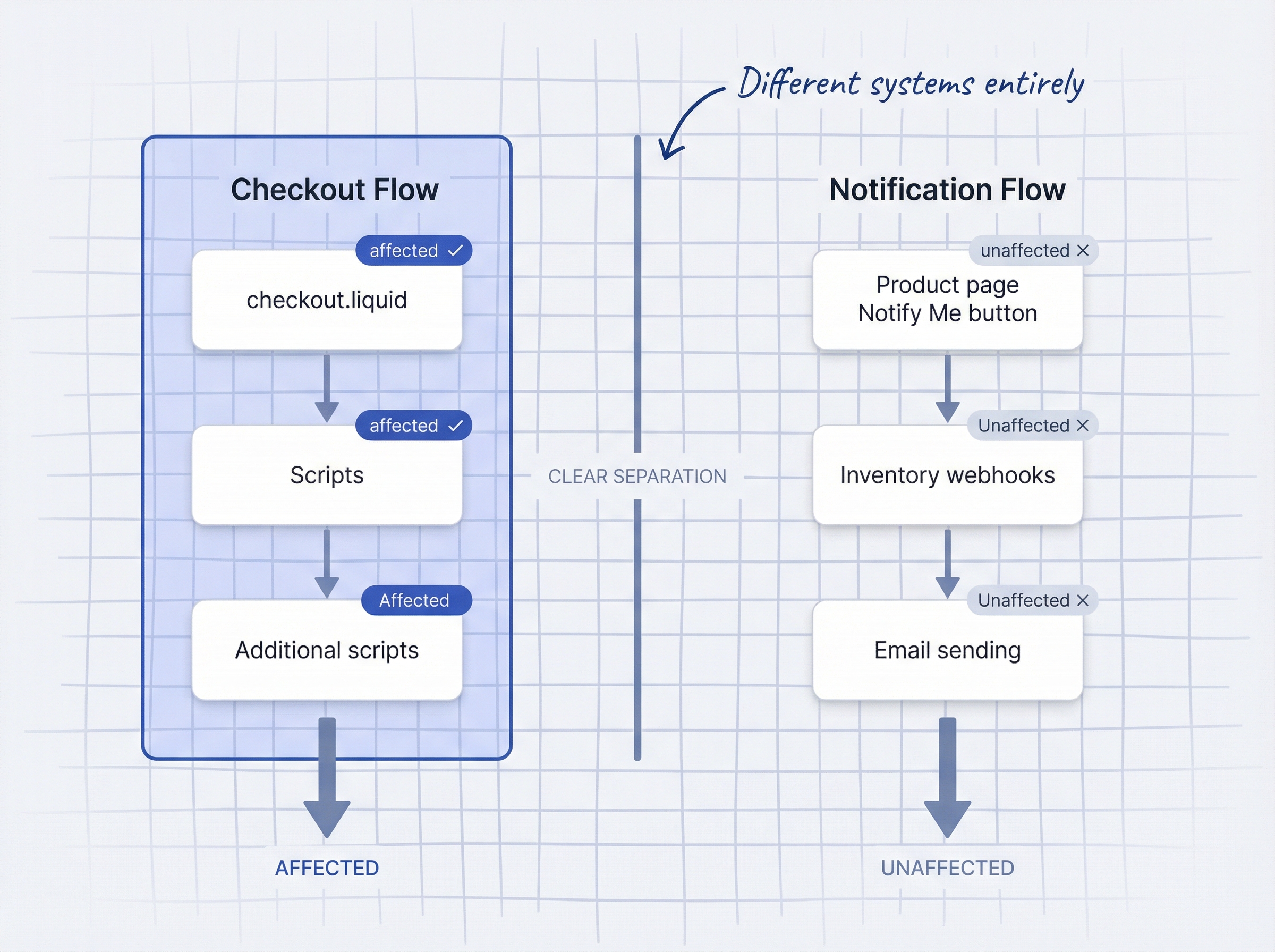
Here is the short answer: your notification apps are almost certainly not affected. They operate on your storefront (product pages), not inside the checkout flow.
The longer answer involves understanding what Shopify checkout extensibility actually changes, what stays the same, and why the new checkout might improve your notification-to-purchase conversion rates. 70.22% of e-commerce shopping carts are abandoned before purchase (Baymard Institute cart abandonment research, 2026), and 22% of those abandonments happen because the checkout is too complex. Shopify’s new checkout directly addresses that problem.
This article breaks down the deadlines, what breaks, what does not, and gives you a checklist to confirm everything is ready before August.
What is Shopify checkout extensibility?
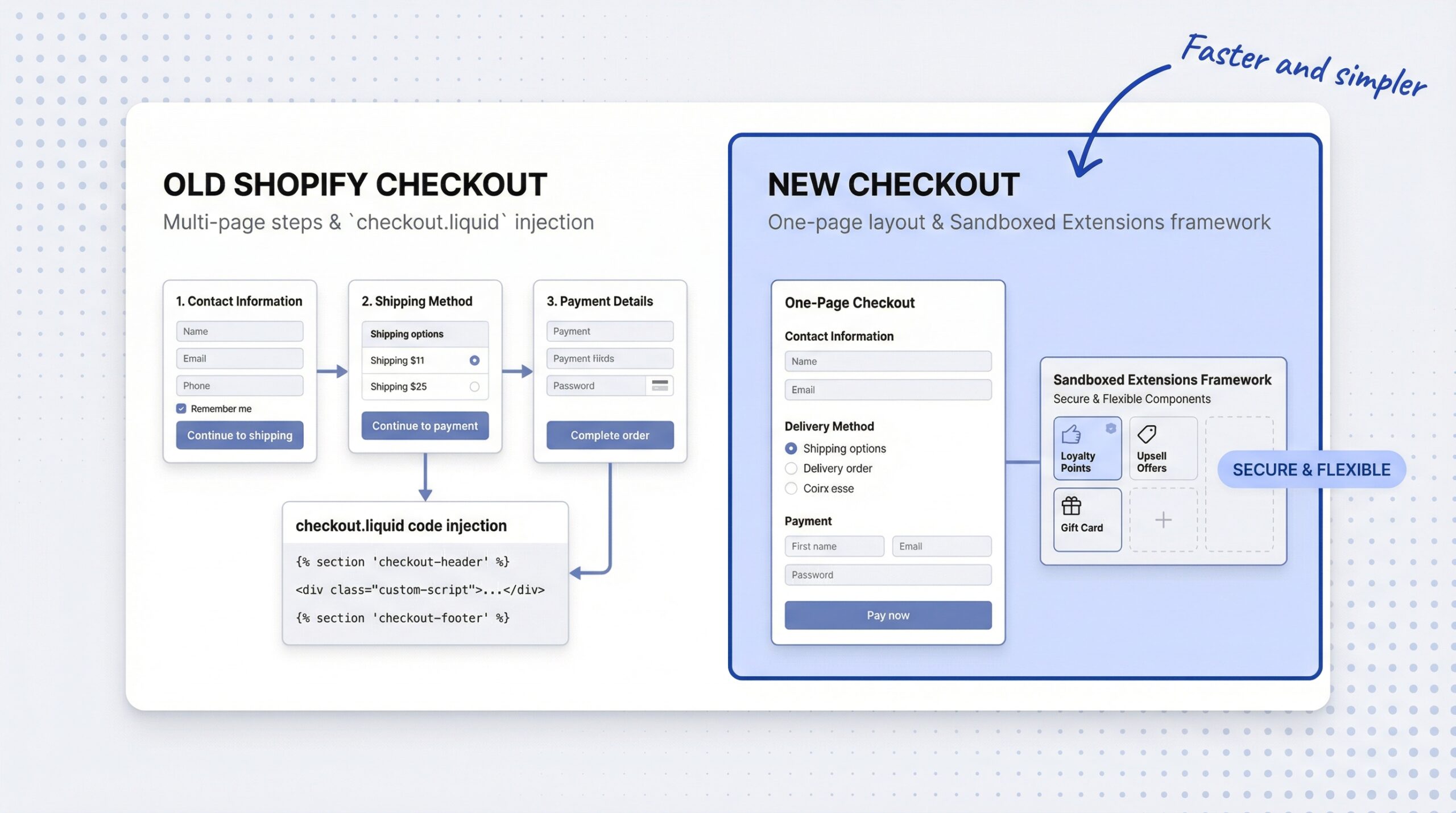
Shopify checkout extensibility is a new checkout framework that replaces three legacy systems: checkout.liquid, additional scripts, and Shopify Scripts. In their place, Shopify introduces three modern tools: checkout UI extensions, Shopify Functions, and Shopify Pixels.
The old checkout let merchants inject custom JavaScript directly into the checkout page through checkout.liquid. There were no security boundaries, no performance limits, and no guarantees that custom code would survive Shopify platform updates. It worked, but it was fragile.
The new framework is sandboxed. Checkout UI extensions run in a controlled environment with a 64KB bundle size limit (Shopify checkout UI extensions documentation, 2026) to keep checkout pages fast. Shopify Functions replace Shopify Scripts for custom discounts, shipping rules, and payment logic. Shopify Pixels replace additional scripts for tracking and analytics.
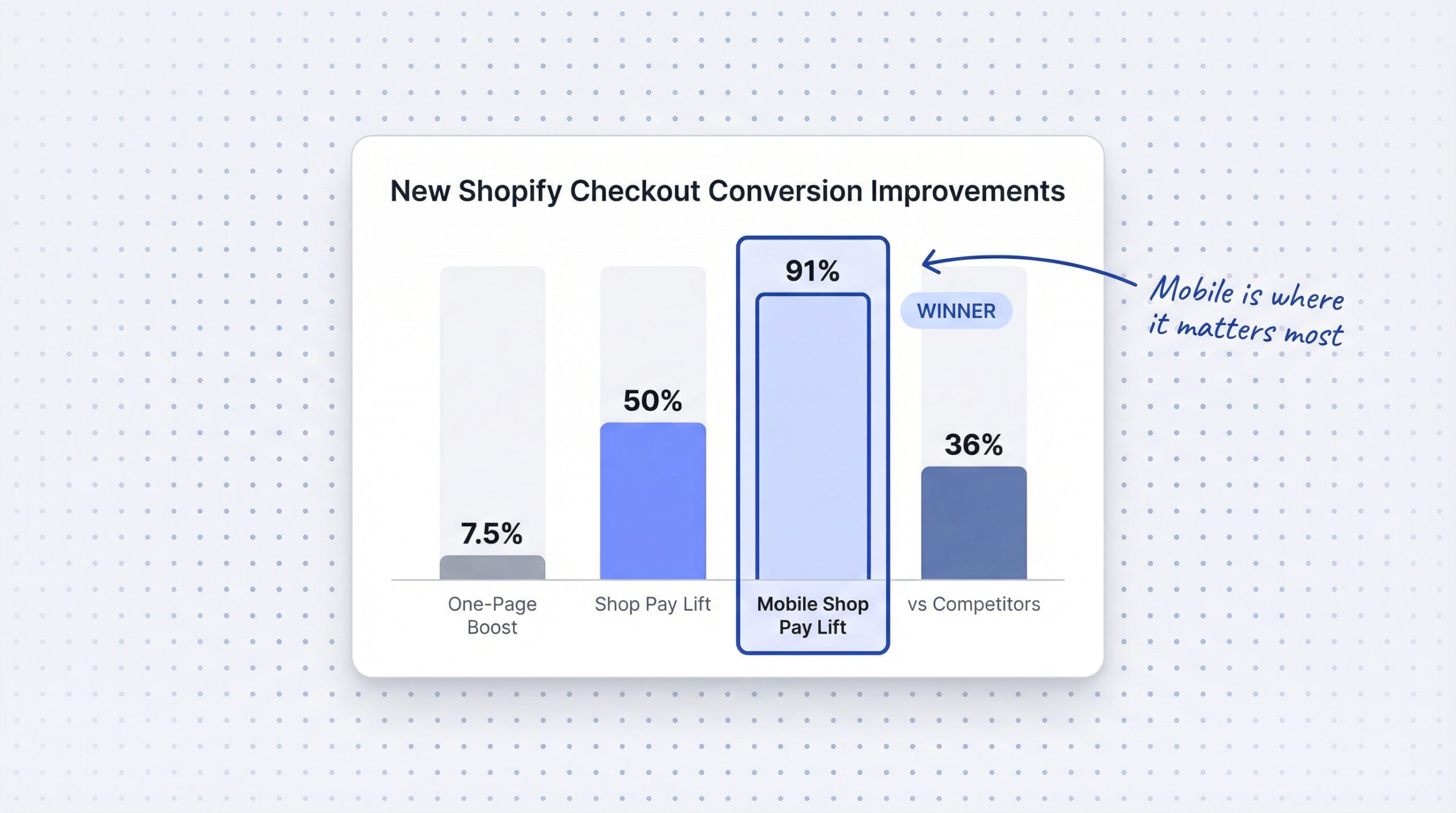
The most visible change for shoppers: the new checkout is a one-page layout instead of the old multi-step process. Shopify reports it converts approximately 7.5% better than the multi-page version (Shopify Enterprise Blog, 2026).
This is not optional. Shopify is forcing the switch because the new architecture is more secure, faster, and upgrade-safe. Every customization built on the new framework survives future Shopify updates automatically.
What are the Shopify checkout extensibility deadlines?
There are three dates that matter. Two are in 2026. One has already passed.
| Deadline | What Happens | Who It Affects |
|---|---|---|
| August 28, 2025 (passed) | Plus stores auto-upgraded to checkout extensibility | Shopify Plus only |
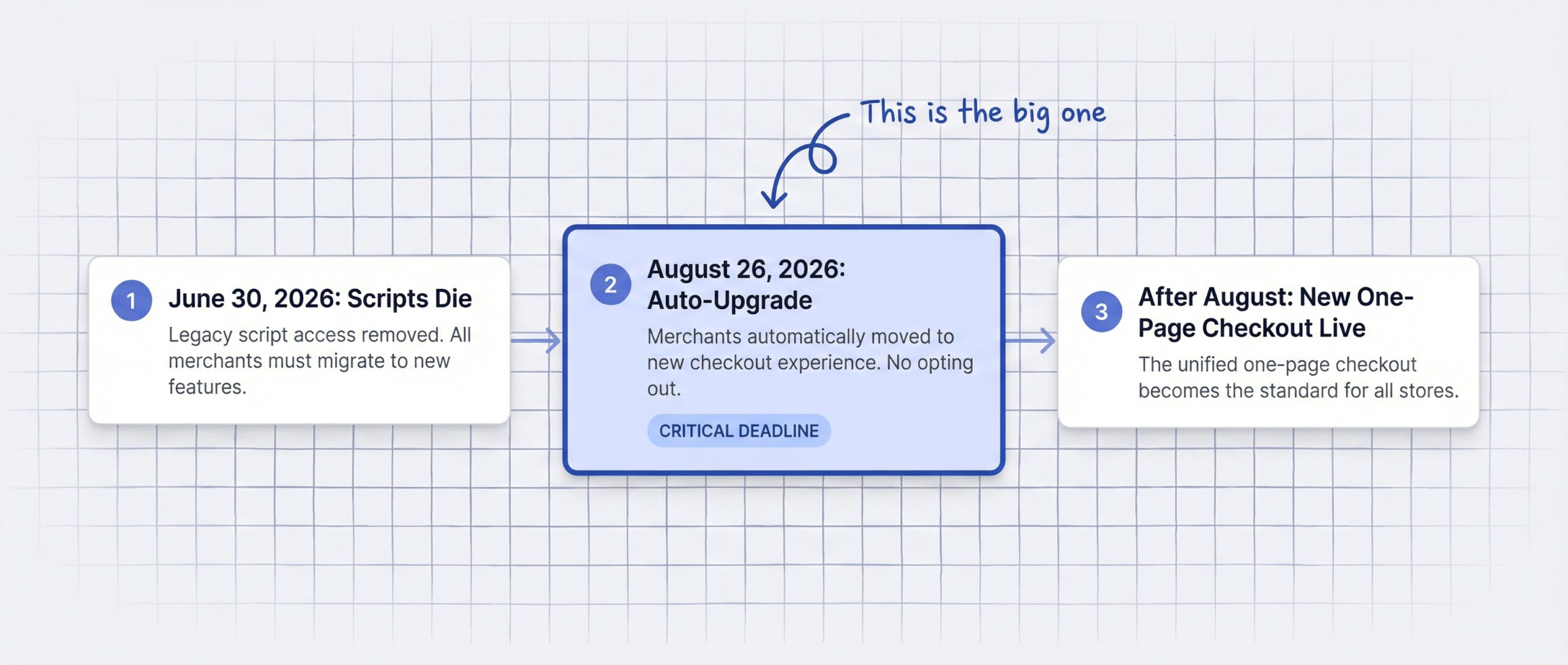
| June 30, 2026 | Shopify Scripts stop working entirely | All stores using Scripts |
| August 26, 2026 | Non-Plus stores auto-upgraded; all legacy checkout customizations removed | All non-Plus stores |
The Shopify Scripts deprecation deadline is the first one to worry about. If your store uses Shopify Scripts for custom discount logic, shipping rules, or payment customizations, those scripts stop functioning on June 30, 2026. You need to migrate them to Shopify Functions before that date (Shopify changelog on Scripts deprecation, 2026).
The Shopify checkout extensibility deadline on August 26, 2026 is the big one for everyone else. On that date, Shopify will auto-upgrade all non-Plus stores. Any custom code in checkout.liquid, any additional scripts on thank-you and order status pages, and any apps that injected into the legacy checkout will stop working.
If you do nothing before August 26, Shopify upgrades your store anyway and removes all legacy customizations. The Shopify Help Center non-Plus upgrade guide confirms: “All customizations using additional scripts, apps with script tags, or checkout.liquid on the Thank you and Order status pages will be lost.”
What breaks when Shopify upgrades your checkout?
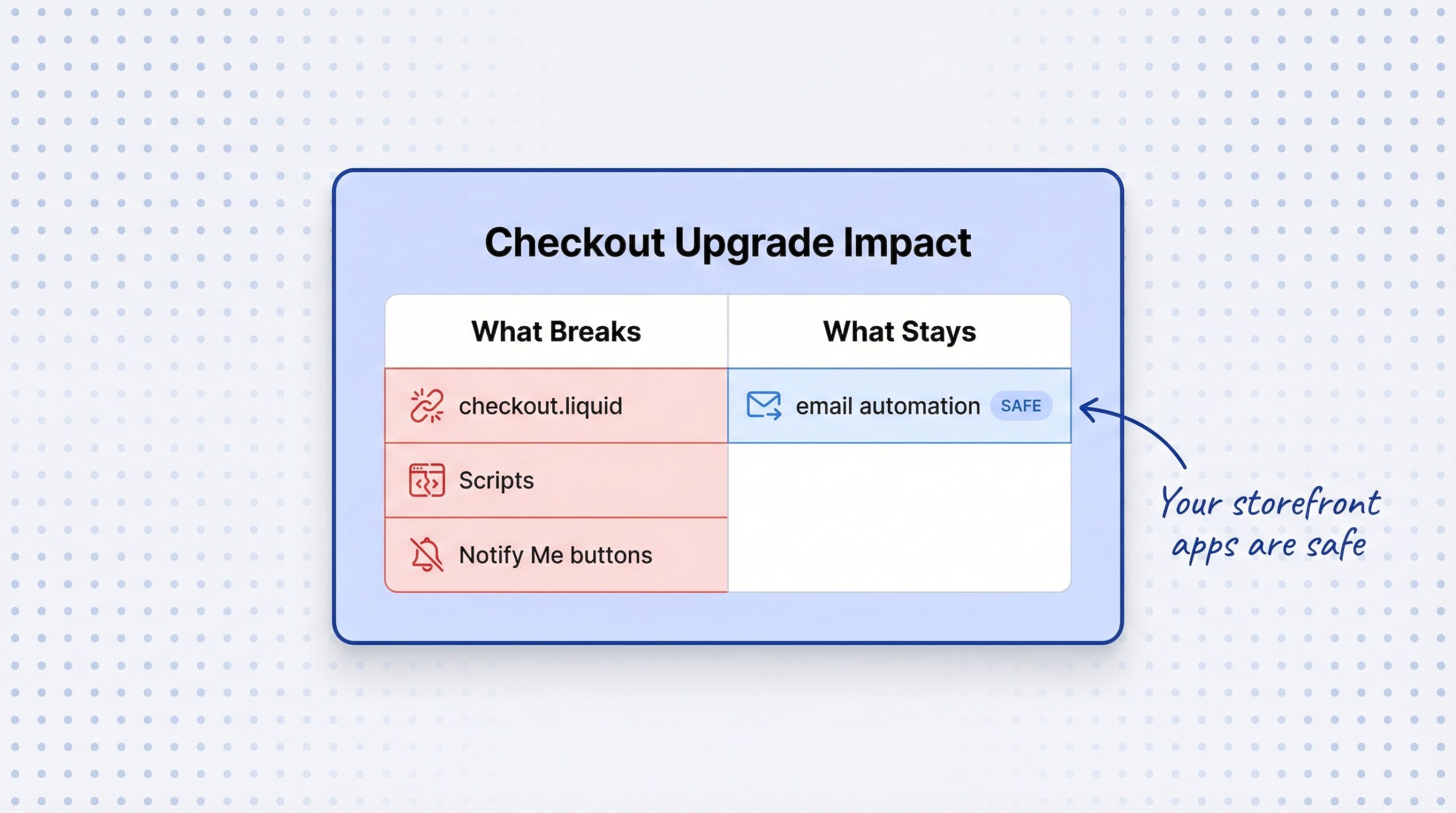
Not everything changes. The key is understanding which surface each piece of your store lives on. Here is the breakdown:
| What Changes or Breaks | What Stays the Same |
|---|---|
| checkout.liquid custom code | Product page layouts and apps |
| Additional scripts on thank-you page | Storefront “Notify Me” buttons |
| Shopify Scripts (custom discounts) | Back-in-stock email automation |
| Tracking pixels via script injection | Inventory webhook triggers |
| Apps that injected into checkout.liquid | WhatsApp and SMS notification flows |
| PII access via additional scripts | Demand insight dashboards |
checkout.liquid: any custom HTML, CSS, or JavaScript in your checkout page is removed. This affects Plus merchants who had heavily customized checkouts. Non-Plus stores rarely had access to this.
Additional scripts: custom code on thank-you and order status pages is removed. This is where many merchants added tracking pixels, conversion tags, or post-purchase upsells via script injection.
Shopify Scripts: custom discount logic (buy X get Y, tiered discounts, free shipping thresholds) stops working. These need migration to Shopify Functions, which is the modern replacement. This is the Shopify Functions vs Scripts migration that affects the most stores.
Tracking pixels: if you added Google Analytics, Facebook Pixel, or other tracking via additional scripts, you need to migrate to Shopify Pixels or the Customer Events API. Analyzify’s checkout extensibility tracking guide covers this migration in detail.
Do back-in-stock and notification apps need to change?
No. Back-in-stock notification apps are not affected by Shopify checkout extensibility because they operate on the storefront, not inside the checkout flow.
Here is why. The “Notify Me” button lives on your product page, right where the “Add to Cart” button normally sits. It has nothing to do with checkout.liquid. When a customer clicks that button, the app collects their email (or WhatsApp number) through a storefront widget. That interaction happens entirely on the product page.
When you restock, the notification trigger is an inventory webhook from Shopify. The app detects the inventory change and sends an alert via email, SMS, or WhatsApp. None of that touches the checkout architecture.
Purchase tracking in notification apps typically uses order webhooks (the Shopify Orders API), not checkout additional scripts. So your back-in-stock alerts ROI tracking continues to work without changes.
We covered how notification systems on Shopify actually work in a separate article. The entire flow, from the Notify Me button on your product page to the automated restock email your subscriber receives, operates on the storefront and through webhooks. The checkout upgrade does not touch any of it.
What to verify: confirm your notification app does not use checkout.liquid or additional scripts for any functionality. Most do not. If you are unsure, contact your app’s support team and ask directly.
How does the new Shopify checkout improve notification conversion rates?
The Shopify checkout upgrade 2026 is not just about removing old code. The new checkout is measurably better for conversion, and that matters for anyone running back-in-stock alerts.
Here is the data:
| Metric | Improvement | Source |
|---|---|---|
| One-page vs. multi-page checkout | ~7.5% better conversion | Shopify Enterprise Blog, 2026 |
| Shop Pay vs. guest checkout | Up to 50% higher conversion | Shopify, 2026 |
| Shop Pay mobile conversion | 91% lift on mobile specifically | Shopify Enterprise Blog, 2026 |
| Shopify checkout vs. competitors | 36% higher conversion on average | Shopify Enterprise Blog, 2025 |
79% of Shopify traffic comes from mobile devices (Shopify Enterprise Blog, 2026). The new one-page checkout is designed for mobile first, which means the majority of your shoppers benefit from the improvement.
With 150+ million Shop Pay users globally (Shopify, 2026) and a 58% year-over-year increase in Shop Pay usage during BFCM 2024 (Shopify, 2024), the accelerated checkout option is becoming the default experience for repeat Shopify shoppers.
What this means for your notification funnel: when a subscriber clicks a restock alert and hits “Buy Now,” they reach a faster, simpler checkout. The last stage of the back-in-stock conversion funnel (click-to-purchase) gets a direct boost. A 35.26% potential conversion increase from better checkout design and usability is achievable based on the current state of e-commerce checkout UX (Baymard Institute, 2026).
The checkout extensibility upgrade is, for notification app users, net-positive news.
What should you do before August 2026?
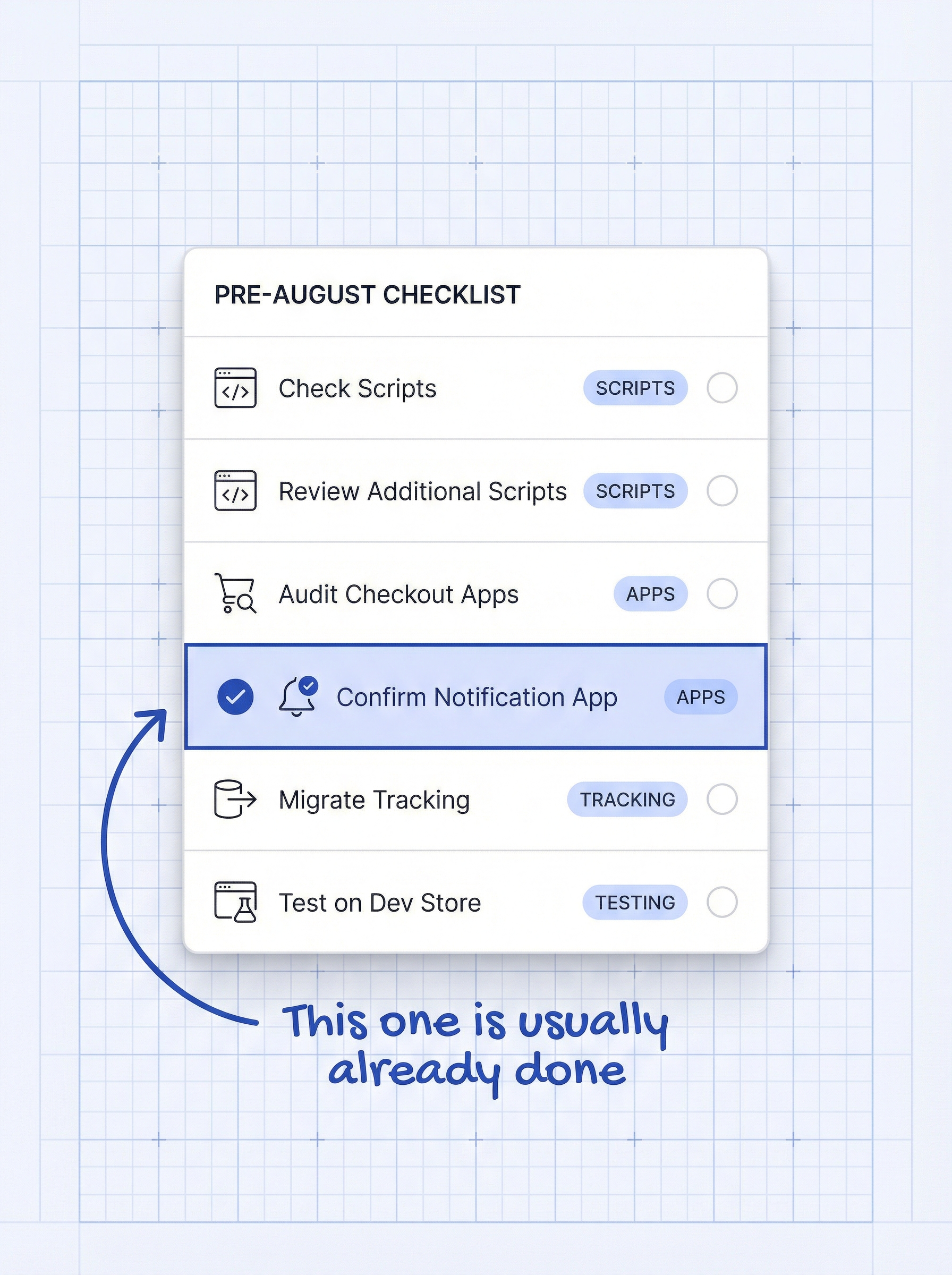
Here is a six-item checklist for Shopify store owners who use notification apps. Most of these take five minutes to check.
- Check if your store uses Shopify Scripts. Go to Settings > Apps and sales channels > Script Editor. If you have active scripts for custom discounts or shipping rules, the Shopify Functions vs Scripts migration is your top priority before June 30.
- Review additional scripts on your thank-you page. Go to Settings > Checkout > Order status page. If you have custom tracking code or conversion tags, copy them and migrate to Shopify Pixels or the Customer Events API.
- Audit your checkout apps. Contact each app that touches your checkout (upsell apps, payment customization apps, discount apps) and ask if they have a checkout extensibility-compatible version.
- Confirm your notification app is storefront-based. If your back-in-stock app’s “Notify Me” button appears on product pages (not in checkout), it is unaffected. A back-in-stock notification app for Shopify that operates on the storefront and uses webhooks for inventory detection does not need any changes.
- Migrate tracking to Shopify Pixels. If you use Google Analytics, Facebook Pixel, or other tracking via additional scripts, migrate to the Customer Events API. This is the most common migration task for non-Plus stores.
- Test on a development store first. If possible, enable checkout extensibility on a dev store and verify all apps work correctly before the auto-upgrade hits your live store.
Frequently asked questions about Shopify checkout extensibility
What is Shopify checkout extensibility?
Shopify checkout extensibility is a new checkout framework that replaces checkout.liquid, additional scripts, and Shopify Scripts with secure, sandboxed tools: checkout UI extensions, Shopify Functions, and Shopify Pixels. It is now the only supported way to customize the Shopify checkout.
When is the Shopify checkout extensibility deadline for non-Plus stores?
August 26, 2026. On that date, Shopify will auto-upgrade all non-Plus stores and remove all legacy checkout customizations, additional scripts, and checkout.liquid code.
Does checkout extensibility affect back-in-stock notification apps?
No. Back-in-stock notification apps operate on the storefront (product pages), not inside the checkout flow. The “Notify Me” button, email automation, and inventory webhook triggers are all independent of checkout architecture.
What happens to Shopify Scripts in 2026?
Shopify Scripts stop working entirely on June 30, 2026. Any custom discount logic, shipping rules, or payment customizations built with Scripts need migration to Shopify Functions before that date.
Will my restock notification emails still work after the checkout upgrade?
Yes. Restock notification emails are triggered by inventory webhooks and sent from your email or notification app. They do not depend on checkout.liquid or additional scripts.
Do I need to reinstall my back-in-stock app after the upgrade?
No. If your app operates on the storefront (where the “Notify Me” button lives), it does not need reinstallation. Confirm with your app’s support team if you are unsure.
How much does the new Shopify checkout improve conversion?
Shopify’s one-page checkout converts approximately 7.5% better than the old multi-page version. Shop Pay lifts conversion by up to 50% compared to guest checkout, with a 91% improvement specifically on mobile.
What should I do if I have custom code in my checkout?
Copy all custom code from checkout.liquid and additional scripts before August 26. Work with a developer to migrate customizations to checkout UI extensions, Shopify Functions, or Shopify Pixels. Test thoroughly on a development store first.