A shopper asks ChatGPT for the best running shoes under $150. Your product is a perfect match, but it is out of stock. Does the AI agent mention your product, or skip it entirely?
The answer depends on how you optimize out of stock product pages on Shopify. If your schema markup, product description, and page indexing are set up correctly, AI agents can still recommend your product in comparison and research queries. If not, the agent skips your page and your product disappears from the conversation.
AI traffic to Shopify stores grew 7x from January to November 2025, and AI-driven orders grew 11x in the same period (TechCrunch reporting on Shopify AI traffic growth, 2025). Yet the average Shopify store scores just 42 out of 100 on AI Search Readiness (StoreSEO, 2025). Most stores have never optimized their out-of-stock pages for AI discovery.
This article is the on-page playbook. If you have read our earlier articles on what happens when AI shoppers find your product out of stock and how Google’s UCP handles product availability, you know the stakes. Here is what to actually change on your product pages.
How do AI agents evaluate out-of-stock product pages?
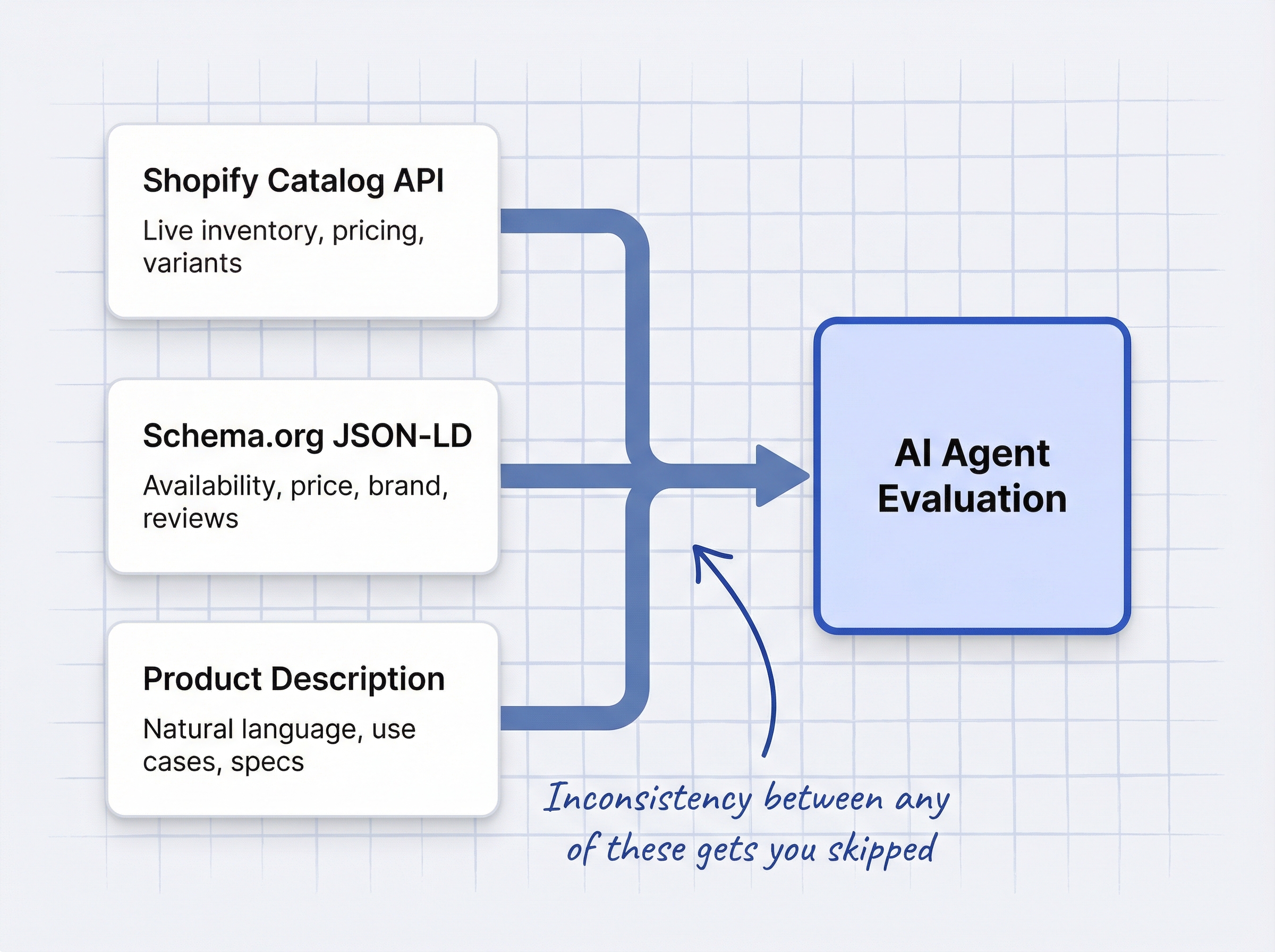
AI shopping agents do not browse your store like a human. They evaluate product pages using three data sources simultaneously.
| Data Source | What It Provides | Why It Matters for OOS Pages |
|---|---|---|
| Shopify Catalog API | Live inventory, pricing, variant data | ChatGPT, Perplexity, and Copilot pull directly from this feed |
| Schema.org structured data | Availability, price, brand, reviews (JSON-LD) | Google AI Mode and Bing Copilot use schema as a trust signal |
| Product description text | Natural language attributes, use cases, specs | LLM crawlers parse descriptions to answer conversational queries |
When all three sources agree, the agent trusts your data. When they contradict each other (schema says InStock, Catalog API says OutOfStock), the agent treats your listing as unreliable and skips it.
Google’s Shopping Graph processes 2 billion product updates per hour across 50 billion+ product listings (Google, 2025). Stale or contradictory data is detected and penalized immediately.
AI agents also compress results. Instead of 10 blue links, they show 3-5 product suggestions (GoDataFeed, 2025). Falling out of that shortlist is far more damaging than dropping from position 3 to position 5 in traditional search.
What Schema.org availability values should you use for out-of-stock products?
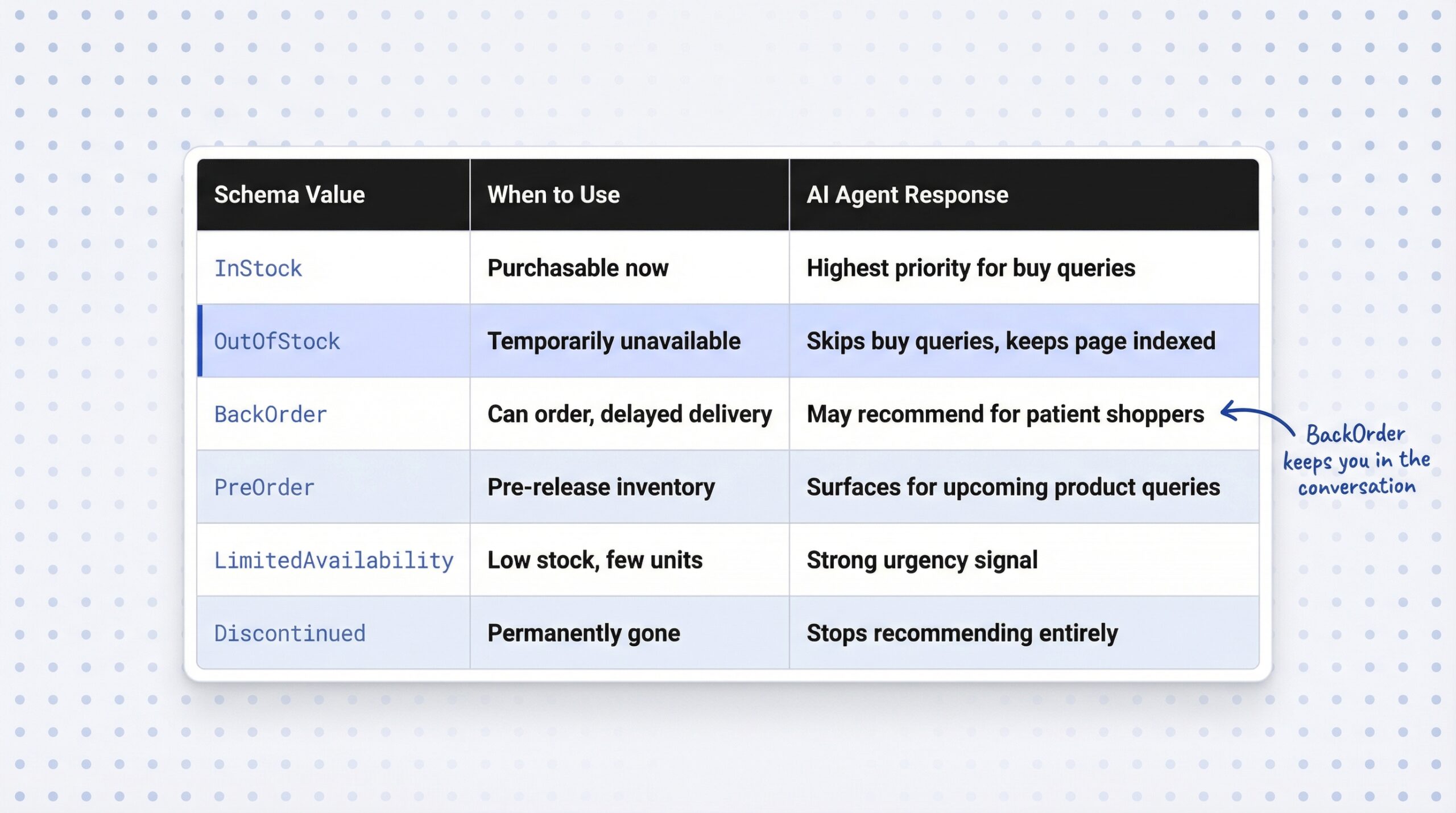
Schema.org defines six ItemAvailability values. Each one signals something different to AI shopping agents.
| Schema Value | When to Use | What AI Agents Do |
|---|---|---|
| InStock | Product is purchasable now | Highest priority for buy-intent queries |
| OutOfStock | Temporarily unavailable | Agents skip for buy-now queries but keep the page indexed |
| BackOrder | Customer can order, delivery delayed | Agents may still recommend for non-urgent shoppers |
| PreOrder | Pre-release or upcoming inventory | Agents surface for “upcoming products” queries |
| LimitedAvailability | Low inventory, few units left | Strong urgency signal in recommendations |
| Discontinued | Permanently gone, will not return | Agents stop recommending entirely |
For temporarily out-of-stock products, use OutOfStock. This keeps your page in the Shopping Graph while telling agents not to recommend it for immediate purchase queries. The page remains eligible for comparison and research queries.
Never use InStock when a product is sold out. AI agents cross-reference schema against the Shopify Catalog API. Microsoft has confirmed that Bing and Copilot use schema.org markup to help AI models understand page content (Insightland, 2025). Contradictions do not boost visibility. They trigger demotion.
Shopify themes generate JSON-LD schema automatically, but the availability value can lag behind real-time inventory changes. Verify your live markup using Google’s Rich Results Test. Paste your product URL and check that the availability property matches your actual stock status.
How to optimize out-of-stock product descriptions for AI agents
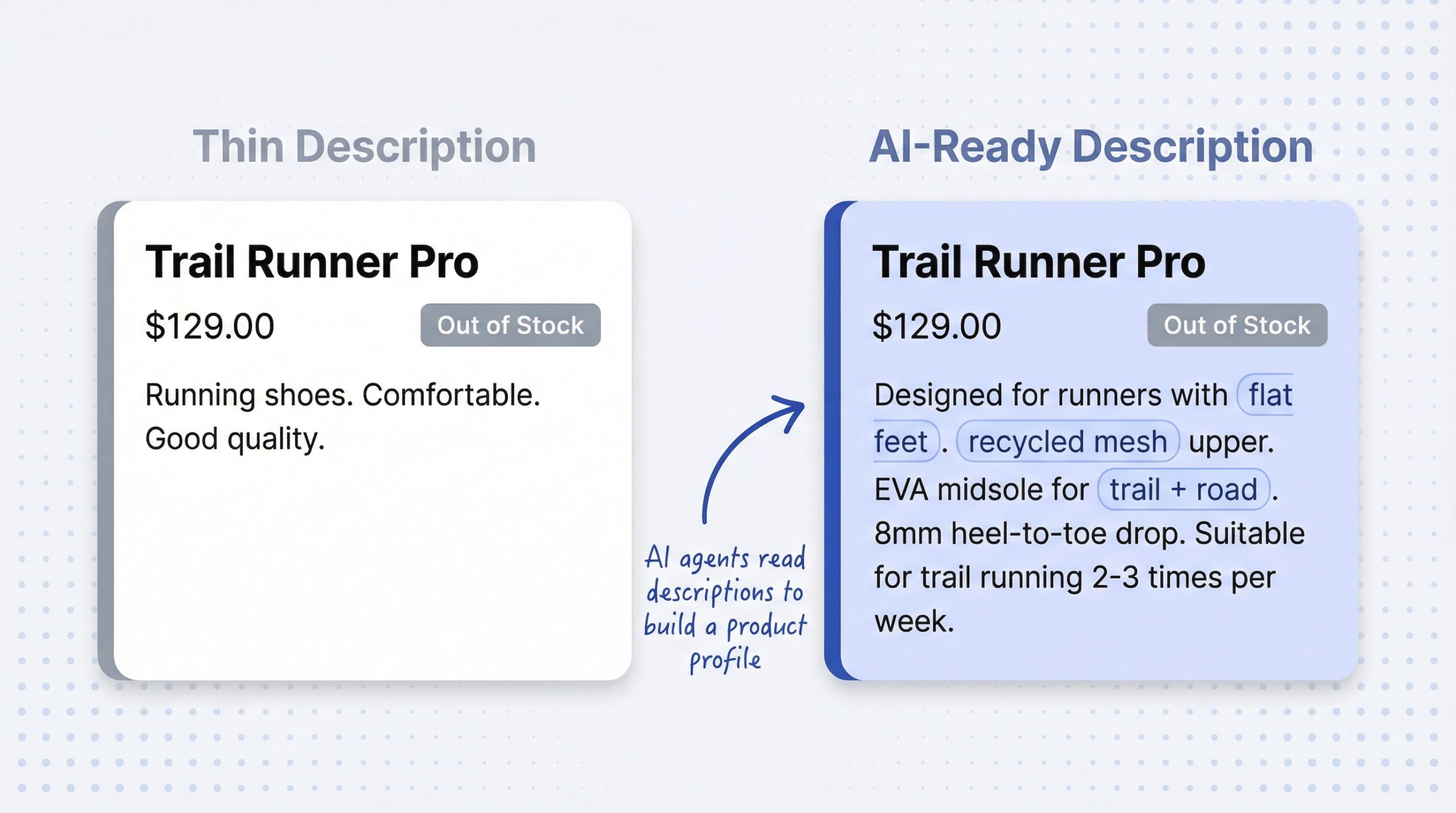
Even when a product is out of stock, AI agents can recommend it in comparison and research queries. A shopper asking “what are the best running shoes for flat feet?” may see your product in the answer, even if it is currently unavailable, if your description is rich enough for the agent to understand the product.
What makes a product description AI-agent-readable:
- Natural language attributes: Materials, use cases, compatibility, dimensions, certifications
- Audience-specific phrasing: “for people with flat feet”, “suitable for trail running twice weekly”
- Benefit-focused copy: Go beyond specs to explain why the product matters
- Complete information: Every attribute that a shopper might ask about should be on the page
Thin descriptions with just a product name and price give AI agents nothing to work with. The agent cannot recommend a product it does not understand, regardless of stock status.
This matters because AI-referred shoppers are more engaged than average. They show 32% longer visits, 10% more pages per visit, and 27% lower bounce rates compared to non-AI traffic (Adobe Analytics data on generative AI shopping engagement, 2025). Keeping your product in the AI agent’s consideration set, even while OOS, positions you for immediate conversion when stock returns.
Should you noindex out-of-stock product pages on Shopify?
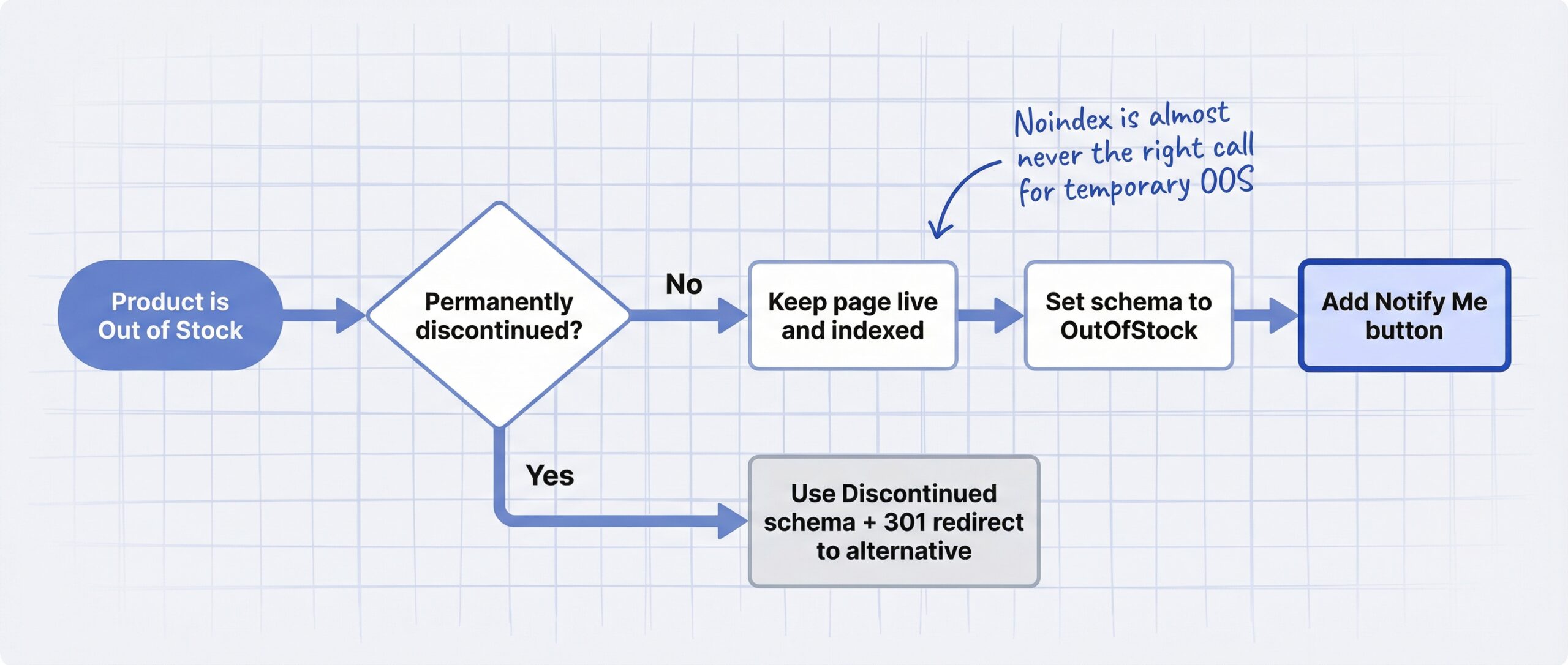
No. Do not noindex out-of-stock product pages unless the product is permanently discontinued.
Three common mistakes destroy AI search visibility for OOS pages:
| Mistake | What It Does | Why It Hurts AI Visibility |
|---|---|---|
| Noindex the page | Removes page from Google’s index | AI crawlers lose access. All link equity and demand history discarded. Re-indexing takes weeks after restock. |
| 301 redirect to category | Permanently replaces the product URL | AI agents that indexed the product land on a generic page with no product-specific data. |
| Remove from sitemap | Deprioritizes crawling of the URL | AI crawlers visit less often, making restock detection slower. |
The correct approach for temporarily out-of-stock products: keep the page live, update the availability schema to OutOfStock, and show a Notify Me button. Let crawlers continue visiting so they detect the restock quickly.
Pages using schema markup see 20-40% higher click-through rates compared to pages without it (Schema App, 2025). Removing your page from the index throws away that advantage permanently.
For permanently discontinued products, the Discontinued schema value is appropriate, and a 301 redirect to a relevant alternative product makes sense. For everything else, keep the page indexed. We covered this decision in detail in our guide on why hiding out-of-stock products hurts SEO.
Why the Notify Me button matters for AI search visibility
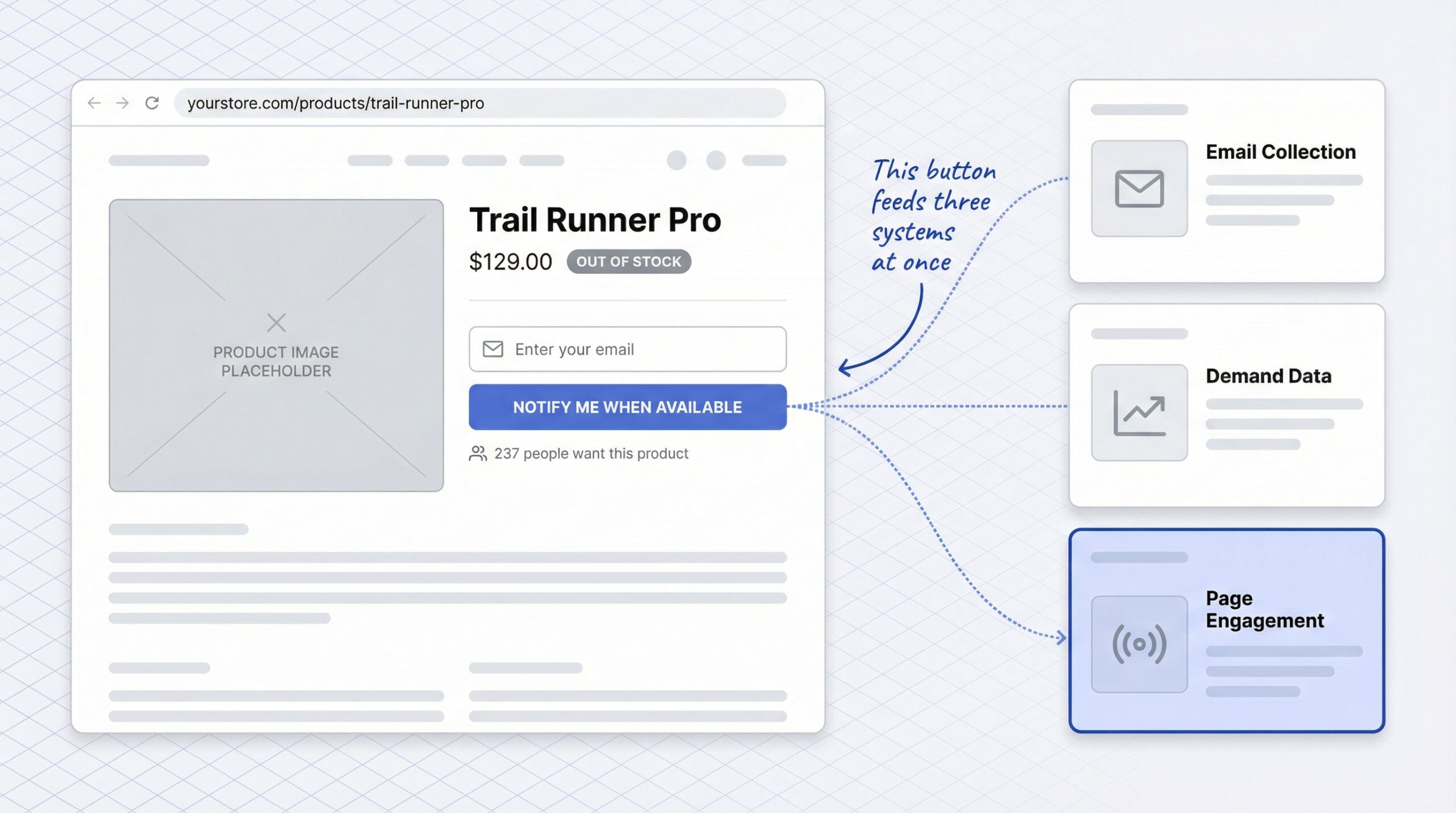
A Notify Me button does more than collect email addresses. It keeps your out-of-stock page active with real user engagement, and that activity feeds richer behavioral signals to AI systems than a dead page.
Two reasons to add one immediately:
1. Merchant intelligence. Waitlist volume tells you which products to restock first. A product with 500 signups is a clear priority. This speeds up the cycle back to InStock, which is when AI agents start recommending the product for buy-now queries again.
2. Page engagement signal. OOS pages with active form completions and repeat visits generate more engagement data than pages with no CTA. AI systems are beginning to factor engagement signals into product recommendations. Keeping the page alive with a Notify Me button gives you an advantage over merchants who hide or noindex their OOS pages.
Back-in-stock alert emails achieve a 22.45% conversion rate, the highest of any e-commerce email type (MarketingSherpa data on back-in-stock email conversion rates). Every signup on your Notify Me form is a potential high-conversion sale when you restock.
You can add a Notify Me button on Shopify in under five minutes with no code. Pair it with a multi-channel notification strategy that includes SMS or WhatsApp alongside email for the fastest restock response.
The out-of-stock page optimization checklist for AI search
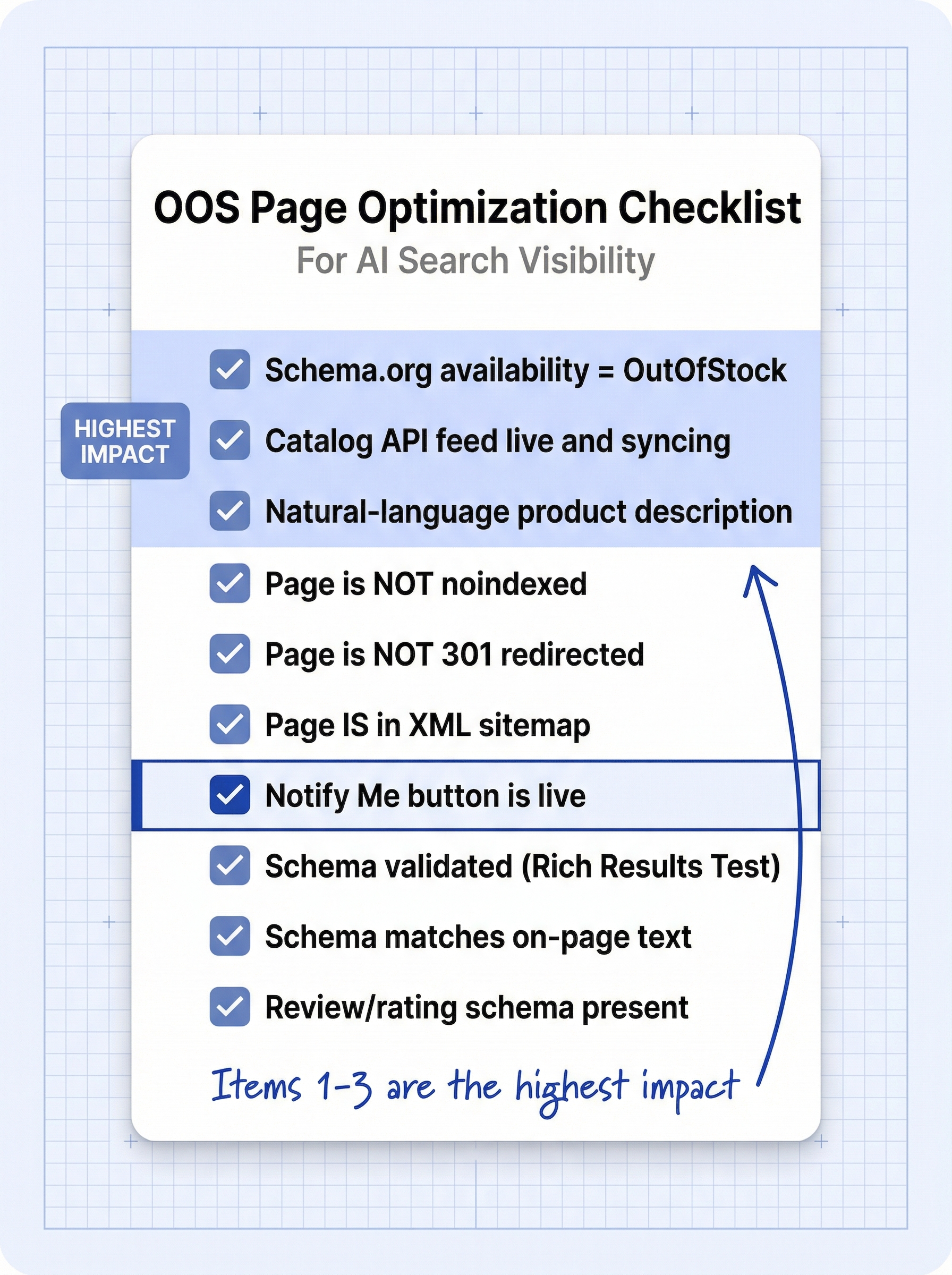
Run through this checklist for every out-of-stock product page on your store:
- Schema.org availability is set to OutOfStock (not missing, not InStock)
- Shopify Catalog API feed is live and syncing (check Shopify admin > Sales channels)
- Product description includes natural-language attributes (materials, use case, audience)
- Page is NOT noindexed (verify in Google Search Console)
- Page is NOT 301 redirected to a category page
- Page IS included in XML sitemap
- Notify Me button is live and collecting signups
- Schema validated via Google Rich Results Test
- Availability schema matches on-page text (no contradiction between “In Stock” badge and OutOfStock schema)
- Review and rating schema is present (builds product authority even while OOS)
Items 1 through 3 have the highest impact. If you only do three things today, make it those.
52% of consumers plan to use generative AI for shopping in 2025 (Capital One Shopping research on AI shopping adoption, 2025). Morgan Stanley estimates agentic shoppers could drive $190-385 billion in U. S. e-commerce spending by 2030 (Morgan Stanley research on agentic commerce market impact). The stores that optimize their OOS pages now will capture demand that competitors never see. Start with a back-in-stock notification app that keeps your pages active and your schema accurate, and work through the checklist from there.
Frequently asked questions about optimizing out-of-stock pages for AI
Does Google penalize out-of-stock product pages in AI search?
No. Google does not penalize correct OutOfStock markup. The page stays in the Shopping Graph but is filtered from buy-intent queries. Inconsistent schema (claiming InStock when sold out) triggers demotion.
Should I noindex my out-of-stock Shopify products?
No, unless the product is permanently discontinued. Noindexing removes AI crawler access, destroys link equity, and requires re-indexing from scratch when you restock.
What Schema.org availability value should I use for out-of-stock products?
Use OutOfStock for temporarily unavailable products. Use BackOrder if customers can place an order for delayed fulfillment. Use Discontinued only for products that will never return.
Can AI shopping agents still recommend products that are out of stock?
Yes. AI agents can surface OOS products in comparison and research queries like “best running shoes for flat feet.” They skip OOS products only for buy-now queries where immediate purchase is the intent.
How does the Shopify Catalog API affect my out-of-stock product visibility?
The Catalog API gives ChatGPT, Perplexity, and Copilot real-time inventory data. If your feed shows OutOfStock, agents filter it from buy-now queries. If the product is disconnected or stale, agents may ignore it entirely.
How do I check if my Shopify product schema is correct?
Use Google’s Rich Results Test. Paste your product page URL and verify the availability property matches your actual stock status. Shopify themes generate schema automatically but may lag on real-time updates.
Does adding a Notify Me button help with AI search visibility?
A Notify Me button keeps your OOS page active with user engagement. Pages with higher engagement signals feed richer data to AI systems than dead or noindexed pages.
What is the fastest way to improve my out-of-stock page visibility in AI search?
Verify your Schema.org availability is set to OutOfStock (not missing or InStock) using Google’s Rich Results Test, and add a Notify Me button to keep the page actively collecting demand signals.