
AI shopping agents are already recommending and buying products for consumers. Google Shopping AI, ChatGPT Shopping, and Perplexity do not browse your store the way a human does. They query your structured product feed, check the availability field, and make a binary decision: surface this product or skip it.
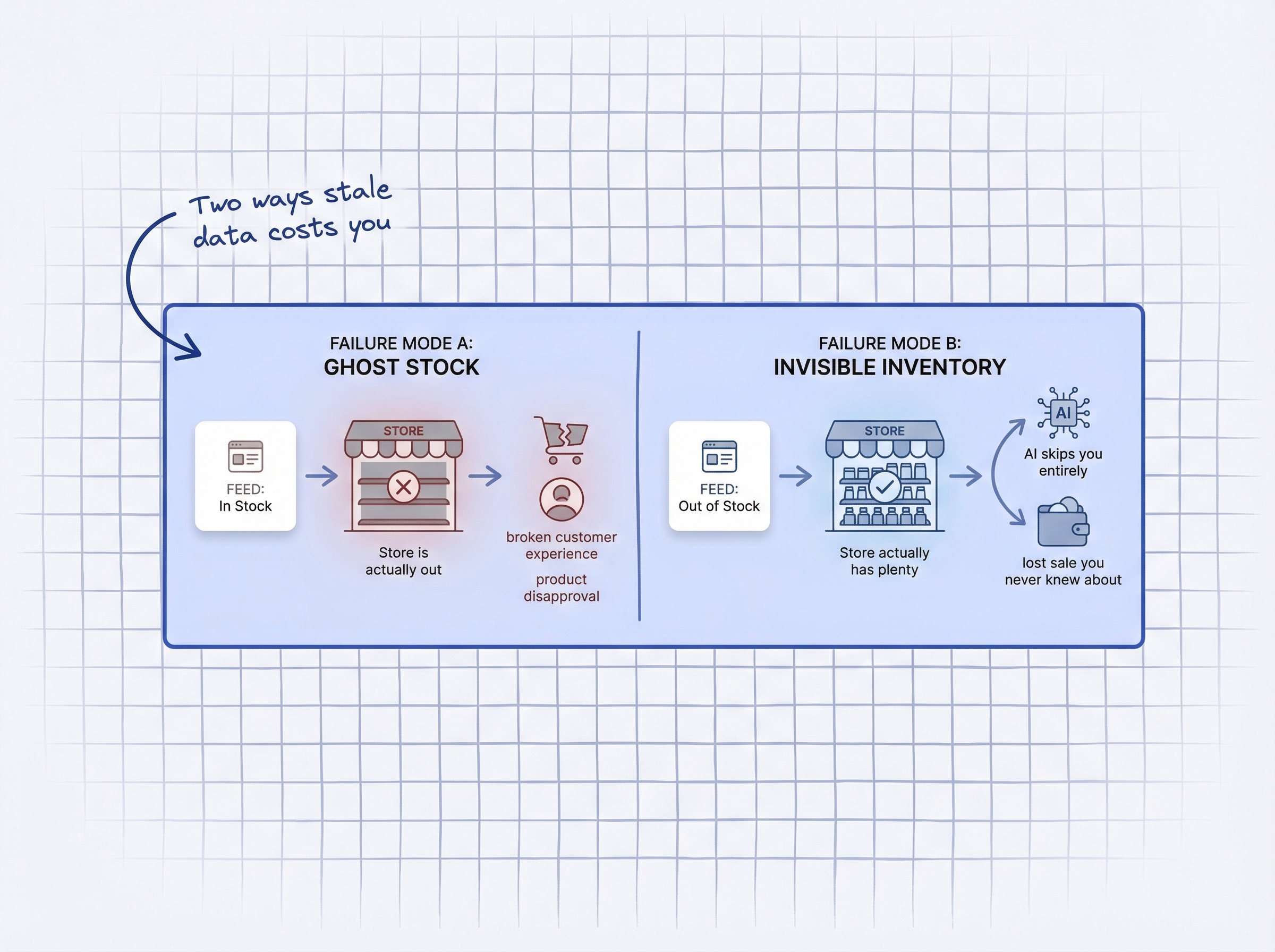
If your feed says “in stock” but you are actually out, the AI sends a customer to a broken experience. If your feed says “out of stock” but you have plenty of units on the shelf, the AI skips you entirely, and you never know the sale existed. AI-driven ecommerce orders have grown 14x since the start of 2025 (Shopify’s guide to agentic-ready product data, 2025), and 30% of consumers say they would let an AI agent complete a purchase on their behalf (Contentsquare consumer AI shopping survey, December 2025).
Real-time inventory accuracy on Shopify was an operations metric. In 2026 it is a customer acquisition requirement.
How do AI shopping agents actually check your inventory?
AI shopping agents do not open your Shopify store and browse product pages. They pull from structured data feeds: Google Merchant Center, Shopify’s product API, and third-party catalogs. Your Shopify inventory accuracy determines whether those agents see your products as purchasable or skip them entirely.
Google’s Shopping Graph tracks over 50 billion product listings and processes 2 billion updates every hour (Google’s agentic checkout and Shopping Graph, 2025). When a shopper asks Google AI for a product recommendation, the system checks your listing’s availability field against the latest feed data. If the availability says “out_of_stock,” your product is filtered out before the shopper ever sees it.
ChatGPT Shopping and Perplexity work similarly. They read structured product data, check availability, and present only products marked as purchasable. There is no “let me check the website to be sure” fallback. The feed is the single source of truth.
Google Merchant Center explicitly requires that your feed data matches your live website at the moment of the shopper’s query, not just at the last feed upload time (Google Merchant Center data quality requirements, 2026). Products with mismatches get disapproved, removing them from both Shopping ads and AI Mode results.
The implication is straightforward: the AI does not check your Shopify backend. It reads the feed you submitted. If that feed is stale by even a few hours, your real-time inventory accuracy is compromised for every AI agent consuming it.
What does inaccurate inventory data cost you in 2026?
Poor inventory accuracy on Shopify has always been expensive. The AI era makes it worse because AI agents react faster and more decisively than human shoppers.
The average retail inventory accuracy is just 83%, meaning 1 in 6 SKUs has incorrect stock data at any given time (CAPS Research, 2024). And 58% of retailers operate below 80% accuracy (Opensend, 2024), which means most businesses are running on data that would fail a basic quality check.
The financial scale is staggering. Inventory distortion, the combined cost of stockouts and overstocks, cost retailers $1.77 trillion globally in 2023, with stockouts alone accounting for $1.2 trillion (IHL Group’s 2023 inventory distortion research, 2023). For context on what that means for your store specifically, see what stockouts cost a small Shopify store.
Two specific failure modes make this worse in AI commerce:
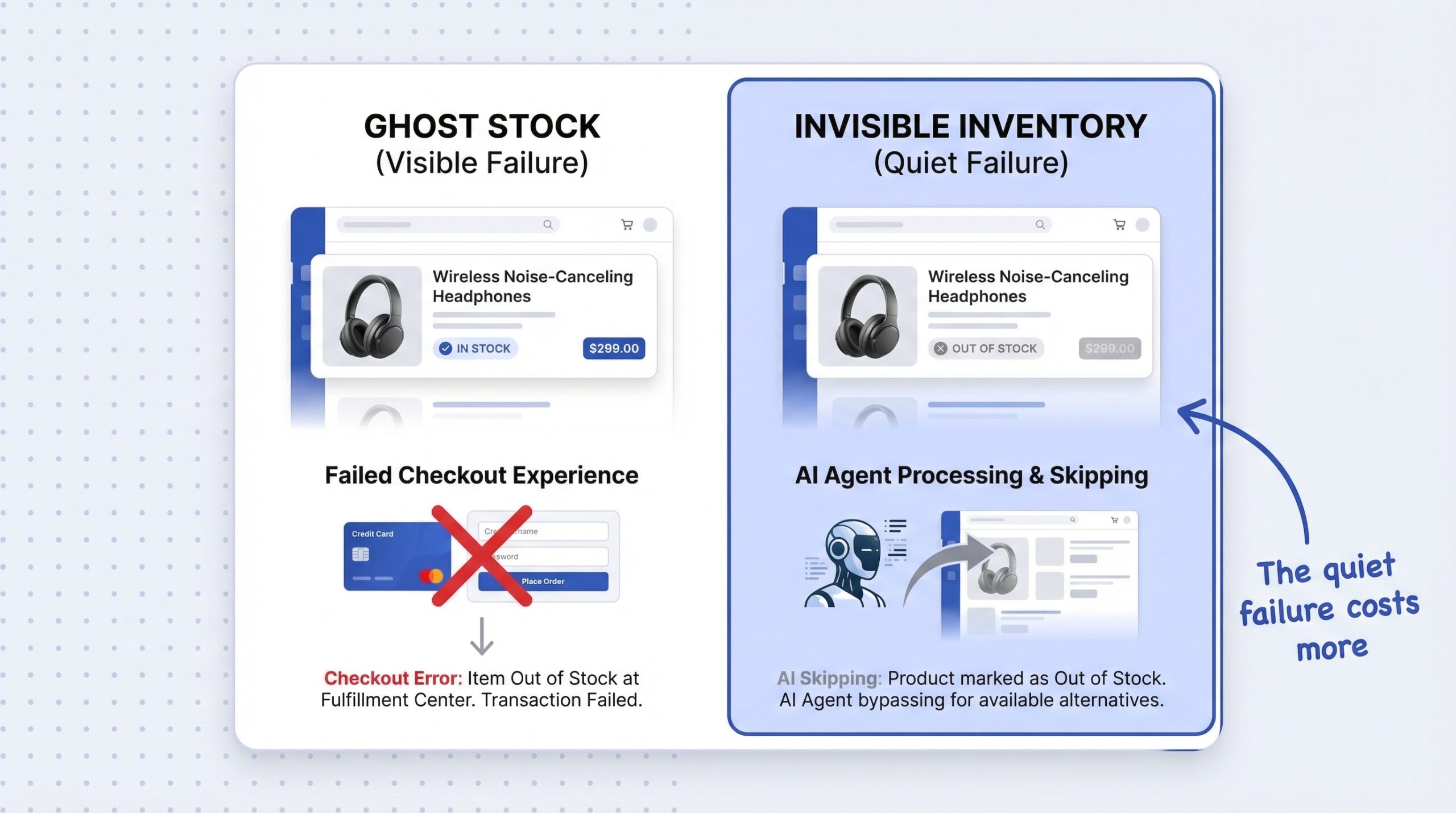
Ghost Stock (feed says “in stock,” store is actually out). The AI recommends your product. The customer clicks through or the AI initiates checkout. The order fails because you have no inventory. Google detects the mismatch and can disapprove your listing. Repeat failures damage your merchant quality score, pushing you further down in AI results. 69% of shoppers switch to a competitor when they encounter an out-of-stock product (Opensend, 2024). With AI agents, the switch is instant and automatic.
Invisible Inventory (feed says “out of stock,” you actually have plenty). This is the quieter failure. The AI sees “unavailable” and simply moves to the next result. You lose the sale without ever knowing the AI considered you. No click, no visit, no analytics trail. You had the product, you had the price, and the AI skipped you because your feed was 6 hours old. Understanding how AI shoppers handle out-of-stock pages makes this failure mode more concrete.
Why is Shopify inventory data often out of sync?
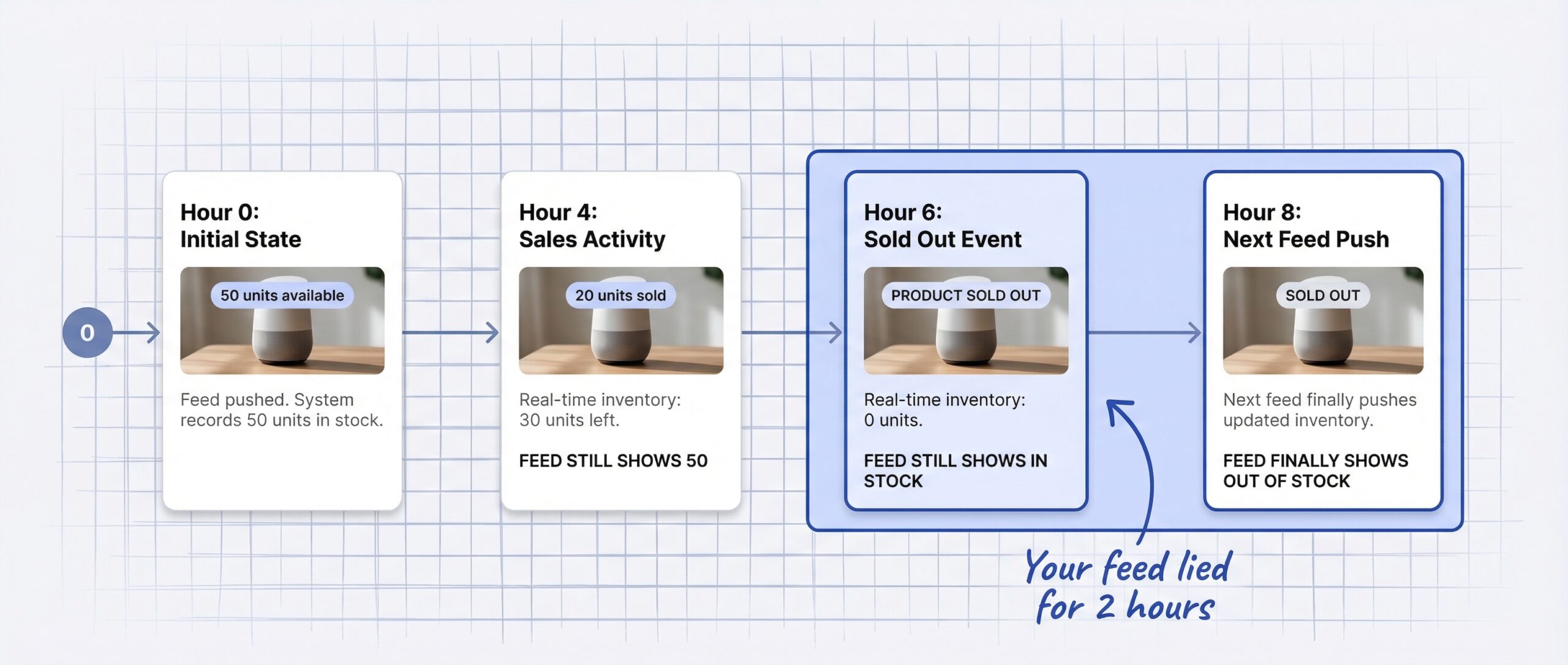
Shopify updates its internal inventory count in real time when an order is placed. That part works well. The problem is the gap between Shopify’s internal inventory and the feeds that AI agents read.
Most Shopify merchants push their product feed to Google Merchant Center once per day, some twice. For a store selling 10-20 units per day of a popular SKU, that product can sell out entirely between feed updates. For those hours, the feed is lying: it still shows “in stock” while the actual inventory is zero.
This inventory sync lag compounds with third-party warehouse integrations, manual stock adjustments, and multi-channel selling. If you also sell on Amazon or a wholesale channel, inventory changes happen outside Shopify’s awareness until the sync catches up.
The practical fix is reducing the update interval to maintain real-time inventory accuracy. But most merchants do not know how often their feed actually updates, or that the default settings are too slow for high-velocity products. Knowing how to handle out-of-stock products on Shopify is the first step, but handling speed matters more than handling method when AI agents are involved.
How can notify-me data flag inventory feed problems?
Your notify-me button generates a signal that most merchants never use for data integrity: real-time purchase intent against specific SKUs.
Here is the cross-check logic. If a product shows “in stock” in your feed but is collecting an unusual number of notify-me signups, something is wrong. Customers are arriving at the product page, finding it unavailable (perhaps a specific variant is out, or stock depleted after the last feed push), and signing up for restock alerts. The feed says available; the customer behavior says otherwise.
This makes the Notify Me button on Shopify more than a retention tool. It is a data integrity sensor. A spike in signups on a supposedly in-stock SKU is an early warning that your feed is stale.
The reverse also matters. When new stock arrives and you trigger back-in-stock notifications through StoreBeep, that restock event should also trigger an immediate feed push to Google Merchant Center. The demand signal and the feed update should fire together. Otherwise, your customers get the email but AI agents still see “out of stock” for hours.
Connecting notify-me data to predictive restocking on Shopify closes the loop further: signup velocity predicts when you will run out, the restock order arrives before that happens, and the feed stays accurate because stock never actually hits zero.
What should you fix first to make your feed AI-ready?
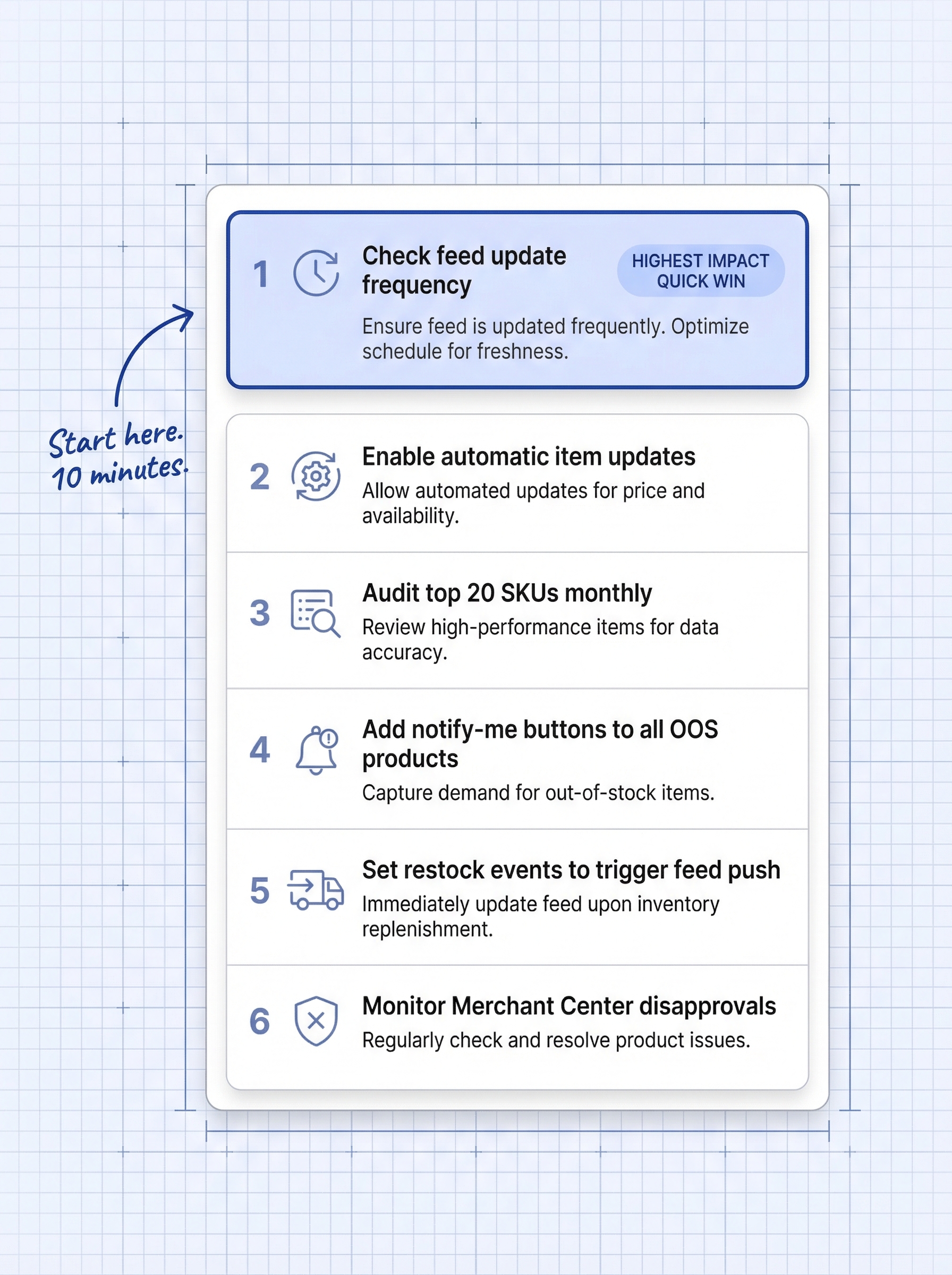
Six steps to improve your Shopify inventory feed accuracy, ranked by impact. Most take 10-15 minutes to implement.
- Check your current feed update frequency. Open your Google Merchant Center account and check when your feed last updated. If it is more than 6 hours old, you are at risk. Increase to at least every 4 hours. If you use Shopify’s native Google channel app, check its sync interval settings.
- Enable Google Merchant Center’s automatic item updates. This setting lets Google crawl your product pages to patch stale feed data between your scheduled uploads. It is not perfect, but it catches obvious mismatches.
- Audit your top 20 SKUs monthly. Compare Google Merchant Center’s “availability” status for your highest-velocity products against your actual Shopify inventory. Flag any mismatches. These are the SKUs where feed lag costs you the most.
- Add notify-me buttons to all OOS products. The signups serve double duty: they capture customer demand for recovery AND they flag potential feed accuracy issues when signups appear on supposedly in-stock products.
- Set restock events to trigger a feed push. When inventory arrives and you update Shopify stock levels, make sure that event also pushes an updated feed to Google Merchant Center. The gap between “product is back” and “AI agents know it is back” should be minutes, not hours.
- Monitor Merchant Center for availability disapprovals. Google Merchant Center flags products where feed data does not match the live site. Check the “Diagnostics” tab weekly. Each disapproval means AI agents cannot recommend that product. Understanding product data quality for AI shopping gives you the full picture of what AI agents need from your data.
Frequently asked questions about inventory accuracy for AI commerce
What is real-time inventory accuracy on Shopify?
Real-time inventory accuracy means your product feed data matches your actual Shopify stock levels at any given moment. For AI commerce, this matters because AI shopping agents read your feed data to decide whether to recommend or skip your products.
How often should I update my Google Merchant Center feed?
At minimum, every 4 hours. Daily updates are no longer sufficient for high-velocity SKUs. Products can sell out between updates, leaving your feed showing “in stock” while the actual inventory is zero.
What happens if my inventory feed is wrong when an AI agent checks it?
Two outcomes. If the feed shows “in stock” but you are actually out, the customer hits a failed experience and Google may disapprove your listing. If the feed shows “out of stock” but you have inventory, the AI skips your product and the customer buys from a competitor.
What is the average inventory accuracy rate for ecommerce?
The average retail inventory accuracy is 83%, per CAPS Research data from 2024. That means approximately 1 in 6 SKUs has incorrect stock data at any given time, and 58% of retailers operate below the 80% accuracy threshold.
Can notify-me signups help identify feed accuracy problems?
Yes. If a product shows “in stock” in your feed but is collecting unusual numbers of notify-me signups, that discrepancy signals a potential feed issue. Customers are finding the product unavailable even though the feed says otherwise.
Does Google penalize Shopify stores for inaccurate inventory data?
Google Merchant Center disapproves product listings where feed data does not match the live website. Disapproved products are removed from Shopping ads and AI Mode results. Repeated mismatches can affect your overall merchant quality score.
How much do inventory inaccuracies cost ecommerce stores?
Globally, inventory distortion cost retailers $1.77 trillion in 2023 according to IHL Group. For individual Shopify stores, the cost depends on store size, but 69% of shoppers switch to a competitor when they encounter an out-of-stock item.
What is ghost stock in ecommerce?
Ghost stock refers to products that appear as “in stock” in your product feed or on your website but are actually out of stock in your warehouse. In AI commerce, ghost stock creates failed purchase experiences and can lead to product disapprovals in Google Merchant Center.