ChatGPT processes roughly 50 million shopping queries every day (Dataslayer, 2026). Google wants a piece of that action, and it built the infrastructure to get it.
Google’s Universal Commerce Protocol (UCP) is an open standard co-developed by Google and Shopify that lets AI agents discover, compare, and purchase products from any merchant. Launched in January 2026, UCP is the protocol behind in-chat checkout on Google AI Mode and Gemini.
But here is the part that matters for your Shopify UCP setup: the protocol has no mechanism for capturing customer demand when a product is out of stock. UCP handles checkout, identity linking, and order management. When an AI agent hits an unavailable product, the shopper sees “unavailable,” the AI recommends a competitor, and you never know that customer existed.
This article explains what UCP means for Shopify merchants and how to bridge the gap between AI-powered product discovery and your back-in-stock notification strategy.
What is the Universal Commerce Protocol?
The Universal Commerce Protocol (UCP) is an open standard that defines how AI shopping agents interact with merchant systems. Co-developed by Google and Shopify and announced at NRF in January 2026, UCP creates a shared language for agentic commerce.
UCP has three core capabilities:
- Checkout: AI agents complete purchases inside the conversation
- Identity linking: Recognizes returning shoppers across AI surfaces
- Order management: Handles returns, tracking, and post-purchase support
The protocol is backed by 20+ partners including Etsy, Target, Walmart, Wayfair, Adyen, Visa, Mastercard, and Stripe (Google, January 2026). It works across REST, MCP, A2A, and AP2 protocols, which means it is designed to be AI-platform agnostic.
For Shopify merchants, UCP matters because it powers checkout in Google AI Mode and the Gemini app. As of March 2026, Etsy and Wayfair are live on UCP checkout. Shopify, Target, and Walmart integrations are rolling out.
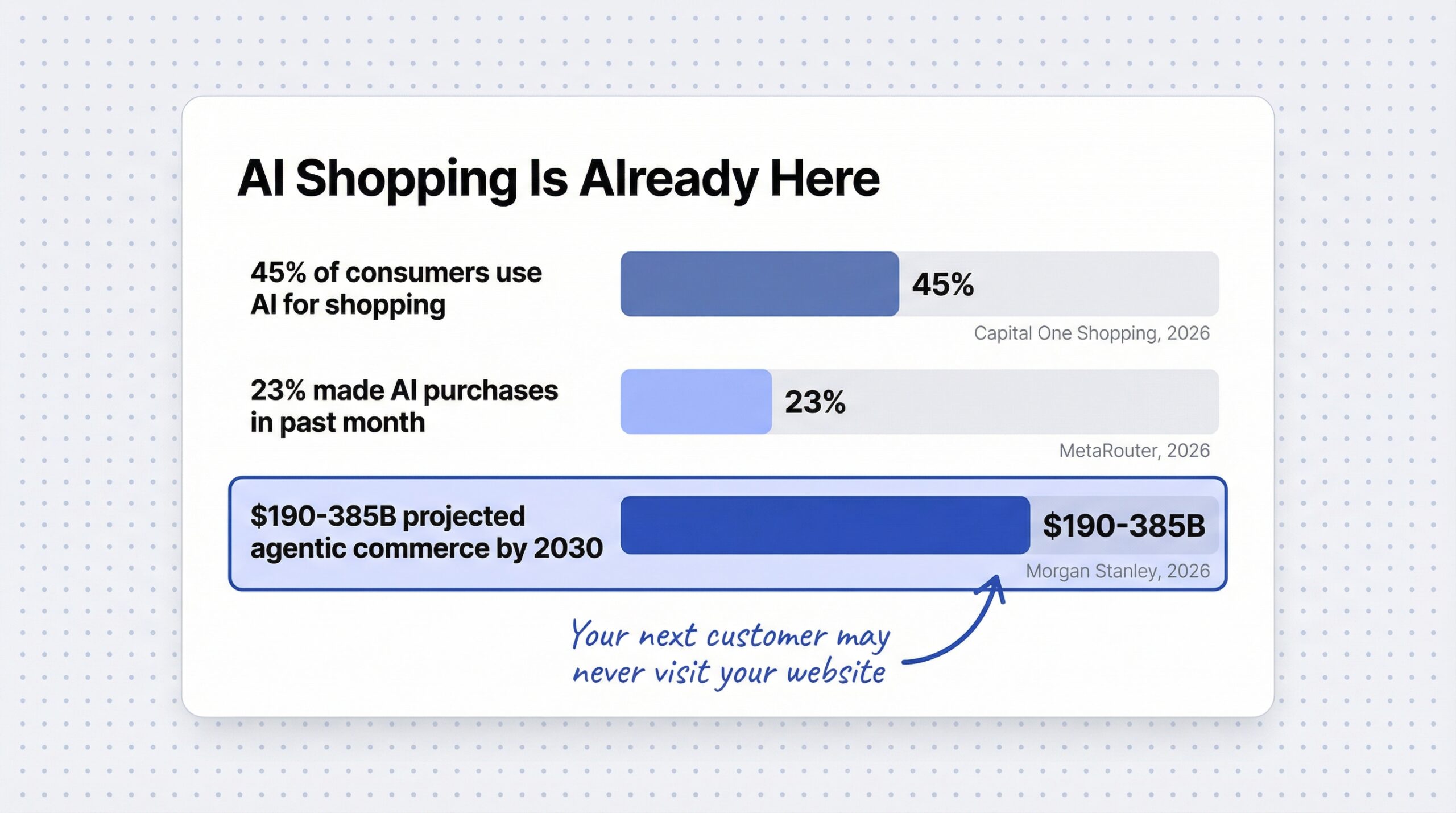
The market behind this is massive. $190-385 billion in U.S. e-commerce spending could be mediated by agentic shoppers by 2030, capturing 10-20% of market share (Morgan Stanley agentic commerce projection, 2026).
How does UCP change product discovery for Shopify stores?
Before UCP, your products reached customers through your website, Google Shopping, and marketplace listings. With the Universal Commerce Protocol, AI agents can query your product data directly. No website visit needed. The agent reads your product feed, evaluates it against the shopper’s request, and presents a product card inside the conversation.
| Before UCP | With UCP |
|---|---|
| Customers visit your website | AI agents query your product data directly |
| Website UX drives conversions | Product feed quality drives AI recommendations |
| You control the shopping experience | The AI controls what customers see |
| SEO gets you organic traffic | Feed optimization gets you AI visibility |
This makes your Shopify UCP product feed the new competitive differentiator. Attribute depth, accurate descriptions, and complete variant data determine whether AI agents recommend your product or a competitor’s.
Shopify merchants connect to UCP automatically through Shopify Catalog, the same system that powers agentic storefronts on ChatGPT and Perplexity. Shopify Catalog takes your product titles, descriptions, images, prices, and real-time inventory levels, then structures them so AI agents can parse the information. No custom integrations needed.
45% of consumers now use AI for shopping (Capital One Shopping, 2026), and 23% of Americans have made purchases using AI in the past month (MetaRouter, 2026). Your next customer may never visit your website.
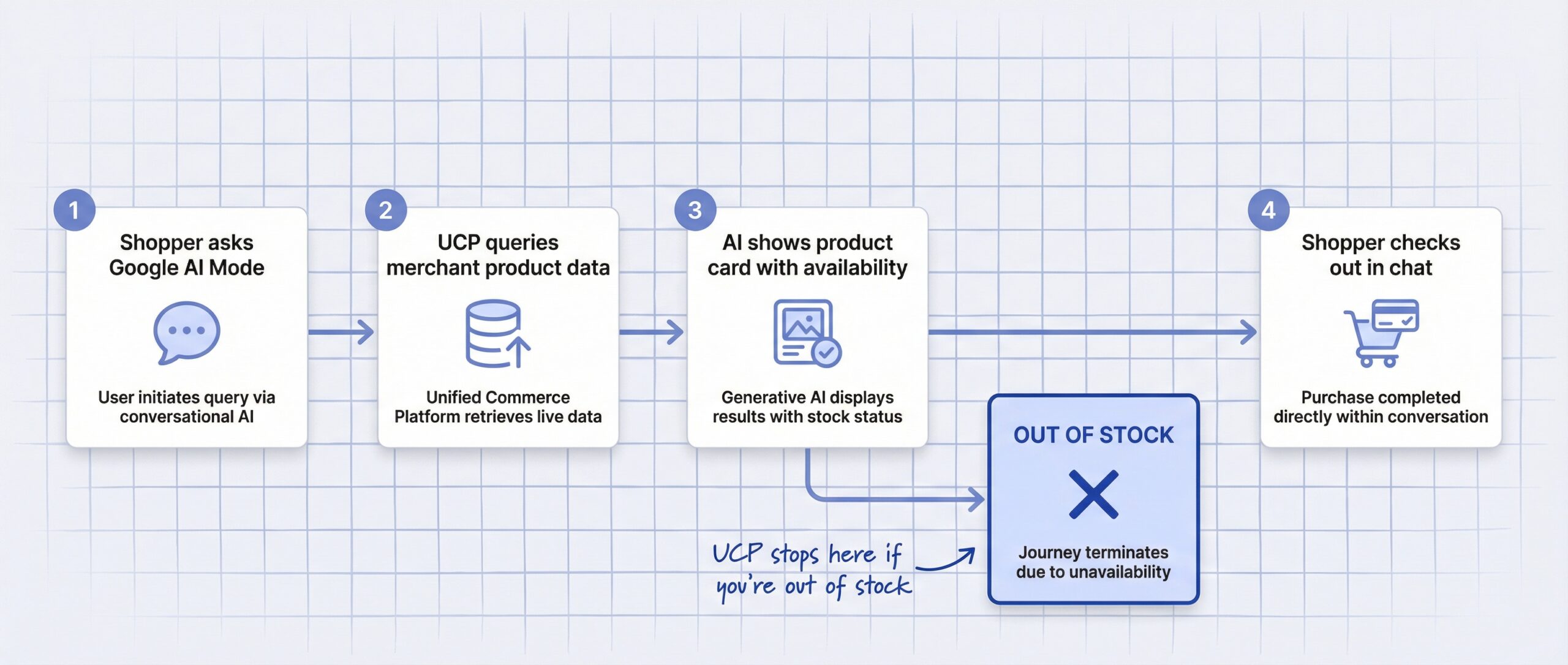
What happens when a UCP-connected product is out of stock?
When a UCP-connected product is out of stock, the AI agent either skips it entirely or shows it as unavailable and recommends alternatives from competitors. There is no “Notify Me” option anywhere in the protocol.
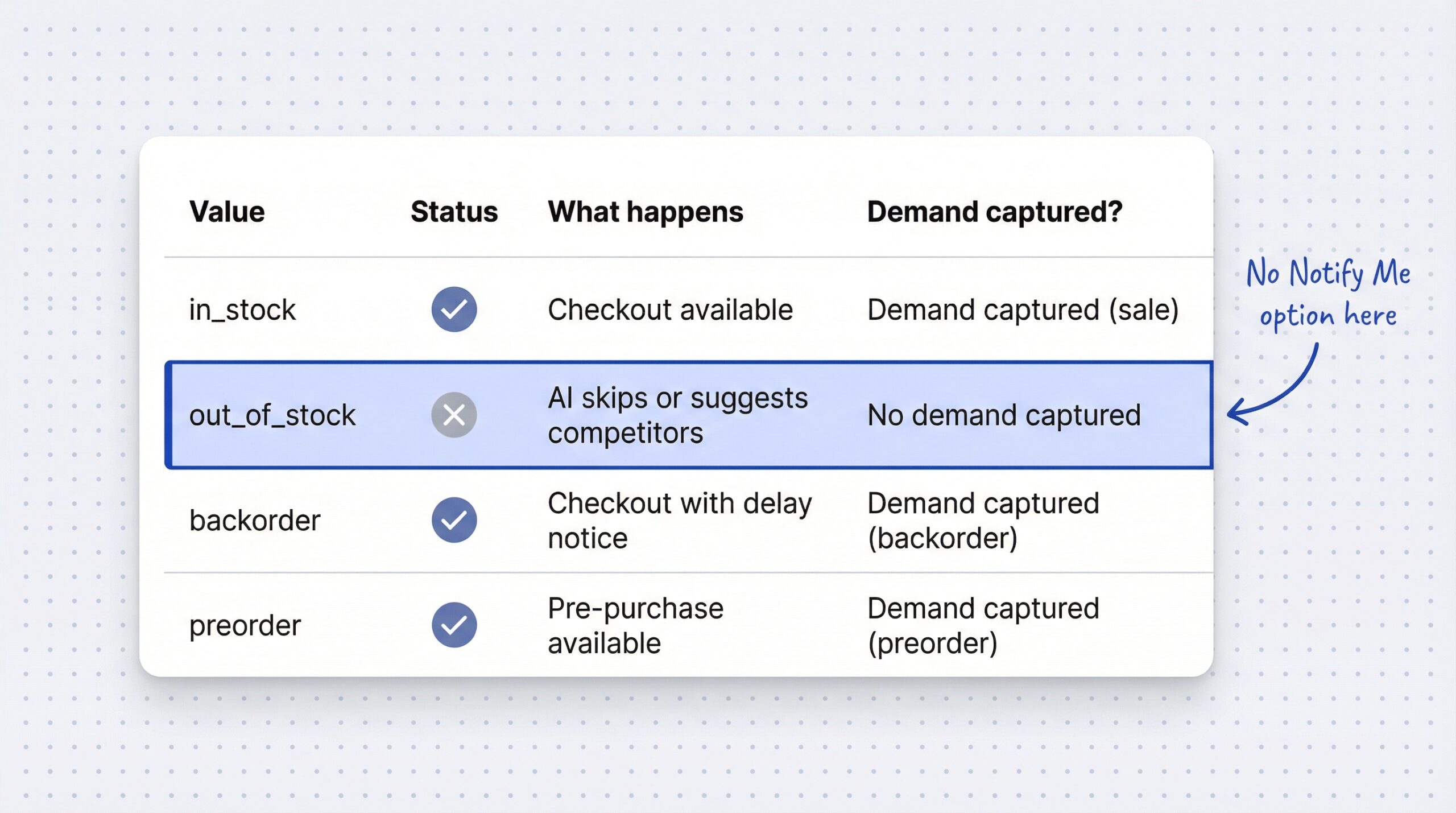
UCP supports four availability values:
| Value | What happens | Checkout? | Demand captured? |
|---|---|---|---|
| in_stock | AI shows product, purchase available | Yes | Yes (sale) |
| out_of_stock | AI skips or shows unavailable | No | No |
| backorder | AI shows product with delay notice | Yes | Yes (backorder) |
| preorder | AI shows product for pre-purchase | Yes | Yes (preorder) |
The out_of_stock value is the problem. When your product carries this status, the AI agent either skips your product silently or tells the shopper it is unavailable and suggests competitors. Either way, you lose the customer.
Stale data makes it worse. If your inventory feed says “in stock” but the product is actually sold out, the AI agent attempts checkout and hits a MERCHANDISE_NOT_AVAILABLE error. That failed transaction damages your reliability score with UCP agents.
Here is a broader view of what UCP does and does not handle for out-of-stock products:
| UCP capability | Supported? | Out-of-stock impact |
|---|---|---|
| Product discovery | Yes | AI agents find products via feed |
| Real-time pricing | Yes | Prices sync automatically |
| Availability status | Yes | in_stock, out_of_stock, backorder, preorder |
| In-chat checkout | Yes | Shoppers buy without visiting store |
| Identity linking | Yes | Recognizes returning shoppers |
| Order management | Yes | Returns, tracking, support |
| “Notify Me” for OOS | No | No demand capture in protocol |
| Email capture on OOS | No | Customer lost entirely |
| Waitlist signup | No | No mechanism exists |
| Demand analytics | No | No data on missed interest |
The gap is clear. Shopify UCP optimizes for available products. For unavailable ones, it creates a blind spot where customers disappear without a trace.
How to protect your Shopify store from UCP stockout losses
You cannot change UCP. But you can control what happens on your end. Here are four steps to capture demand from AI shoppers when products are unavailable.
1. Keep inventory synced in real time
UCP pulls availability directly from your product feed. Stale inventory data causes two problems: AI agents show the wrong status to shoppers, and attempted checkouts fail with errors.
Inventory inaccuracies account for 4-8% of lost sales globally (McKinsey agentic commerce research, 2026). Poor product availability costs e-commerce stores up to 8% of revenue (Shopify, 2026). In the UCP world, inaccurate inventory does not just lose sales. It trains AI agents to deprioritize your products.
Enable “Track quantity” on every product and variant. If you use multiple warehouse locations, confirm each location’s inventory is accurate.
2. Use the backorder availability value when appropriate
If you restock predictably and can fulfill orders with a delay, set your availability to backorder instead of out_of_stock. UCP agents will still show your product and allow checkout. The shopper completes the purchase with a delivery delay notice.
This is the simplest way to keep capturing revenue through your Shopify UCP integration when inventory dips. Not every product qualifies, but for items with reliable restock timelines, backorder keeps you in the AI shopping conversation instead of being replaced by a competitor.
3. Make sure your product page captures demand
UCP agents frequently link back to your product page for additional details and checkout verification. When a shopper clicks through and finds the product out of stock, a back-in-stock notification button captures their email. That is the bridge between AI discovery and demand capture.
A Notify Me button on your Shopify store takes five minutes to set up and captures every visitor who wants your product, regardless of how they found it. AI-referred traffic converts well because these shoppers are pre-qualified. They already asked an AI about your product category and showed purchase intent.
You can also handle out-of-stock products on Shopify with strategies that turn stockouts into future sales, even when the traffic comes from UCP agents.
4. Track which products UCP agents are surfacing
Cross-reference your AI referral traffic with your most-waitlisted products. If a product gets heavy AI traffic but is frequently out of stock, you have a restocking priority problem.
Your notification app data tells you which products customers want most. Combine that with AI referral analytics, and you have a clear picture of where to invest in inventory. Brands implementing UCP with Identity Linking have seen a 35% increase in subscription-like behavior (ALM Corp, 2026), which means the shoppers UCP sends you are worth retaining.
Frequently asked questions about Google UCP and Shopify
What is Google’s Universal Commerce Protocol?
UCP is an open standard co-developed by Google and Shopify that lets AI agents discover, compare, and purchase products from any merchant. It launched in January 2026 with support from 20+ partners including Etsy, Target, Walmart, and Wayfair.
How does UCP work with Shopify?
Shopify merchants connect to UCP automatically through Shopify Catalog, which syndicates product data to AI platforms. No custom integration is needed for basic UCP functionality.
Does UCP support back-in-stock notifications?
No. UCP handles checkout, identity linking, and order management, but it has no mechanism for capturing customer demand when a product is out of stock. Your product page is the only place to capture restock interest.
What are the UCP product availability values?
UCP supports four availability values: in_stock (available for purchase), out_of_stock (unavailable), backorder (available with delayed shipping), and preorder (available before release). Only in_stock, backorder, and preorder allow checkout.
Does UCP work with Google AI Mode?
Yes. UCP powers checkout in Google AI Mode in Search and the Gemini app. As of early 2026, Etsy and Wayfair are live. Shopify, Target, and Walmart integrations are rolling out.
How does UCP affect out-of-stock products?
When a product is out of stock in UCP, AI agents either skip it entirely or show it as unavailable and suggest competitors. There is no “Notify Me” or demand capture mechanism in the protocol.
Do I need to set up UCP manually on Shopify?
For most Shopify merchants, UCP functionality is handled automatically through Shopify Catalog and agentic storefronts. Advanced UCP features like custom capability declarations may require developer setup.
How do I capture demand from UCP shoppers when products are out of stock?
Add a back-in-stock notification button to your product pages. UCP agents often link back to your store for product details, so a “Notify Me” button captures demand from AI-referred visitors who find the product unavailable.
What this means for your Shopify store
Google’s Universal Commerce Protocol creates a direct line between AI shopping agents and your product catalog. For available products, this is a breakthrough. For out-of-stock products, it is a gap you need to bridge on your own.
The fix follows the same playbook as the broader agentic commerce out-of-stock challenge: keep your inventory accurate, do not hide out-of-stock products on Shopify, and make sure every product page has a “Notify Me” button ready to capture demand from wherever it comes. The real cost of stockouts on Shopify now extends to invisible AI shoppers you will never see in your analytics.
$3-5 trillion in global consumer commerce could be AI-mediated by 2030 (McKinsey, 2026). 85% of Gen Alpha and millennial high-earners have already adopted agentic commerce tools (Ekamoira, 2026). The protocol is here. Your product page is your safety net.