Traffic from generative AI to retail sites grew 4,700% year-over-year in mid-2025 (Adobe’s data on generative AI retail traffic growth, 2025). That number kept climbing through the 2025 holiday season, with AI referral traffic up 693% (Adobe Analytics, 2026).
If you read our articles on Shopify agentic commerce and the out-of-stock gap and Google’s Universal Commerce Protocol, you know the problem: AI shopping channels have no “Notify Me” button. When your product is out of stock, the customer disappears.
This article is the practical follow-up. Your back-in-stock notification strategy was built for organic search visitors. AI shoppers are different. Here are three things to change and one prerequisite to check.
Why AI shoppers need a different notification approach
AI-referred visitors are not the same as organic search browsers. The data makes this clear:
- 33% lower bounce rate compared to non-AI traffic sources (Adobe Analytics, 2025)
- 45% more time on-site and 13% more pages per visit (Adobe Analytics, 2025)
- 31% higher conversion rate for ChatGPT traffic versus non-branded organic search (Visibility Labs study on ChatGPT traffic conversion rates, 2025)
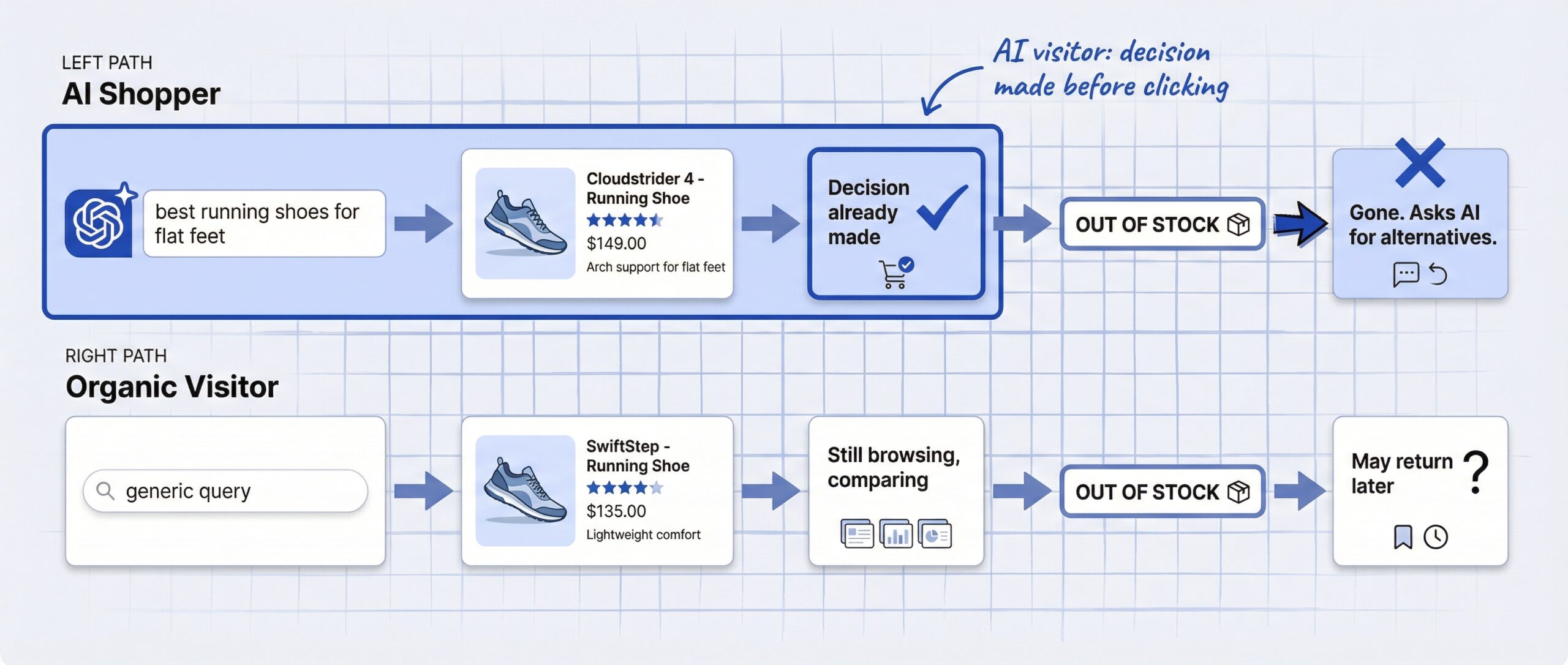
Why? Because they already did the research. A shopper who asks ChatGPT “best running shoes for flat feet under $120” and clicks through to your product page has already narrowed the field. They are not browsing. They are buying.
That high intent is great when the product is in stock. When it is not, the same intent works against you. These visitors will not come back tomorrow to check. They have ChatGPT or Perplexity open in another tab, and they will ask for alternatives immediately.
51% of consumers now use AI tools for online shopping (Capital One Shopping, 2025). 41% use dedicated AI platforms like ChatGPT or Perplexity for product discovery (eMarketer, 2026). Your back-in-stock notification strategy needs to match the urgency these visitors bring.
Make your Notify Me signup unmissable
Most Shopify stores bury the Notify Me form below the fold or hide it behind a small text link. That worked when visitors scrolled through product pages deciding whether to buy. AI-referred visitors do not browse. They scan and decide in seconds.
Here is what to change:
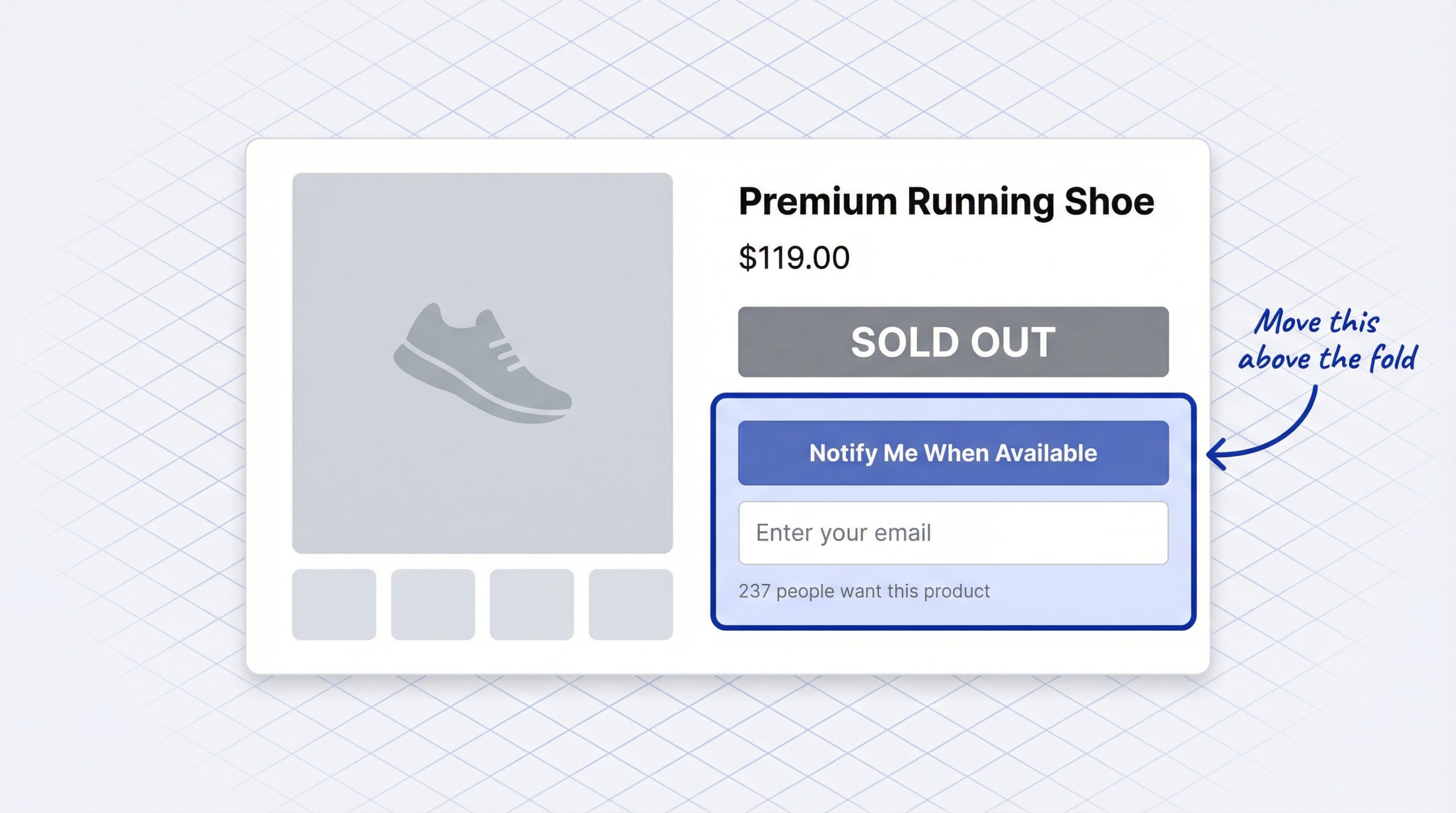
Move the signup above the fold. The Notify Me button should be the first thing a visitor sees on an out-of-stock product page. Not the third scroll down. Not behind a “See options” link. Right where the Add to Cart button would normally be.
Reduce friction to one field. Email only. Or one-tap signup using an existing session. Every extra field you add drops signups from high-intent visitors who are three seconds away from asking ChatGPT for a competitor.
Add social proof. Show how many people are waiting: “237 people want this product.” That number tells the visitor two things: the product is worth waiting for, and they are not alone. It also signals to return-visiting AI agents that this product has active demand.
A Notify Me button on your Shopify store takes five minutes to set up. The placement and design choices you make after setup are what separate a form that captures 5% of visitors from one that captures 25%.
Add a fast-read channel to your notification mix
If email is your only restock notification channel, you are missing the multi-channel back in stock alerts that AI shopping notifications demand. You are using the slowest channel for the highest-intent customers.
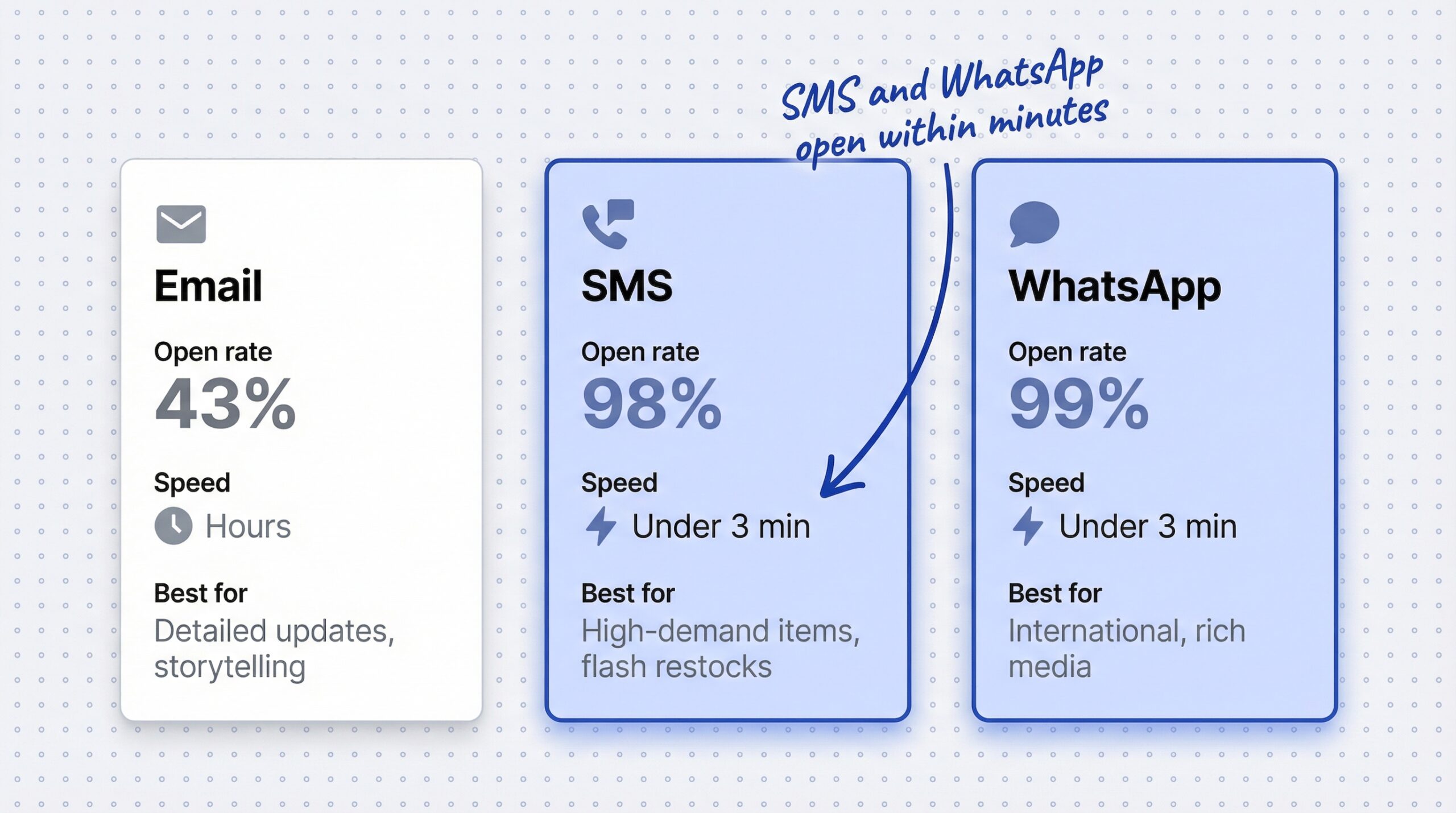
| Channel | Open rate | Time to read | Best for |
|---|---|---|---|
| 43% | Hours | Detailed product updates, visual storytelling | |
| SMS | 98% | Under 3 min | High-demand items, limited editions, flash restocks |
| 99% | Under 3 min | International customers, rich media, conversations |
Back-in-stock alert emails still perform well. They achieve a 22.45% average conversion rate, the highest of any e-commerce email type (MarketingSherpa back-in-stock email conversion data). Apps report 30-35% click-through rates and 20% purchase conversion for well-timed alerts (Swym, 2025).
But email takes hours to be read. SMS and WhatsApp are read within minutes.
AI shoppers are mobile-first. They asked a question on their phone, got a product recommendation, and tapped through to your store. When the product restocks, reaching them on the same device they used to find you, within minutes instead of hours, is the difference between a sale and a lost customer.
You do not need to replace email. You need to add a fast channel alongside it. For a deep comparison of each channel’s costs and conversion rates, see our guide on SMS vs email vs WhatsApp for restock alerts. If you want to get started with WhatsApp specifically, here is how to set up WhatsApp back in stock alerts on Shopify.
Trigger notifications in under 60 seconds
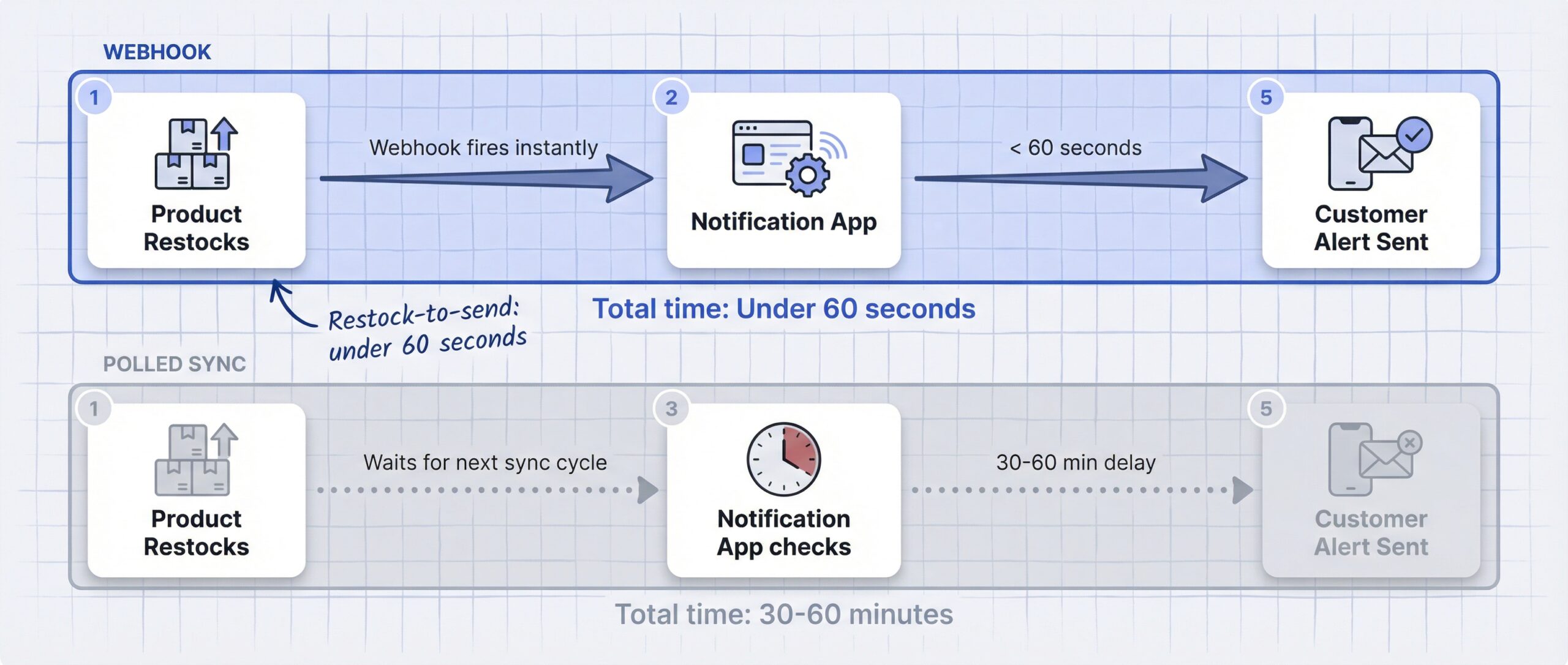
Many Shopify stores rely on scheduled syncs between their inventory system and notification platform. Stock updates every 30 minutes. Notifications go out on the next batch cycle. For organic traffic, that delay was tolerable.
For AI-referred traffic, it is not.
Here is why: an AI shopper who signed up for your restock notification still has ChatGPT open. They are still comparing. If a competitor restocks the same product and notifies instantly, your 30-minute delay just cost you the sale.
The fix is technical but straightforward:
- Use a notification app that triggers on Shopify inventory webhooks, not polled syncs. Webhooks fire the moment inventory changes. Polled syncs check on a schedule and miss the window.
- Test your current delay. Restock a product and time how long it takes for the notification to arrive. If it takes more than 60 seconds, your app is using polled sync.
- Check that variant-level restocks trigger alerts. Some apps only fire when the parent product restocks, missing individual size or color restocks.
Speed has always mattered for back-in-stock notifications. Your Shopify restock notification strategy needs to account for the fact that competitors are one AI query away.
The prerequisite: accurate inventory data
None of the changes above matter if your inventory data is wrong.
If your Shopify store shows a product as “in stock” but it is actually sold out, two things break at once. First, AI agents like Google’s Universal Commerce Protocol send customers to a product they cannot buy, and that MERCHANDISE_NOT_AVAILABLE error trains AI agents to deprioritize your entire catalog. Second, your notification system never triggers because it thinks the product is still available.
The reverse is equally bad. If your product restocks but your data lags, AI agents keep telling customers the product is unavailable. You miss AI-referred traffic entirely.
What to check:
- Real-time inventory sync between Shopify and your notification app (not daily CSV exports)
- Schema.org availability markup matches your actual stock level (InStock vs OutOfStock)
- Multi-location accuracy if you sell from multiple warehouses
We covered this in detail in our article on what stockouts actually cost your Shopify store. Inventory accuracy is not just an operations issue anymore. It is a notification strategy issue and an AI visibility issue.
Frequently asked questions about back-in-stock notification strategy
How do AI shoppers behave differently on product pages?
AI-referred visitors bounce 33% less, spend 45% more time on-site, and convert 31% higher than organic search traffic. They arrive having already researched the product in ChatGPT or Perplexity.
Should I change my back-in-stock notification strategy for AI shopping?
Yes. AI shoppers arrive with higher intent and shorter patience. Your notification signup needs to be more prominent, your channels need to be faster, and your notifications need to trigger within 60 seconds of restocking.
What is the best notification channel for AI-referred shoppers?
SMS and WhatsApp reach shoppers faster, with 98-99% open rates within minutes. Email still works but is slower. Use email as the default and add SMS or WhatsApp for high-demand products.
How fast should back-in-stock notifications send?
Under 60 seconds from restock. AI shoppers keep competitor tabs open. A delay of even 30 minutes can mean losing the sale to a competitor who restocked and notified first.
Where should the Notify Me button be on my product page?
Above the fold on out-of-stock product pages. AI-referred visitors scan and decide in seconds. A buried signup form misses high-intent traffic.
Do back-in-stock emails still work in the AI shopping era?
Yes. Back-in-stock emails achieve a 22.45% conversion rate, the highest of any e-commerce email type. But adding SMS or WhatsApp captures AI-era shoppers who check their phones before their inbox.
Does inventory accuracy affect my notification strategy?
Yes. If your inventory data is stale, AI agents send customers to products that appear available but are not. The customer arrives confused, and your notification system never captures them.
What is the conversion rate for back-in-stock alert emails?
Back-in-stock alert emails average a 22.45% conversion rate (MarketingSherpa). Well-timed alerts report 30-35% CTR and 20% purchase conversion (Swym).
What to do this week
AI shopping is not replacing your current traffic overnight. But it is adding a new layer of high-intent visitors who behave differently from the customers your notification strategy was designed for.
Three changes, one prerequisite:
- Move the Notify Me button above the fold on every out-of-stock product page
- Add SMS or WhatsApp as a fast-read channel alongside email
- Confirm your notification app triggers on webhooks, not polled syncs
- Verify your inventory data syncs in real time between Shopify and your notification platform
These are not complex changes. Most Shopify merchants can implement all four in a single afternoon. The stores that move first will capture demand from AI shoppers that competitors never even see. Start with a back-in-stock notification app that supports multi-channel alerts and real-time inventory sync, and work through the checklist from there.