
Shopify’s Stocky inventory app shuts down on August 31, 2026, and demand forecasting is the feature that won’t survive the transition. Shopify Admin absorbs some of Stocky’s capabilities, like inventory transfers and basic tracking, but the forecasting tools that told you what to reorder and how much? Those are gone with no native replacement announced.
If you relied on Stocky’s “Fill Shelves” or “Last X Days” suggestions to build purchase orders, you’re now looking at third-party Stocky alternatives that start at $47/month and climb past $400. For stores running tight margins, that’s a steep jump from the free tool bundled with POS Pro.
But here’s what most Shopify Stocky replacement guides won’t tell you: you already have a demand signal source you’re probably not using. Every “Notify Me” signup on an out-of-stock product is a customer telling you exactly what they want to buy and which variant they want it in. That data is free, real-time, and arguably more accurate than any algorithm for small stores.
This article covers what Stocky’s shutdown means for your inventory workflow, which features you lose, and how to rebuild your demand intelligence without enterprise-level budgets.
What is happening with Shopify Stocky?
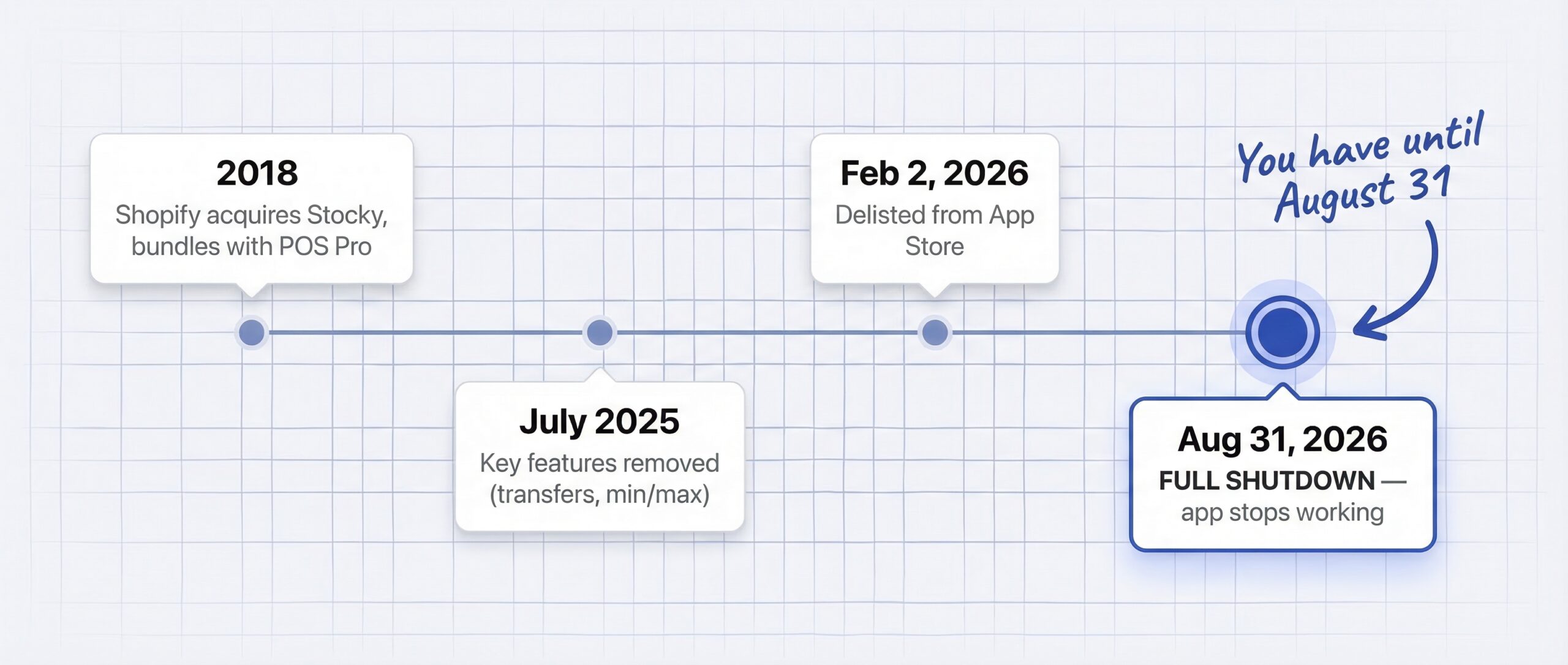
Stocky was an inventory management app Shopify acquired in 2018 and bundled free with Shopify POS Pro subscriptions. It handled purchase orders, demand forecasting, inventory reports, supplier management, and stocktakes. With 5.6 to 6.9 million active Shopify stores worldwide and 30% of the US ecommerce market (Charle Agency, 2025), the shutdown affects a massive merchant base. As of March 2026, Stocky is in its final months.
The Stocky shutdown timeline
| Date | What happened |
|---|---|
| 2018 | Shopify acquired Stocky, bundled it with POS Pro |
| May 2020 | Cutoff for free Stocky inclusion in new subscriptions |
| July 7, 2025 | Key features removed: inventory transfers, min/max forecasting |
| February 2, 2026 | Delisted from Shopify App Store. No new installs |
| August 31, 2026 | Full shutdown. App stops working. Historical data becomes inaccessible |
The timeline matters because your Stocky data, including old purchase orders, stocktake records, and inventory reports, will not automatically migrate anywhere. If you haven’t exported that data, you need to do it before August 31 using Stocky’s built-in CSV export. One critical limitation: supplier lists cannot be exported from Stocky at all, so save those manually.
What Shopify Admin replaces (and what it doesn’t)
Shopify’s official position is that integrating inventory management directly into Admin creates a “unified experience.” That’s true for some features. Not for the ones that matter most to inventory planning.
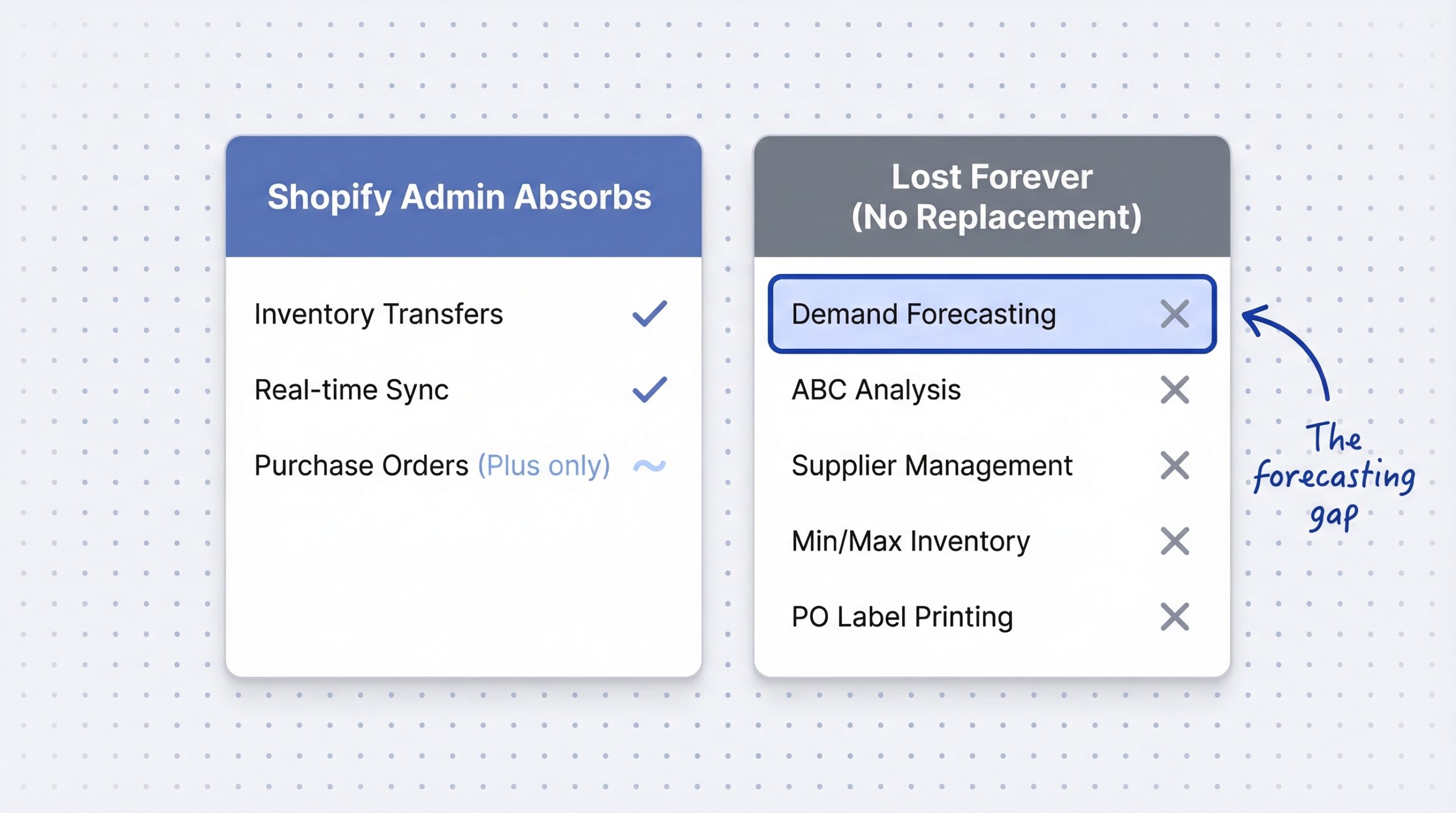
| Stocky feature | Absorbed into Shopify Admin? | Notes |
|---|---|---|
| Inventory transfers | Yes | Enhanced with barcode scanning, CSV upload |
| Real-time sync | Yes | Built into Shopify Admin |
| Purchase orders | Partial | Available on Shopify Plus only |
| Demand forecasting | No | No native replacement |
| ABC analysis | No | No native replacement |
| Supplier management | No | Cannot export supplier data from Stocky |
| Barcode stocktakes | Not yet | Marked “Not available yet” in migration docs |
| Min/max inventory levels | No | No native replacement |
| PO label printing | No | No native replacement |
The gap is clear. Operational features like transfers and sync are covered. Intelligence features like demand forecasting, ABC analysis, and reorder suggestions are not.
Why losing demand forecasting hurts more than losing purchase orders
Most Stocky replacement articles focus on purchase order workflows. That makes sense since POs are the daily operational task. But the bigger loss is the intelligence layer that told you which POs to create in the first place.
What Stocky’s forecasting methods actually did
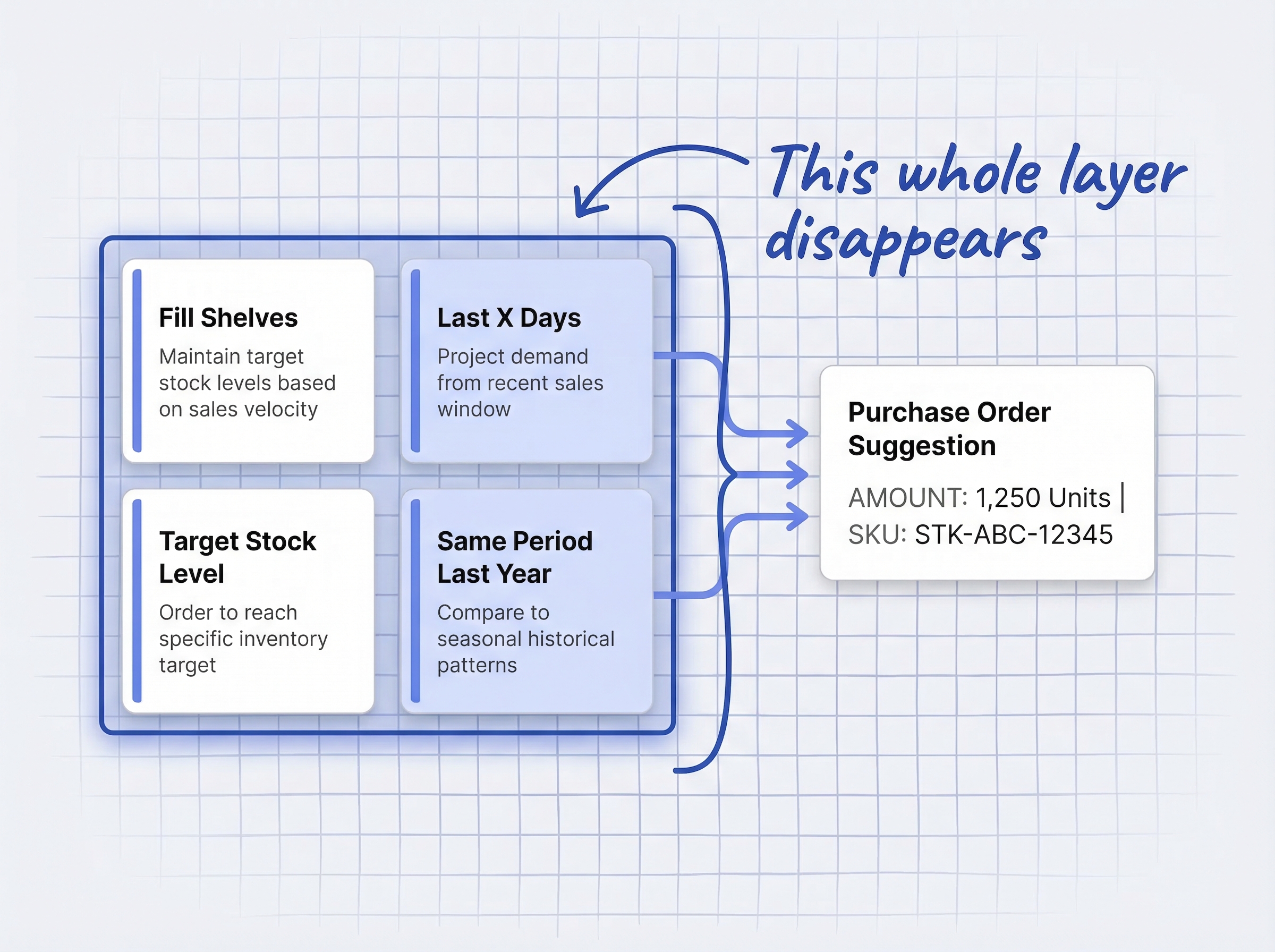
Stocky offered four demand forecasting approaches:
- Fill Shelves: Calculated how much stock you needed to maintain target levels based on sales velocity
- Target Stock Level: Suggested order quantities to reach a specific inventory target
- Last X Days: Projected future demand based on your most recent sales window
- Same Period Last Year: Compared current demand to historical seasonal patterns
These weren’t perfect. They relied on historical sales data, which means they couldn’t predict demand for new products or account for marketing spikes. But for stores with consistent sales patterns, they replaced guesswork with data.
Why Shopify Admin has no equivalent
Shopify Admin gives you inventory reports and sales data, but it does not interpret that data into reorder suggestions. There’s no “you should order 200 units of this SKU based on the last 30 days of sales” feature anywhere in the native Shopify experience.
The Shopify Community reaction reflects this frustration. One merchant wrote that Shopify Admin has “no ‘Fill Shelves,’ no order based on last X days sales.” Another called the removal a “material retail operations risk,” identifying POS merchant churn and platform trust erosion as direct consequences.
43% of small businesses do not track inventory or rely on outdated manual methods (Firework inventory management statistics, 2025). For many of these stores, Stocky was the only structured demand signal they had. Now it’s gone.
How do you replace Stocky’s demand signals without enterprise tools?
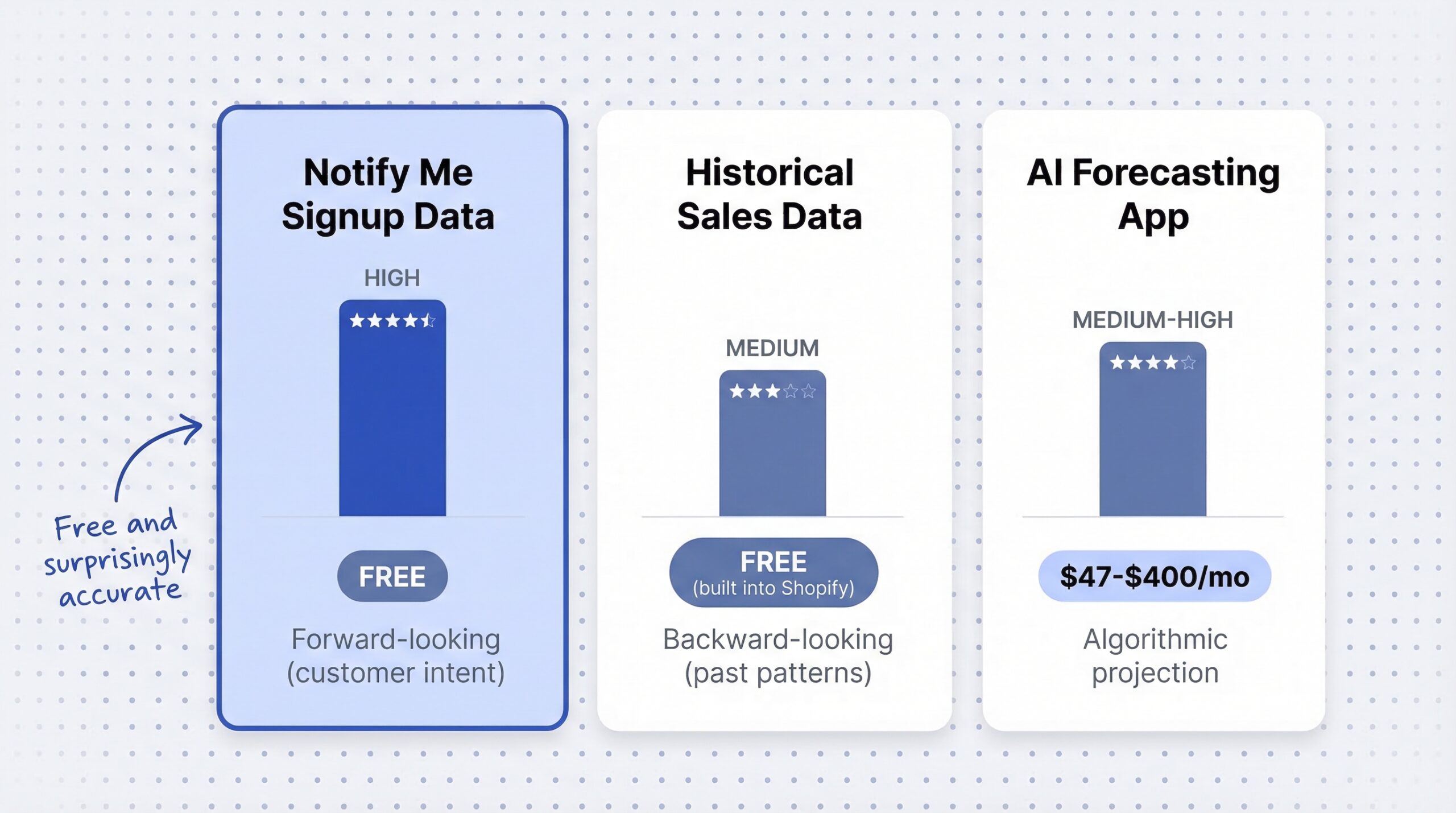
The obvious Stocky alternative is a dedicated forecasting app. Tools like Monocle ($47/month), Prediko ($49-$349/month), and Fabrikator ($99-$199/month) all offer AI-powered demand forecasting. But $175,000 to $230,000 is the average implementation cost for AI demand forecasting at mid-market retailers (InDataLabs, 2025), and while Shopify apps are far cheaper, many small stores still can’t justify $50-$400/month for a forecasting tool.
There’s a simpler demand signal source most stores already have access to: their back-in-stock notification data.
Every “Notify Me” signup is a demand signal your supplier needs to see
When a customer clicks “Notify Me” on an out-of-stock product, they’re doing something no historical sales algorithm can: they’re telling you they want to buy this product right now. That’s a forward-looking demand signal, not a backward-looking extrapolation.
If you have 340 notification signups spread across eight out-of-stock products, you know:
- Which products have the highest unmet demand
- The relative priority for your next purchase order
- That real customers are waiting to convert, not just an algorithm projecting they might
22.45% of back-in-stock alert recipients convert to purchasers, compared to roughly 2% site-wide conversion (MarketingSherpa back-in-stock case study, 2025). Those aren’t cold leads. They’re pre-qualified buyers who declared intent.
Your back-in-stock demand data is, in many cases, a stronger inventory planning input than Stocky’s historical sales projections ever were. Sales data tells you what happened. Notification signups tell you what’s about to happen.
Variant-level demand that sales history misses
Stocky’s forecasting operated at the product level, sometimes at the variant level, but always based on past sales. Back-in-stock notification data captures demand at the exact variant level: specific size, color, and option.
When 85 customers sign up for notifications on a medium blue hoodie but only 12 sign up for XXL, you know exactly which variants to prioritize in your next order. This granularity is difficult to achieve with algorithmic forecasting, especially for products with many variants or inconsistent sales history.
Signup velocity tells you how urgently to reorder
Signup velocity, the rate at which new “Notify Me” registrations accumulate for a specific product, is a real-time urgency indicator. If a product gets 50 signups in two days versus 50 over two months, the reorder urgency is completely different.
You can track this through your notification app’s dashboard. Products with accelerating signup velocity should jump to the top of your purchase order queue. Products with slow, steady signups can wait for your regular reorder cycle.
This is similar to what predictive restocking on Shopify looks like in practice: using real customer signals to anticipate demand instead of relying purely on historical patterns.
What should your post-Stocky inventory workflow look like?
The right approach depends on your store’s size, SKU count, and budget. Here’s how to think about it.
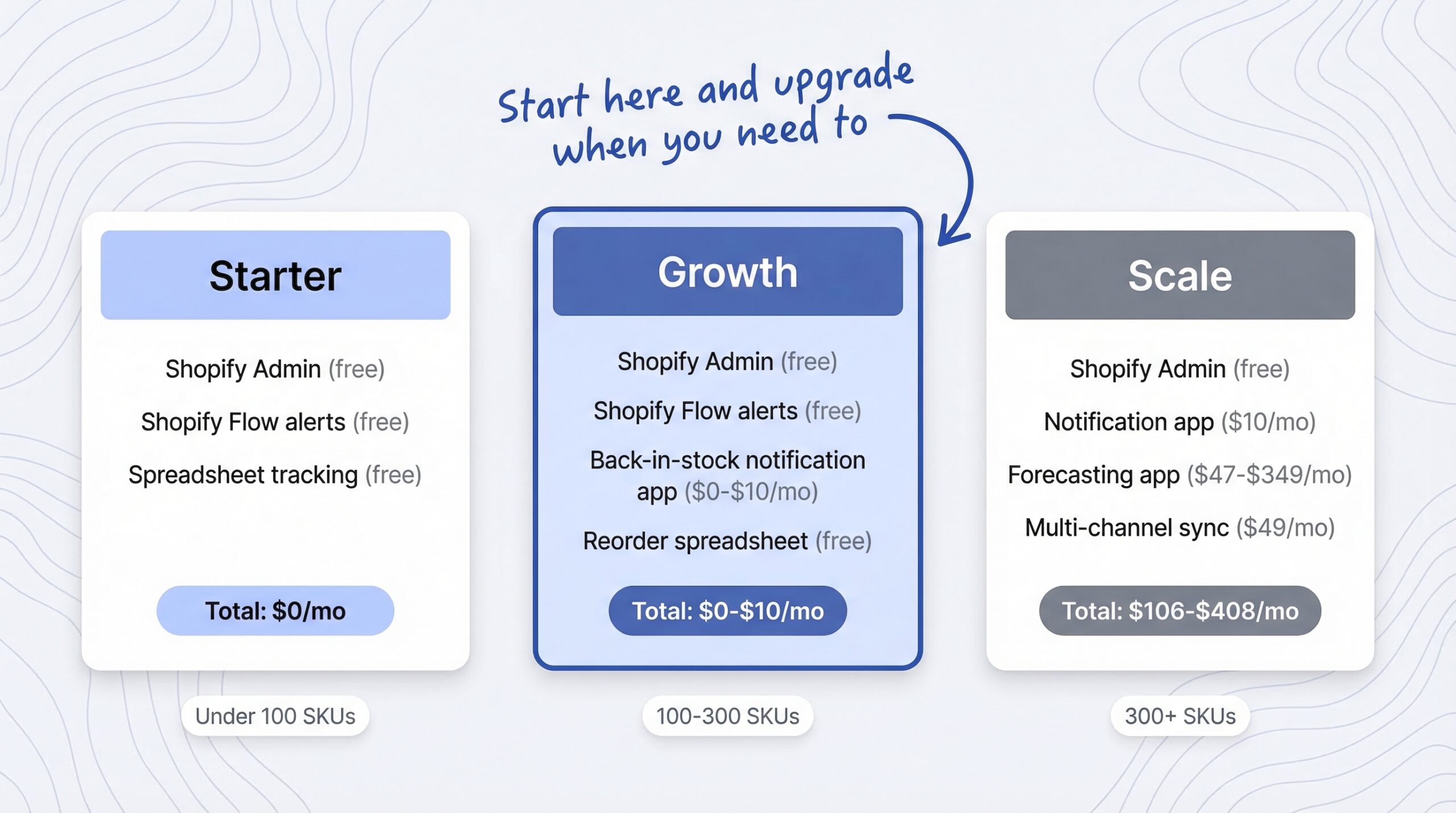
The budget-friendly stack: Shopify Admin + restock notifications
For stores with fewer than 200 SKUs and straightforward supply chains, this combination handles most of what Stocky did:
- Shopify Admin (free): Use built-in inventory tracking, transfers, and sales reports for operational inventory management
- Shopify Flow (free): Set up automated low-stock alerts using trigger-condition-action workflows. Flow can email you when inventory drops below thresholds, pause Google ads for out-of-stock products, or tag products for review
- Back-in-stock notification app like StoreBeep (free to $9.99/month): Capture demand signals through “Notify Me” signups. Use waitlist data as a lightweight demand forecasting input to inform purchase order quantities and variant priorities
- Shopify sales reports + spreadsheet (free): Export sales data monthly and track reorder points using basic formulas. Calculate average daily sales, multiply by supplier lead time, add safety stock
Total cost: $0 to $9.99/month, compared to Stocky’s free bundling or third-party alternatives starting at $47/month.
This stack won’t give you AI-powered demand projections or automated purchase order generation. But for small stores, it replaces the core value Stocky provided: knowing what to reorder and roughly how much.
When you actually need a dedicated inventory tool
Consider a dedicated forecasting app when:
- You manage 300+ active SKUs across multiple variants
- Your supplier lead times vary significantly (some 2 weeks, some 8 weeks)
- You sell across multiple channels (Shopify + Amazon + wholesale)
- You need automated purchase order generation, not just reorder suggestions
- Your monthly revenue exceeds $50,000 and stockout costs justify the tool expense
Nearly half of all intended purchases are lost when products are unavailable in store or online (Mirakl, 2025). At scale, those lost sales justify the tool expense.
Combining tools without paying for overlap
The mistake most merchants make is buying a full inventory suite when they only need one or two features. Here’s a smarter approach:
| What you need | Budget option | Full-featured option |
|---|---|---|
| Basic tracking + transfers | Shopify Admin (free) | Shopify Admin (free) |
| Low stock alerts | Shopify Flow (free) | Dedicated app |
| Demand signals | Back-in-stock notification app ($0-$10/mo) | Same, plus forecasting app |
| Purchase order creation | Manual / spreadsheet | Monocle ($47/mo) or Prediko ($49/mo) |
| AI demand forecasting | Not needed for <200 SKUs | Prediko ($49-$349/mo) or Fabrikator ($99-$199/mo) |
| Multi-channel sync | Not needed if Shopify-only | Sumtracker ($49/mo) |
Adding a “Notify Me” button on Shopify takes about five minutes and starts capturing demand data immediately. That’s the fastest way to rebuild your demand signal layer after Stocky.
What should you do before August 31, 2026?
Don’t wait until July. Stocky’s data export tools may become unreliable as the shutdown date approaches, and you’ll need time to test your replacement workflow.
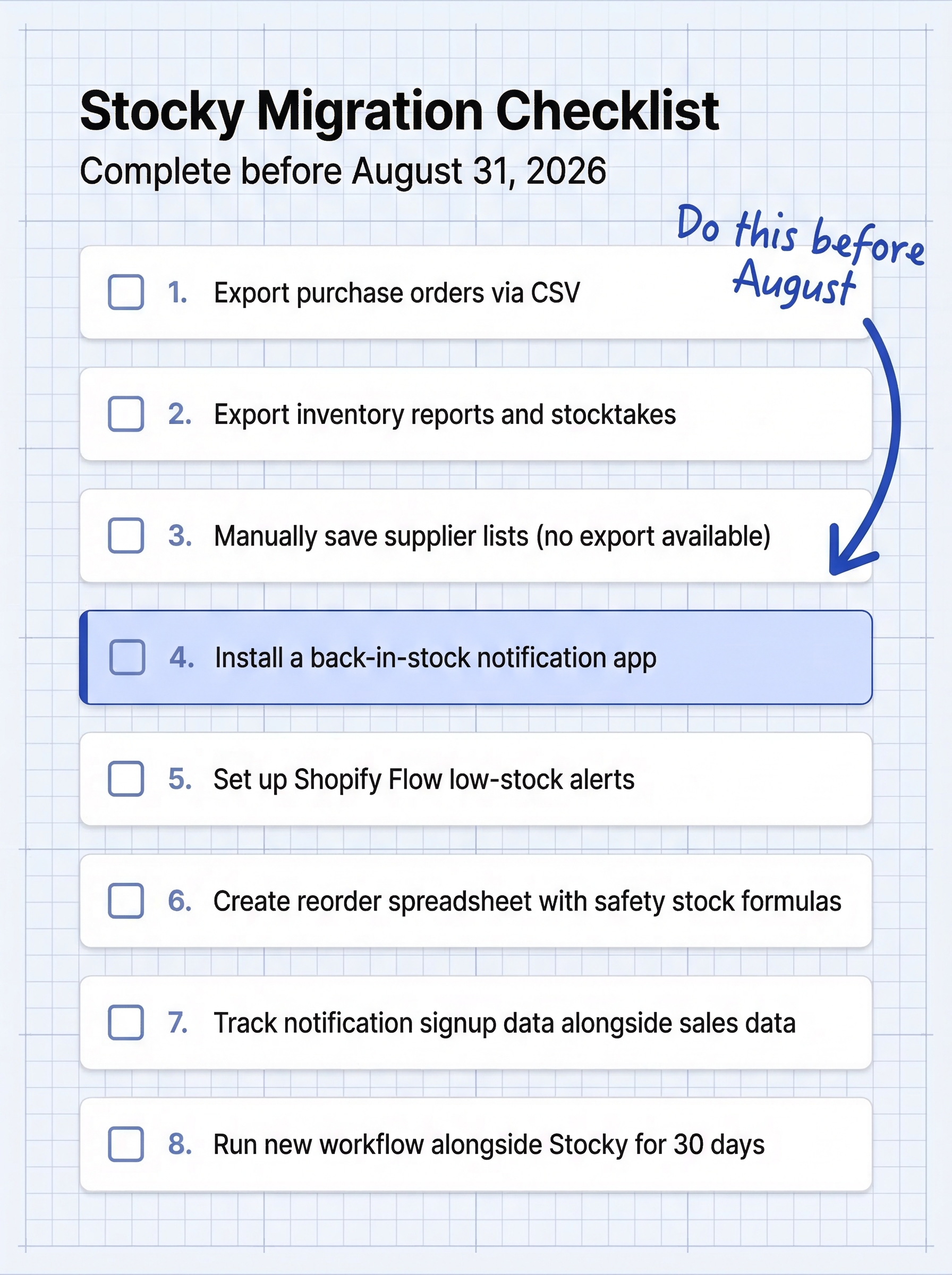
Export your Stocky data now
- Open Stocky and navigate to each section: Purchase Orders, Inventory Reports, Stocktakes
- Use the built-in CSV export on each screen. Download everything
- Manually document your supplier list. Stocky does not support supplier data export
- Save cost adjustment records and average cost calculations
- Store all exports in a dedicated folder. Label by date and type
Do this now, not in August. If Stocky removes additional features before the shutdown (as it did with transfers in July 2025), you may lose access to export tools early.
Set up your replacement workflow
- If you don’t have one already, install a back-in-stock notification app and confirm it’s capturing signups on all out-of-stock products
- Set up Shopify Flow automations for low-stock alerts at your critical thresholds
- Create a simple reorder spreadsheet: product, current stock, average daily sales, lead time, reorder point
- Start tracking notification signup data alongside sales data in your weekly inventory review
- If you need purchase order functionality on a non-Plus plan, evaluate Horse ($20-$50/month) or Monocle ($47/month) as lightweight options
Test your new workflow before the deadline
Run your new system alongside Stocky for at least 30 days. Compare the reorder decisions you’d make based on Stocky’s suggestions versus your new signal combination. If the decisions are similar, you’re covered. If they diverge significantly, you may need to add a dedicated forecasting tool.
Why demand signals matter even more in 2026
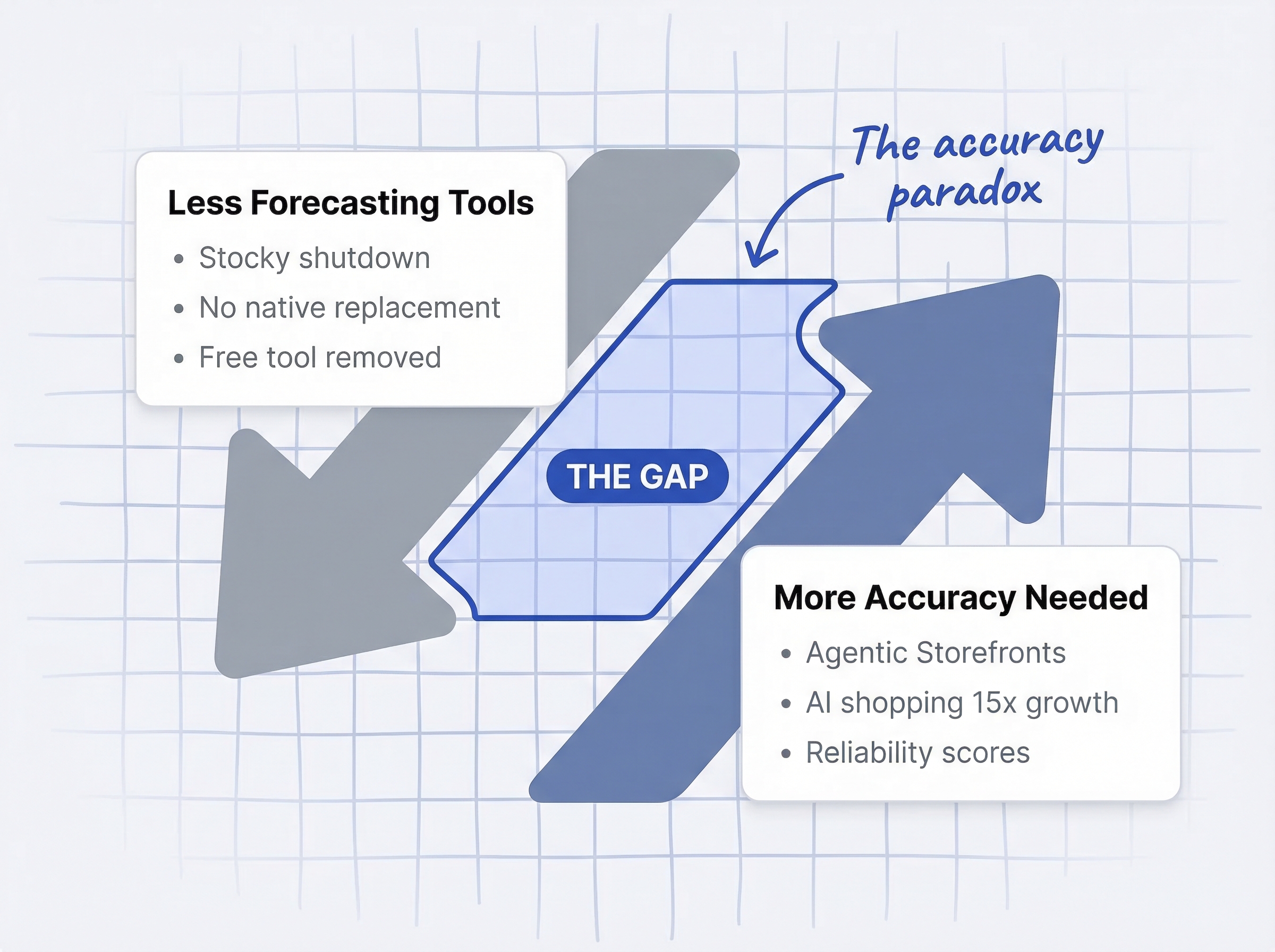
The Stocky shutdown isn’t happening in isolation. Shopify is simultaneously pushing merchants toward AI-powered commerce channels that demand higher inventory accuracy than ever.
AI shopping agents need real-time inventory data
AI-powered shopping orders on Shopify increased 15x since January 2025 (Shopify Winter ’26 Commerce Report, 2026). With Agentic Storefronts, your products now show up inside ChatGPT, Perplexity, and Microsoft Copilot conversations. When an AI agent recommends your product and a customer tries to buy it, your inventory feed needs to be accurate. Stale data means failed transactions and lower merchant reliability scores.
The irony is hard to miss: Shopify is removing the only free forecasting tool that helped merchants keep stock levels optimized while simultaneously building a commerce system that penalizes merchants for being out of stock.
Small stores need affordable demand intelligence
$1.73 trillion in annual retail inventory distortion costs globally, with out-of-stocks accounting for $1.2 trillion of that figure (IHL Group inventory distortion research, 2025). Poor inventory management costs businesses 11% of annual revenue on average (Meteor Space, 2025). Small stores feel this proportionally more because a single stockout on a bestseller can represent a significant chunk of monthly revenue.
Meanwhile, only 36% of companies use AI for demand forecasting (EComposer, 2025). The rest rely on manual methods, gut instinct, or basic spreadsheets. For these stores, back-in-stock notification data isn’t a stopgap replacement for Stocky. It’s an upgrade from having no structured demand signals at all.
The real cost of stockouts goes beyond lost sales. As the stockout cost breakdown for Shopify stores shows, you’re also losing customer lifetime value, wasting ad spend driving traffic to empty shelves, and training customers to shop with competitors.
Frequently asked questions
What is replacing Shopify Stocky?
Shopify Admin absorbs inventory transfers, real-time sync, and purchase orders (Plus plans only). Demand forecasting, ABC analysis, supplier management, and barcode stocktakes have no native replacement. Third-party apps like Monocle, Prediko, and Fabrikator fill the forecasting gap.
When does Stocky shut down completely?
Stocky shuts down on August 31, 2026. It was delisted from the Shopify App Store on February 2, 2026, meaning no new installs or reinstalls are possible.
Can I still use Stocky after February 2026?
Yes, if Stocky is already installed on your store, it continues to work until August 31, 2026. Some features like inventory transfers were already removed in July 2025.
How do I export my data from Stocky before it shuts down?
Use Stocky’s built-in CSV export for purchase orders, inventory reports, and stocktake records. Supplier lists cannot be exported, so save those manually before August 31.
Does Shopify Admin have demand forecasting?
No. Shopify Admin does not include demand forecasting as of March 2026, and Shopify has not announced plans to add it. Stocky’s “Fill Shelves” and “Last X Days” methods are discontinued without a native replacement.
Can back-in-stock notification data work as a demand signal?
Yes. Every “Notify Me” signup is a customer declaring purchase intent for a specific product variant. Waitlist volume, signup velocity, and variant-level demand data provide real-time, customer-generated demand signals at no additional cost.
Do I need a demand forecasting tool if I have fewer than 100 SKUs?
For most stores under 100 SKUs, Shopify’s built-in sales reports combined with back-in-stock notification data provide sufficient demand intelligence. Dedicated forecasting tools become more valuable above 200-300 SKUs or with complex supplier lead times.
What’s the cheapest way to replace Stocky’s functionality?
The most budget-friendly approach combines Shopify Admin (free for transfers and tracking) with a back-in-stock notification app (free to $9.99/month for demand signals). This replaces Stocky’s core value for under $10/month, compared to $47-$400+/month for dedicated inventory forecasting apps.
What this means for your store
Stocky’s shutdown removes a convenient, free tool. But finding a Shopify Stocky replacement doesn’t require an enterprise budget. The data you need is still available, just from different sources.
Here’s the short version:
- Export your Stocky data now. Don’t wait until August. Supplier lists can’t be exported at all, so document those manually
- Install a notification app. Every “Notify Me” signup is a demand signal. Start capturing that data today, even if you’re still using Stocky
- Build a simple reorder system. Shopify sales reports plus notification signup data plus a basic spreadsheet covers 80% of what Stocky’s forecasting did
- Evaluate paid tools only if you need them. Stores under 200 SKUs rarely need $50+/month forecasting apps. Stores over 300 SKUs with complex supply chains probably do
58% of retailers maintain inventory accuracy below 80% (Opensend, 2025). You don’t need a perfect forecasting system. You need a system that’s better than guessing. Back-in-stock notification data, combined with your sales history and a little spreadsheet work, gets you there for a fraction of what enterprise tools cost.
Stocky is leaving. Your demand signals don’t have to.