You set up your notify-me button. You connected the restock email. You picked a channel. And then you moved on. That was probably six months ago, or longer.
Here is the problem: notification setups do not degrade loudly. They degrade quietly. The button stops showing on mobile after a theme update, and no one notices. The email goes to a subscriber who already bought the product from a competitor, and the send count still looks fine. The inventory feed says “out of stock” to AI shopping agents while you actually restocked on Tuesday.
This is the Q2 2026 restock notification audit. It covers five areas: your notify-me button, your channel mix, your conversion tracking, your AI readiness, and your inventory feed accuracy. Each section has pass/fail checkpoints. Most merchants find at least two fixable gaps they did not know existed.
Is your notify-me button actually working?
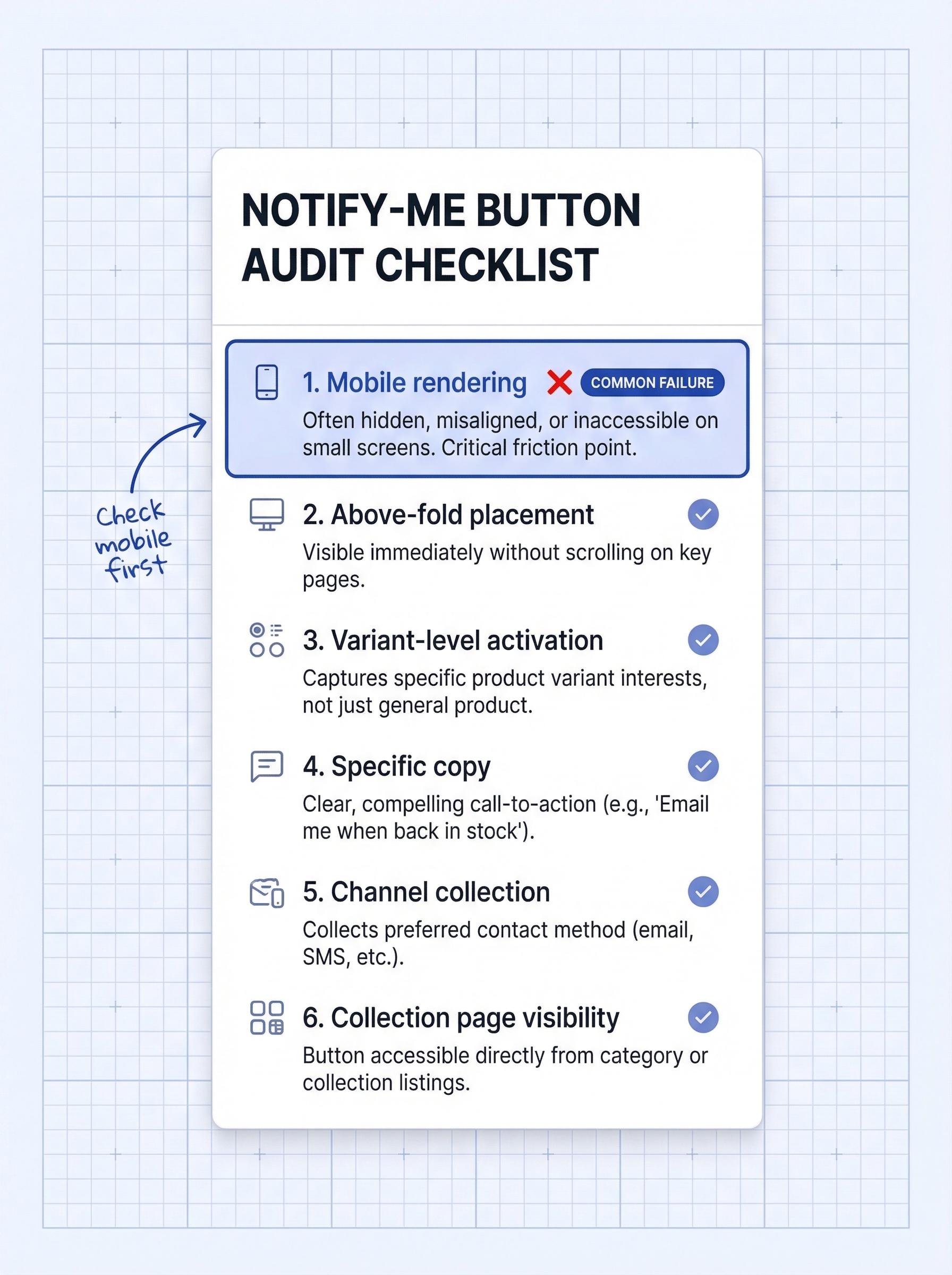
The button is the front door of your entire notification system. If it is invisible, broken, or buried, nothing downstream matters because you never collected the subscriber.
Run these checks:
- Does the button render correctly on mobile? Over 70% of Shopify traffic is mobile. Open your product page on a phone and scroll to where the button should be.
- Is the button above the fold, or buried below reviews and descriptions?
- Does the button appear automatically when a variant goes out of stock, or only when the entire product is out?
- Is the button copy specific (“Notify me when this restocks”) rather than generic (“Submit” or “Sign up”)?
- Does the button collect the subscriber’s preferred channel (email, SMS, WhatsApp) or default to email only?
- Is the button visible on collection pages as well as individual product pages?
The most common gap: Theme updates and Shopify checkout extensibility migrations frequently reset or hide the notify-me widget. If you updated your theme in the last six months and have not checked the button placement since, check it now. A full guide to adding and optimizing your Notify Me button on Shopify covers every placement decision.
69% of online shoppers abandon entirely when they hit an out-of-stock page with no way to be notified (ecommerce stockout behavior data, 2024). A broken button is an invisible revenue leak.
Is your channel mix leaving conversions on the table?
A back-in-stock notification is only as strong as the channel delivering it. Most Shopify merchants set up email and never revisit. But channel defaults from 18 months ago may now be missing the largest open-rate gap in ecommerce.
Run these checks:
- Are you collecting subscriber channel preferences (email, SMS, WhatsApp) at the notify-me button, or forcing everyone onto email?
- What is your current restock email open rate? If it is below 45%, investigate deliverability or subject lines. Benchmark: 59% open rate for top performers (Omnisend’s analysis of 150,000 ecommerce brands, 2025).
- Have you enabled SMS restock alerts? SMS reaches 95%+ open rates and typical response time is 90 seconds versus 90 minutes for email.
- Have you enabled WhatsApp restock alerts? WhatsApp open rates reach 98% compared to email’s 21%. This is the single largest channel upgrade available right now.
- Are you sending a single notification blast, or using a send sequence (immediate alert plus a 48-hour follow-up for unconverted subscribers)?
- Have you cleaned subscribers who have been on your waitlist for over 90 days without purchasing?
The most common gap: Email-only setups. The 98% vs. 21% open rate gap between WhatsApp and email is not a marginal improvement. It is an entirely different response curve. If you have not added a second channel, that is the single highest-impact change this audit will surface.
Are you tracking what your notifications actually recover?
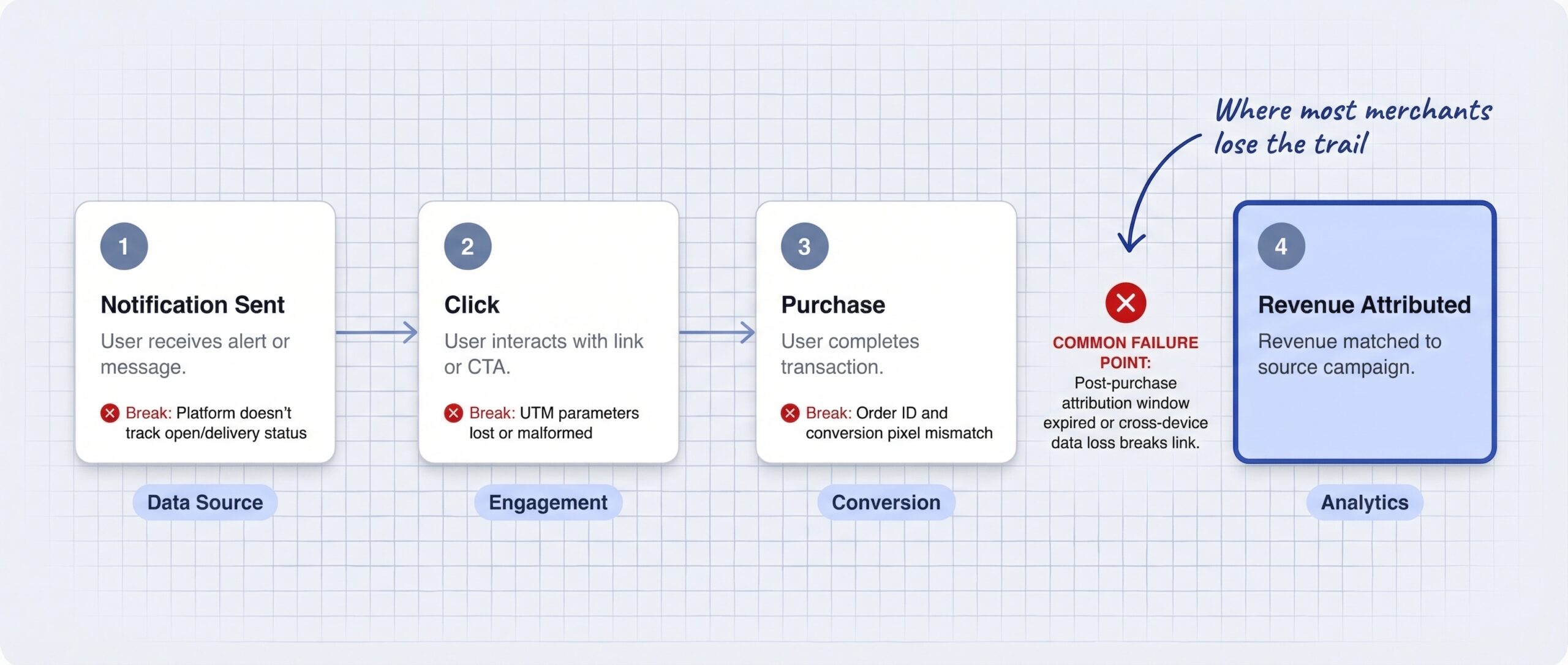
Most merchants can see how many notifications they sent. Far fewer can answer: how much revenue did those notifications generate? Without that number, you cannot improve what you cannot measure.
Run these checks:
- Do you have revenue attribution set up? Are restock notification links tagged with UTM parameters, or does your app track revenue natively?
- What is your subscriber-to-purchase conversion rate? Benchmark: 6.41% for top performers, red flag below 3% (Omnisend, 2025).
- What attribution window are you using? 24-hour, 72-hour, or 7-day? The standard recommendation is 72 hours for honest reporting.
- Do you know your revenue per subscriber for each channel separately (email vs. SMS vs. WhatsApp)?
- Can you calculate your cost per recovered sale (total program cost divided by recovered orders)?
- Do you review these numbers monthly, or only when something looks obviously wrong?
The most common gap: Zero revenue attribution. Merchants see “notifications sent” in the app dashboard but have no link to actual orders in Shopify analytics. This means the program’s ROI is unknown, making it hard to justify expansion or investment. A detailed breakdown of back-in-stock conversion rate benchmarks on Shopify gives you the numbers to compare against, and the full back-in-stock alerts ROI framework shows how to calculate what the program is worth.
Are your out-of-stock pages ready for AI shopping agents?
AI shopping agents from Google, ChatGPT, and Perplexity are now surfacing and filtering Shopify products based on real-time availability data. AI-driven ecommerce orders have grown 14x since the start of 2025 (Shopify’s agentic commerce readiness guidance, 2025). A notification system that works for human shoppers may be invisible to the AI layer.
Run these checks:
- Are your out-of-stock product pages indexed and visible to search engines and AI agents? Hiding or redirecting OOS pages removes the very page where AI shoppers could discover your product.
- Do your OOS pages include a visible, functional notify-me button that does not require complex JavaScript interactions to access?
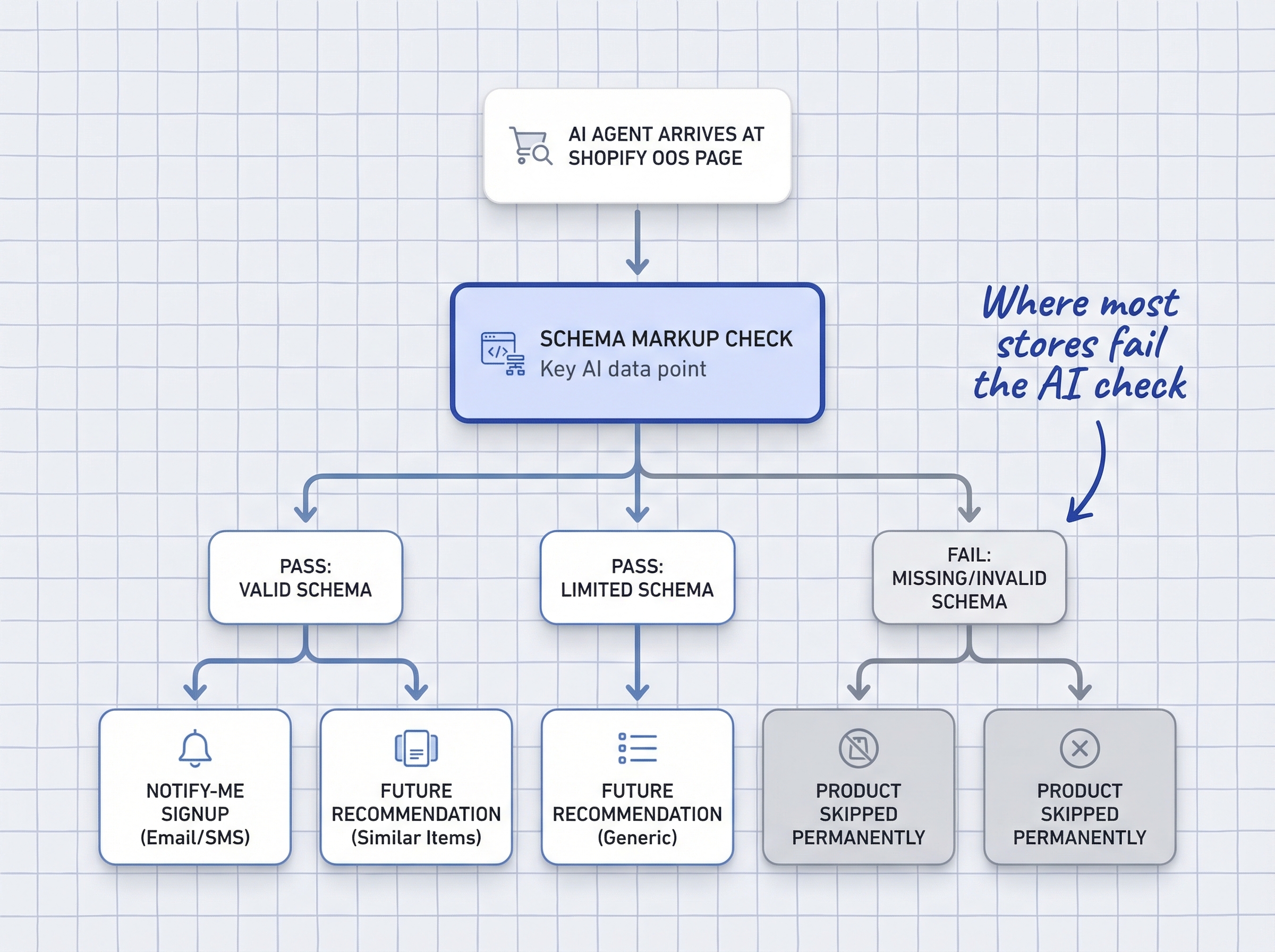
- Is your Schema.org product availability markup set to “OutOfStock” when the product is unavailable, rather than left as “InStock” or removed entirely?
- Are your product descriptions detailed enough for AI agents to understand the product context and potential substitutes?
- Does your restock confirmation message contain enough product detail for the subscriber to remember exactly what they signed up for?
The most common gap: Merchants who hide out-of-stock products lose both the notify-me signup opportunity AND AI discoverability simultaneously. Understanding how AI shoppers handle out-of-stock pages on Shopify makes the cost of hiding OOS pages concrete.
Is your inventory feed telling the truth?
Your notify-me button and email flows exist to recover demand after a stockout. But if your inventory feed tells AI agents that a product is still out of stock when you actually restocked it, the entire system fires on false signals. Feed inaccuracy is the least visible audit area and the most damaging.
Run these checks:
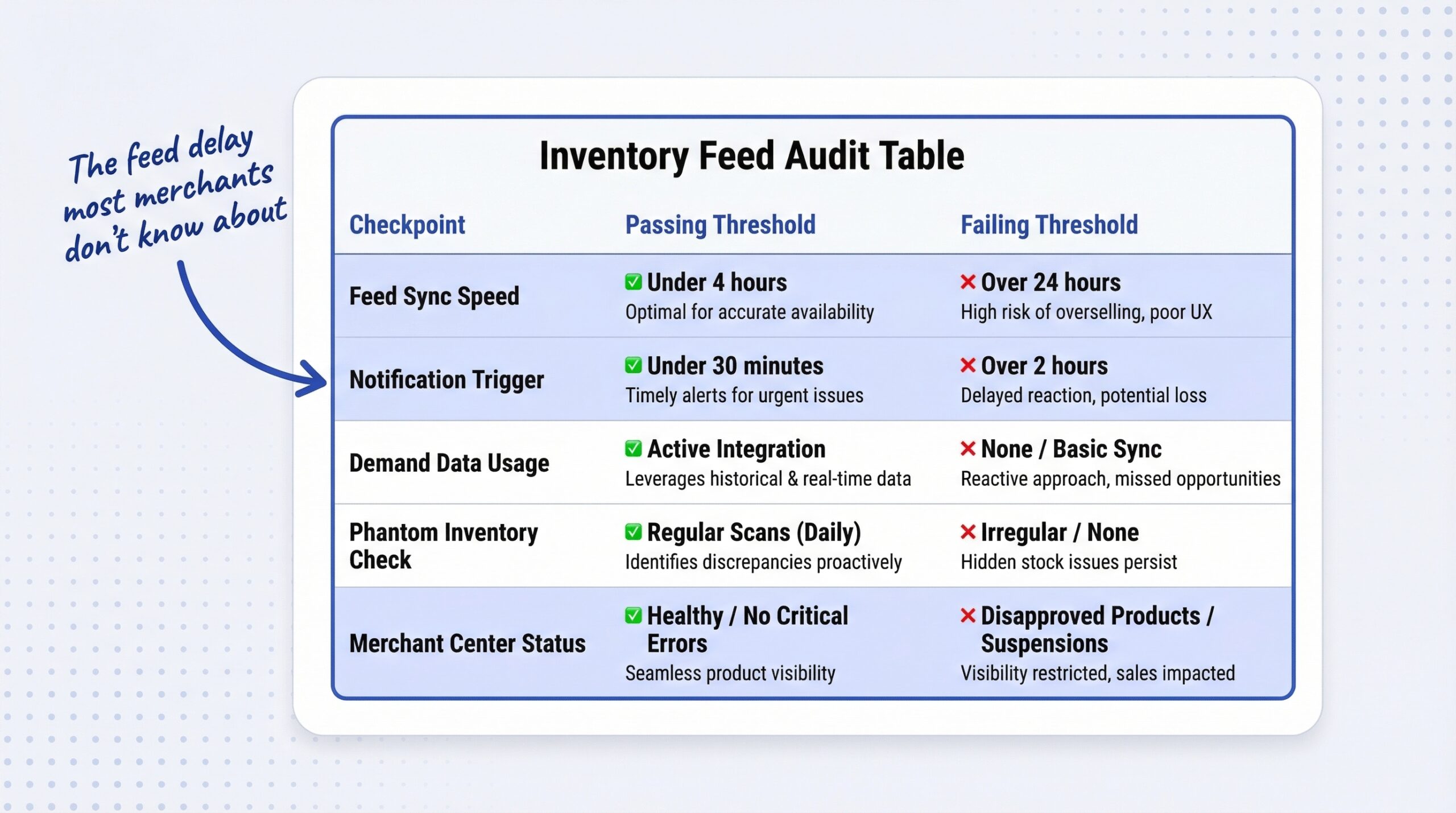
- How long does it take for a Shopify inventory update to reflect in your Google Merchant Center feed? Target: under 4 hours. Daily syncs are not fast enough for the AI era.
- How long does it take for a restock event to trigger your back-in-stock notification send? Target: under 30 minutes. Manual trigger setups can take hours or days.
- Are your waitlist signups feeding back into your purchasing decisions? Signup velocity is a demand signal for predictive restocking on Shopify.
- Do you have phantom inventory: SKUs showing in stock in Shopify but actually unavailable due to shipping holds, damage, or location splits?
- After a restock notification is sent, does your system track inventory in real time as subscribers purchase? Or could you oversell?
- Is your Google Merchant Center connected and active, with the feed refreshing at minimum every 4-6 hours?
The most common gap: The gap between “product restocked in Shopify” and “AI agents know it is back” is hours for most merchants, sometimes a full day. During that window, every AI shopping query for your product sees “unavailable” and recommends a competitor instead. A deep dive into inventory feed accuracy for AI shoppers covers the full fix. Using waitlist data to inform restock planning closes the loop between demand capture and purchasing.
Score your audit and decide what to fix first
Count your failed checkpoints across all five sections (29 total checkpoints).
0-2 failed checkpoints: Your notification setup is healthy. Focus on marginal optimization: adding a second channel, tightening attribution windows, or increasing feed sync frequency.
3-6 failed checkpoints: You have real gaps generating real lost revenue. Prioritize by section: channel mix and conversion tracking gaps are the highest-priority restock notification optimization areas because they affect every notification you send.
7 or more failed checkpoints: The setup needs a systematic rebuild, not incremental tweaks. Start with the notify-me button (if it is broken, nothing else matters), then add channels, then fix tracking.
This audit draws on every topic covered in this 14-article series: notify-me button optimization, conversion rate benchmarks, ROI measurement, AI readiness, inventory feed accuracy, and predictive restocking. Each checkpoint has a deeper breakdown in the articles linked throughout.
Q2 2026 is the right moment to run this. The Shopify checkout extensibility deadline is approaching in August. AI shopping agents are accelerating. WhatsApp adoption is growing. The merchants who audit now will capture the demand that merchants who wait will lose.
Frequently asked questions about restock notification audits
How often should I audit my Shopify restock notification setup?
Quarterly is the recommended cadence. Theme updates, app changes, and Shopify platform updates can silently break notification components between audits. A Q2 and Q4 review catches most issues before they compound.
What is the most common notification setup gap on Shopify?
The most frequently failed checkpoint is mobile button visibility. Over 70% of Shopify traffic is mobile, but many notify-me buttons are invisible or broken on smaller screens due to theme updates that reset widget placement.
What conversion rate should I expect from back-in-stock notifications?
The benchmark is 6.41% subscriber-to-purchase conversion rate for top-performing stores, based on Omnisend’s 2025 data across 150,000 brands. If your rate is below 3%, investigate your send timing, subject lines, and channel mix.
Should I add WhatsApp to my restock notification channels?
Yes, if your customer base uses WhatsApp. WhatsApp open rates reach 98% compared to 21% for email. For most Shopify stores, adding WhatsApp as a notification channel is the single highest-impact change available in Q2 2026.
How do I know if AI shopping agents can see my out-of-stock products?
Check two things: that your OOS product pages are not hidden or redirected (they should remain indexed), and that your Schema.org product availability markup correctly reads “OutOfStock” rather than “InStock” or missing entirely.
What is the fastest way to find gaps in my notification setup?
Run through the five-section audit in this article. It takes one session. Count your failed checkpoints and prioritize fixes by section. Button and channel mix gaps have the highest immediate revenue impact.